Maximise Your WooCommerce Store’s Potential with Knowband’s Advanced Analytics Solution

Building an eCommerce business demands more than attractive products and competitive prices. Furthermore, successful online retailers understand that data-driven decisions separate profitable stores from struggling ones. However, implementing comprehensive analytics can seem overwhelming for many store owners. Therefore, choosing the right solution becomes critical for long-term success. Moreover, Knowband has developed a powerful WooCommerce gtag Integrator solution that transforms complex analytics into simple, actionable insights. Additionally, this comprehensive plugin eliminates technical barriers while providing enterprise-level tracking capabilities. Consequently, store owners can focus on growing their business rather than wrestling with complicated code.

Revolutionary Features of Knowband’s Analytics Integration

Seamless Tag Management Implementation

First and foremost, Knowband’s WooCommerce Google Tag Manager Plugin revolutionizes how you handle analytics tracking. Subsequently, this unified WooCommerce GTM Plugin centralizes all your marketing tags in one intuitive dashboard. Furthermore, the Google Tag Manager for WooCommerce integration eliminates the need for manual code modifications.

Additionally, even non-technical users can implement sophisticated tracking systems effortlessly. Therefore, small business owners gain access to the same analytics capabilities used by major eCommerce brands.

Comprehensive Marketing Integration Capabilities

Similarly, the WooCommerce Google Marketing Integration feature connects your store seamlessly with major marketing platforms. Consequently, you can track campaign performance across multiple channels with unprecedented accuracy. Furthermore, the WooCommerce Google Marketing Integration Plugin provides detailed attribution data for every marketing dollar spent.

Additionally, this integration reveals which marketing channels generate the highest-quality customers. Therefore, you can optimize your advertising budget for maximum return on investment.

Advanced Event Tracking System

Meanwhile, the Custom Event Tracking WooCommerce Plugin functionality monitors every crucial customer interaction automatically. For instance, it captures product views, cart additions, and purchase completions in real-time. Moreover, the GTM WooCommerce Plugin provides granular insights into customer behavior patterns throughout the shopping journey.

Furthermore, the WooCommerce Google Event Tracker Plugin helps identify conversion bottlenecks before they impact your revenue. As a result, you can optimize your store’s performance based on actual customer data.

Next-Generation WooCommerce Google Analytics Implementation

Complete Google Analytics Integration

Furthermore, the WooCommerce Google Analytics Integration component delivers comprehensive data collection across your entire store. Subsequently, the WooCommerce Google Analytics Integration Extension ensures accurate tracking on every page and interaction. Additionally, the WooCommerce Google Analytics Integration Plugin handles complex eCommerce scenarios automatically.

Therefore, you receive detailed insights into customer demographics, shopping preferences, and behavioral patterns. Moreover, this data enables informed decisions about inventory management, pricing strategies, and marketing campaigns.

Advanced GA4 Implementation

In addition, the WooCommerce GA4 Integration brings cutting-edge analytics capabilities to your store. Similarly, the WooCommerce GA4 Integration Plugin provides enhanced tracking features unavailable in previous versions. Furthermore, the WooCommerce GA4 Integration Extension ensures your analytics remain future-proof as platforms evolve.

Consequently, you benefit from improved data accuracy, enhanced privacy controls, and machine learning insights. Additionally, GA4’s predictive capabilities help forecast customer behavior and business trends.

Enhanced Gtag Integration Features

Moreover, the WooCommerce gtag Integrator streamlines your tracking implementation without compromising site performance. Subsequently, the WooCommerce gtag Integration Plugin maintains optimal loading speeds while collecting comprehensive data. Furthermore, the WooCommerce gtag Integrator offers flexible configuration options for diverse business needs.

Therefore, you can maintain excellent user experience while gathering valuable analytics insights.

Comprehensive eCommerce Tracking Capabilities

Detailed Event Monitoring System

Additionally, WooCommerce GA4 eCommerce Events provide precise transaction tracking and revenue attribution. For instance, you can monitor purchase patterns, product performance, and customer lifetime value accurately. Furthermore, these events help identify your most profitable products and customer segments.

Granular Control Over Tracking Events

Furthermore, Knowband’s solution offers complete control over specific tracking events. Consequently, you can enable or disable monitoring based on your unique business requirements:

Customer Journey Tracking: Monitor page views to understand navigation patterns, while category views reveal popular product sections. Additionally, product detail tracking shows which items generate the most interest.

Purchase Behavior Analysis: Moreover, add-to-cart events provide purchase intent data, while cart removal tracking identifies potential obstacles. Similarly, checkout progression monitoring helps optimize your conversion funnel.

Customer Engagement Insights: Meanwhile, login and registration tracking reveals customer loyalty patterns. Similarly, discount code usage monitoring evaluates promotional campaign effectiveness.

Advanced Analytics Features: Additionally, internal search tracking captures valuable keyword data, while UTM parameter collection ensures accurate campaign attribution across all marketing channels.

Comprehensive Measurement Solutions

Furthermore, the WooCommerce gtag Integrator provides advanced analytics specifically designed for online retailers. Subsequently, you can track sophisticated metrics including customer acquisition costs, repeat purchase rates, and seasonal trends. Therefore, strategic business decisions become data-driven rather than assumption-based.

Key Benefits for WooCommerce Store Owners

Simplified Implementation Process

Most importantly, this comprehensive solution eliminates technical complexity from advanced analytics implementation. Instead of hiring expensive developers, you can deploy enterprise-level tracking yourself. Therefore, businesses of all sizes can access professional-grade analytics capabilities.

Enhanced Decision-Making Capabilities

Moreover, accurate data collection transforms how you make business decisions. As a result, you can optimize marketing campaigns, improve product offerings, and enhance customer experiences based on real performance data rather than guesswork.

Improved Marketing ROI

Additionally, comprehensive tracking identifies your most profitable marketing channels and campaigns. Hence, you can focus resources on strategies that generate the highest returns while eliminating wasteful spending on underperforming initiatives.

Simple Setup and Configuration

User-Friendly Installation Process

First, this WooCommerce gtag Integrator features straightforward installation procedures with step-by-step guidance. Additionally, intuitive configuration wizards walk you through the entire setup process. Therefore, you can start collecting valuable analytics data within minutes of installation.

Moreover, the WooCommerce No-Code Google Tag Manager Integration provides beginner-friendly instructions requiring zero technical knowledge. Furthermore, store administrators can easily access Google Tag Manager and Google Analytics consoles to retrieve necessary integration credentials.

Ongoing Support and Optimization

Moreover, regular monitoring ensures your tracking remains accurate and comprehensive. Furthermore, continuous optimization helps identify new opportunities for improvement and growth.

Conclusion

In conclusion, implementing comprehensive analytics integration is essential for modern WooCommerce store success. Therefore, investing in the right tracking solution provides long-term benefits that far exceed initial implementation costs. Moreover, the combination of simplified setup and powerful insights makes this solution invaluable for serious retailers.

Additionally, with features including automated event tracking, advanced eCommerce measurement, and seamless platform integration, this plugin addresses every aspect of store analytics. Furthermore, it provides the solid foundation necessary for data-driven growth strategies that deliver sustainable results.

Finally, whether you’re launching a new venture or scaling an existing store, comprehensive analytics integration remains crucial for understanding your customers and maximizing your eCommerce potential.

WooCommerce Google Tag Manager (gtag, GA4, GTM Events) Plugin– User Manual

The Knowband WooCommerce Google Tag Manager Plugin is a robust solution that streamlines the integration of Google Tag Manager (GTM) with your WooCommerce store. Designed with ease of use in mind, this plugin allows store owners to effortlessly implement and manage various Google tags—no technical knowledge is required.

Moreover, with the WooCommerce GTM Plugin, you can accurately track key customer interactions, including product views, category views, add-to-cart and remove-from-cart actions, checkout steps, payment processes, shipping details, and order confirmations. As a result, these insights help you better understand customer behaviour and optimize the user journey.

In addition, the Google Tag Manager for WooCommerce also captures UTM parameters, giving you a clearer picture of how your marketing campaigns are performing. By doing so, it allows store owners to identify which campaigns generate the most traffic and conversions. Consequently, this enables smarter budget allocation and an improved return on investment (ROI).

Ultimately, this plugin is ideal for businesses aiming to enhance their analytics, boost conversions, and elevate the overall shopping experience. The Knowband WooCommerce Google Tag Manager Extension supports Google Analytics, GA4, and other Google marketing tools—thereby empowering data-driven decision-making with precision and ease

Key Features of WooCommerce Google Tag Manager Plugin

Effortless Google Tag Manager Integration
Knowband’s WooCommerce Google Marketing Integration user-friendly integration tool makes it easy to connect Google Analytics 4 to your WooCommerce store with no technical skills or coding experience needed.

Moreover, this plugin allows the store admins to track key e-commerce metrics like product views, add-to-cart events, purchases, and more in real-time. Make data-driven decisions to boost conversions and grow your business, all from an intuitive dashboard.

Real-Time Event Tracking for Actionable Insights
WooCommerce Google Marketing Integration Plugin allows store owners to track critical customer interactions as they happen, including product views, add-to-cart actions, checkout steps, coupon usage, and selected payment and shipping methods, giving you immediate visibility into user behaviour.

Campaign Tracking with UTM Parameter Support
Furthermore, Custom Event Tracking WooCommerce Plugin automatically capture UTM parameters to evaluate your marketing campaign performance and identify the channels driving the highest traffic and conversions.

Enhanced eCommerce Tracking for Smarter Decisions
GTM WooCommerce Plugin allows the store owners to gain deeper insights into your store’s performance with advanced tracking of product engagement, cart activity, and completed purchases—perfect for data-driven strategy optimization.

Fast and Simple Setup – No Technical Knowledge Needed
The WooCommerce Google Event Tracker Plugin features an intuitive interface that enables a smooth, hassle-free setup—allowing users to manage tracking tags effortlessly, with no coding required.

Powerful Admin Dashboard for Complete Control
Moreover, you can manage all your tracking tags and events directly from your WooCommerce admin panel using a streamlined and user-friendly dashboard.

Multi-Language Compatibility for Global Reach
Knowband’s WooCommerce Google Analytics Integration is designed for international stores, the extension supports multiple languages to help you deliver a consistent, localized shopping experience across different regions.

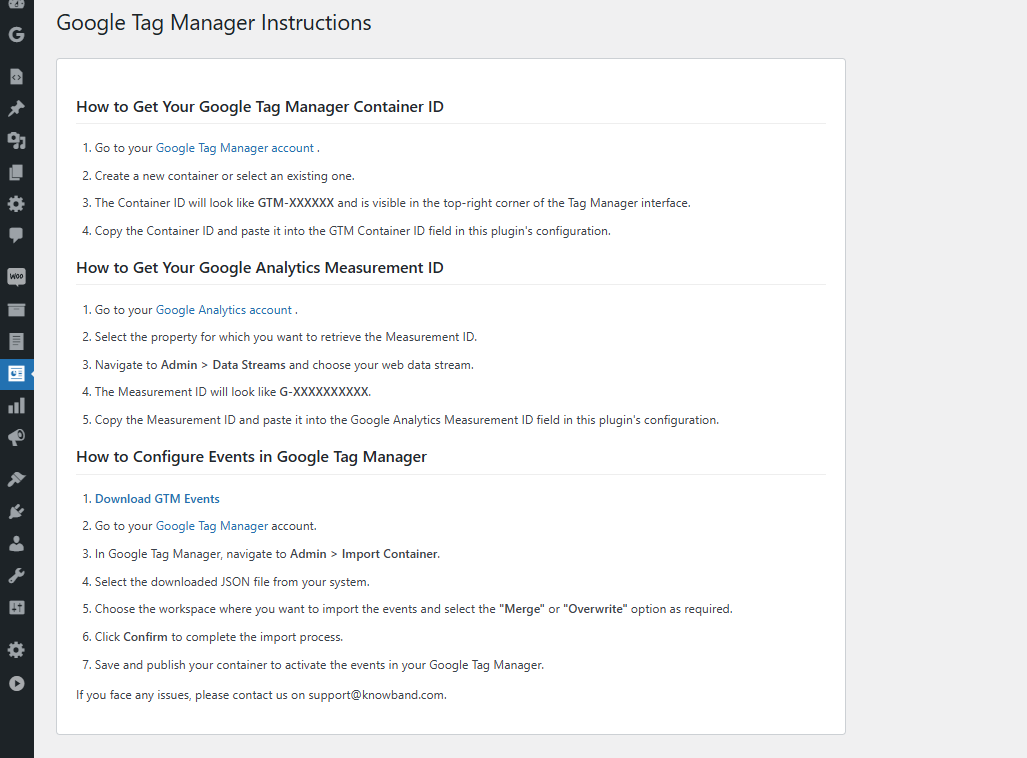
2.1 Steps to Get the Google Tag Manager ID and Google Analytics Measurement ID

2.1.1 Steps to Get Google Tag Manager ID

Step 1: Access the Google Tag Manager account.

Step 2: Create a new container or select an existing container within your Google Tag Manager account.

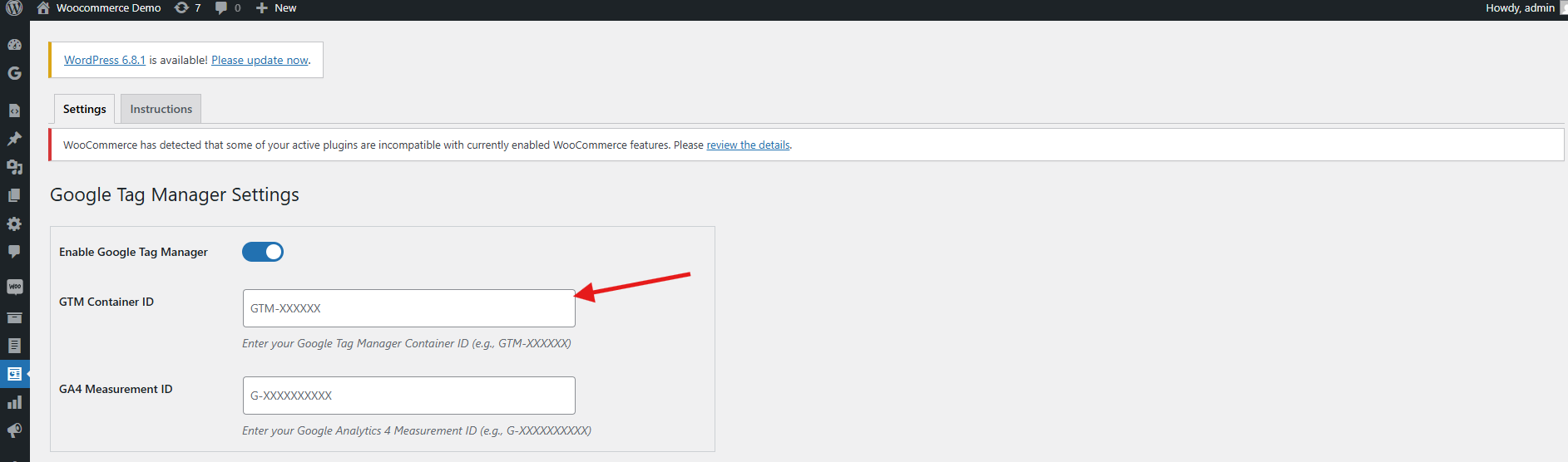
Step 3: The Container ID will be displayed in the top-right corner of your Google Tag Manager dashboard, typically formatted as: GTM-XXXXXX.

Step 4: Copy the Container ID and add it to the GTM container ID field in the configuration field.

2.1.2 Follow these steps to get Google Measurement ID 

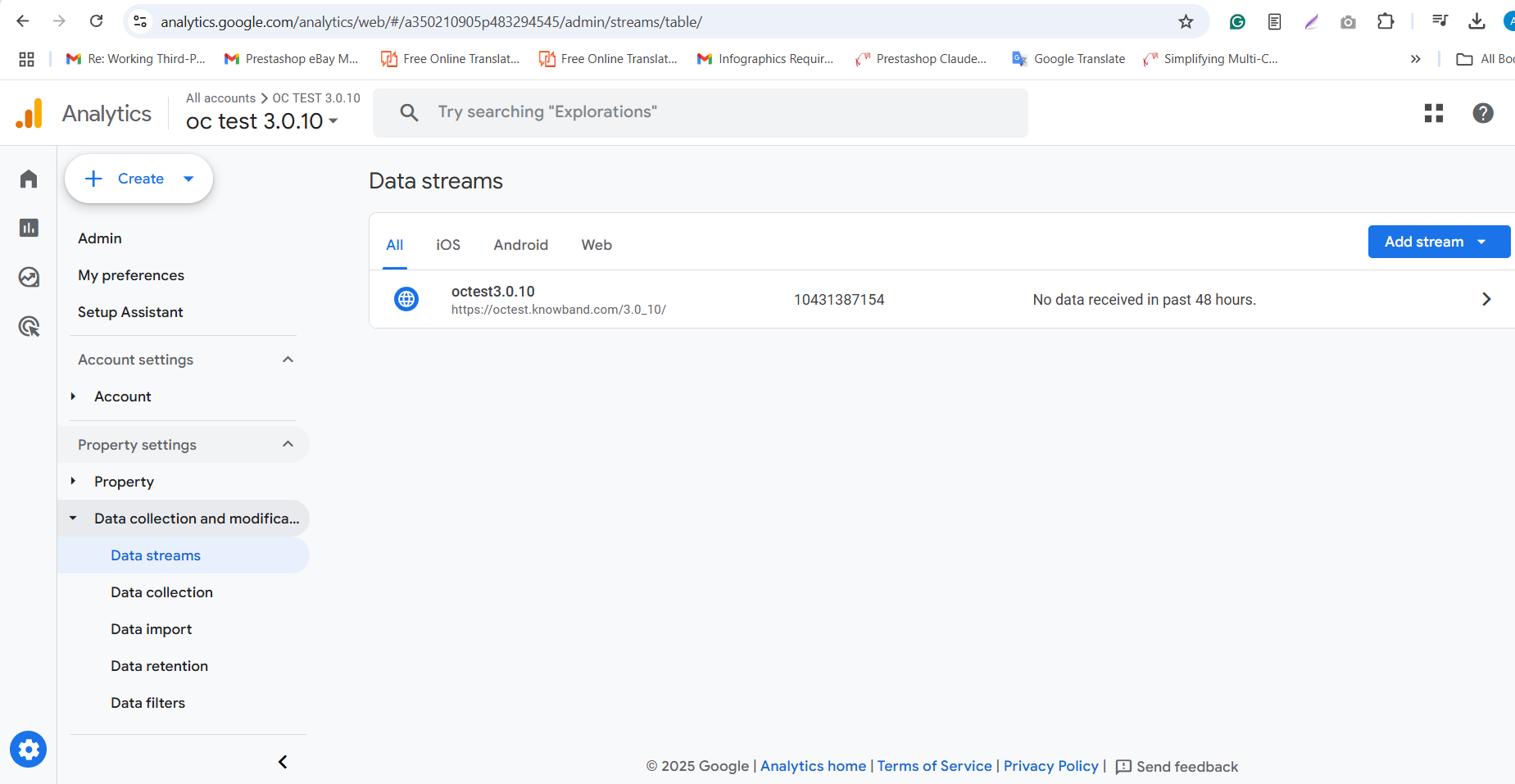
Step 1: Visit the Google Analytics account.

Step 2: Select the property for which you want to get the Measurement ID.

Step 3: Navigate to Admin ->Data Streams and choose your web data stream.

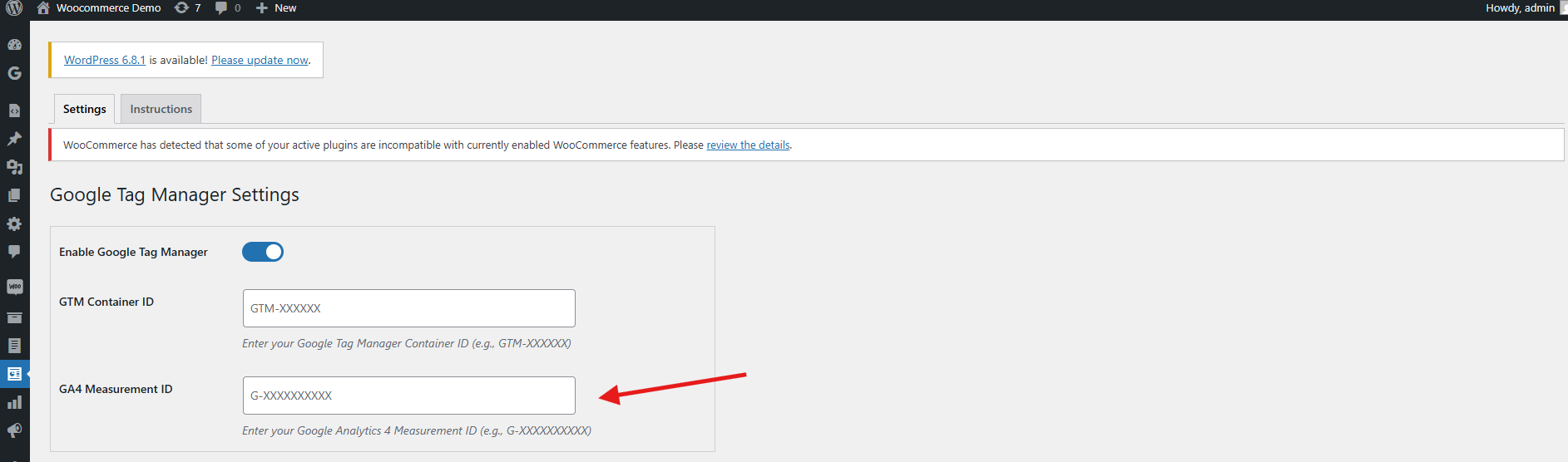
Step 4: Navigate to Admin > Data Streams in your Google Analytics account, then locate the Measurement ID, which appears in this format: G-XXXXXXXXXX.

Step 5: Copy this ID and paste it into the Google Measurement ID field within the module’s configuration settings.

3.1 Configuring Events in Google Tag Manager

To enable event tracking in your WooCommerce store using the WooCommerce Google Analytics Integration Plugin, follow these steps:

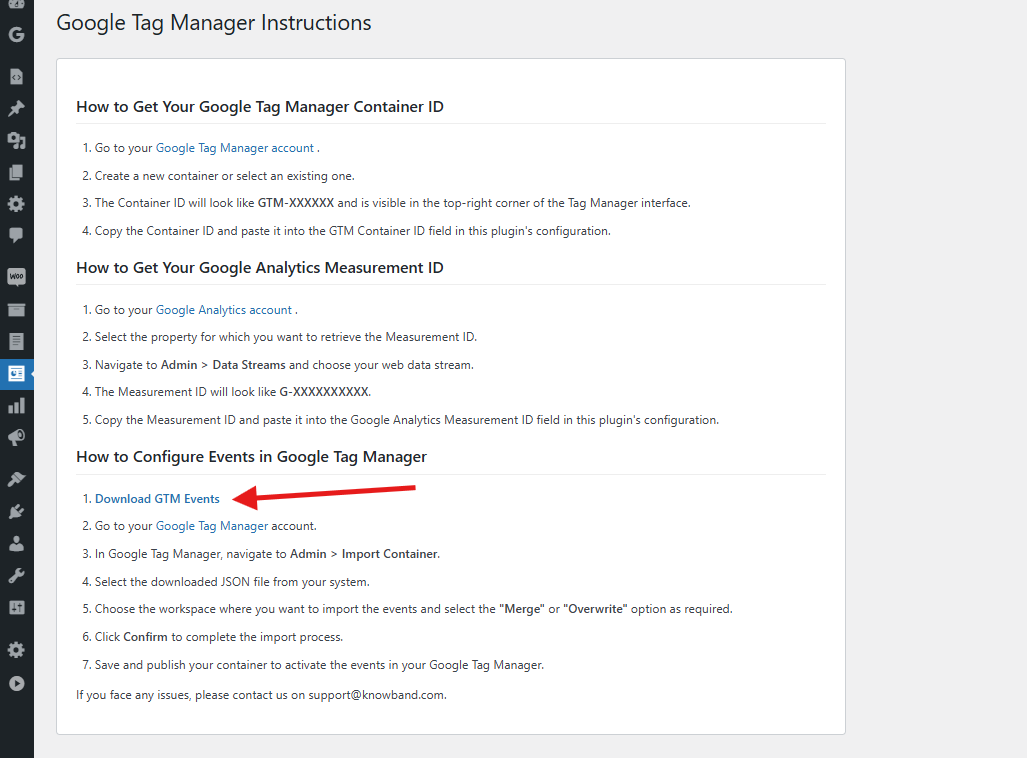
Step 1: Download the GTM Events File
Navigate to the WooCommerce gtag Integration Plugin’s configuration panel and go to the Instructions tab. There you’ll find a direct link to download the GTM events JSON File.

Step 2: Log into Google Tag Manager
Access your Google Tag Manager account.

Step 3: Import the Events Container
Go to Admin > Import Container in your GTM dashboard.

Step 4: Upload the JSON File
Select the downloaded JSON file from your computer.

Step 5: Choose the Workspace and Import Option
Pick the GTM workspace where you’d like to import the events. Then choose either Merge (to combine with existing settings) or Overwrite (to replace them entirely), based on your preference.

Step 6: Confirm the Import
Click Confirm to complete the import process.

Step 7: Publish the Container
Save and publish the updated container to activate the new events in your GTM account

By following the above steps, you can successfully configure the WooCommerce gtag Integration Extension. However, if you face any issues, please feel free to contact us at support@knowband.com.

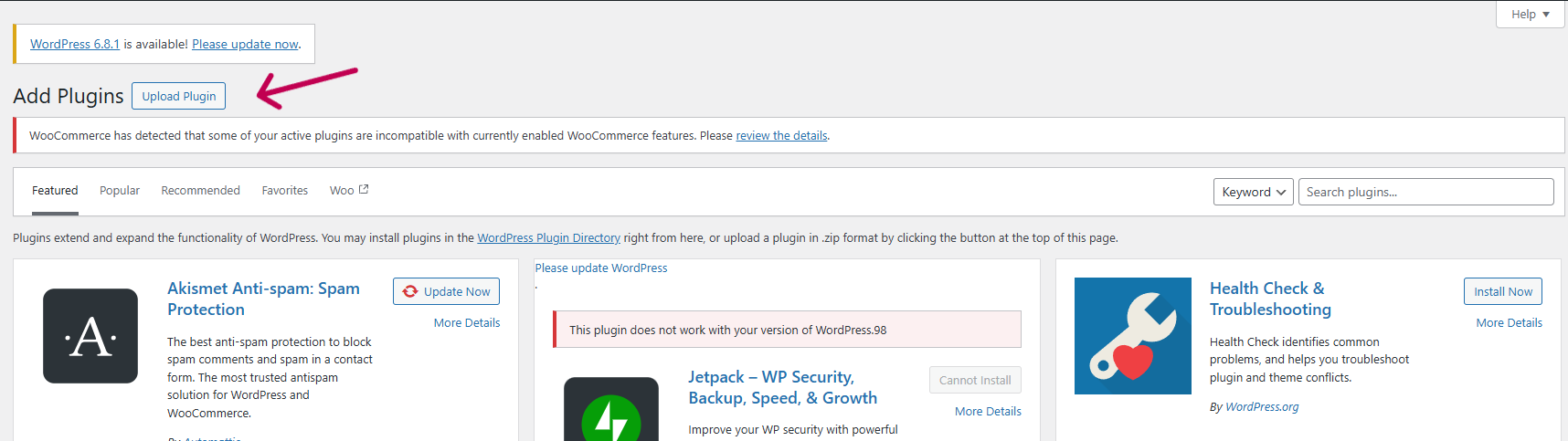
4.0 Set Up WooCommerce Google Analytics Integration Plugin in 3 Simple Steps

Log in to your WordPress Admin Dashboard.

Navigate to Plugins > Add New.

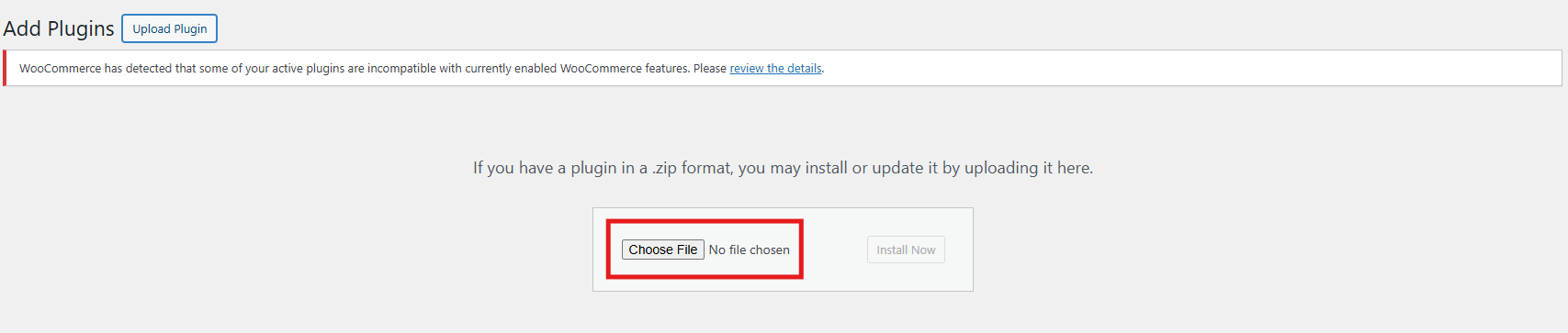
Upload the zipped file provided with the WooCommerce GA4 Integration purchase.

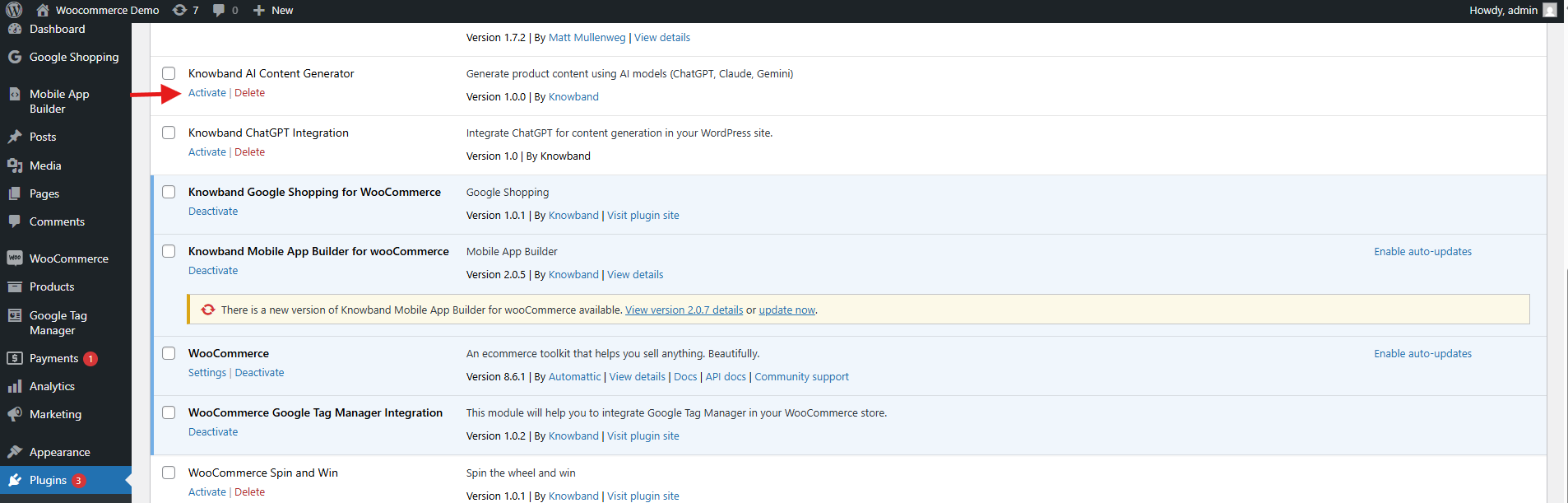
Click Install Now next to the plugin, then click Activate once installed.

5.0. Admin Panel Overview of WooCommerce eCommerce Measure Extension

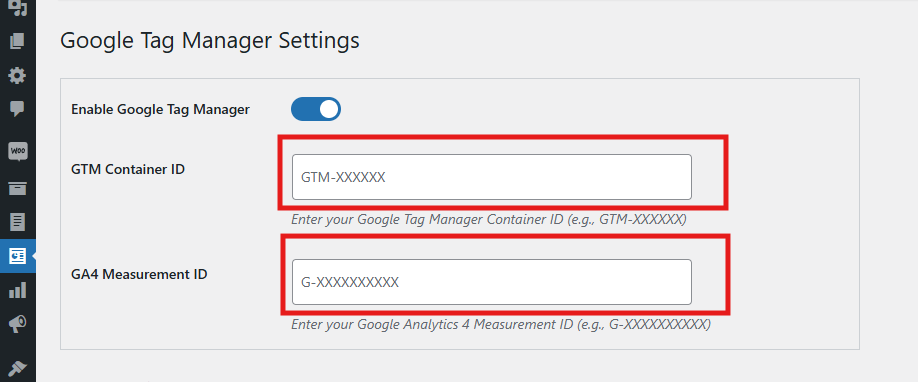
The Google Tag Manager for WooCommerce extension includes a user-friendly admin dashboard that allows store owners to easily configure and manage tracking tags directly from the WooCommerce backend—no technical expertise required.

Core Features of the Admin Panel

  • Enable or Disable Extension
    Instantly activate or deactivate the module as needed with a simple toggle.
  • GTM Container ID
    Please enter your Google Tag Manager Container ID in this field to seamlessly connect your WooCommerce store with GTM.
  •  Refer to section 1.1 for guidance on locating this ID.
  • Google Analytics ID
    Input your Google Analytics Measurement ID to link Google Analytics with GTM and start tracking store performance.

Event-Based Tag Management

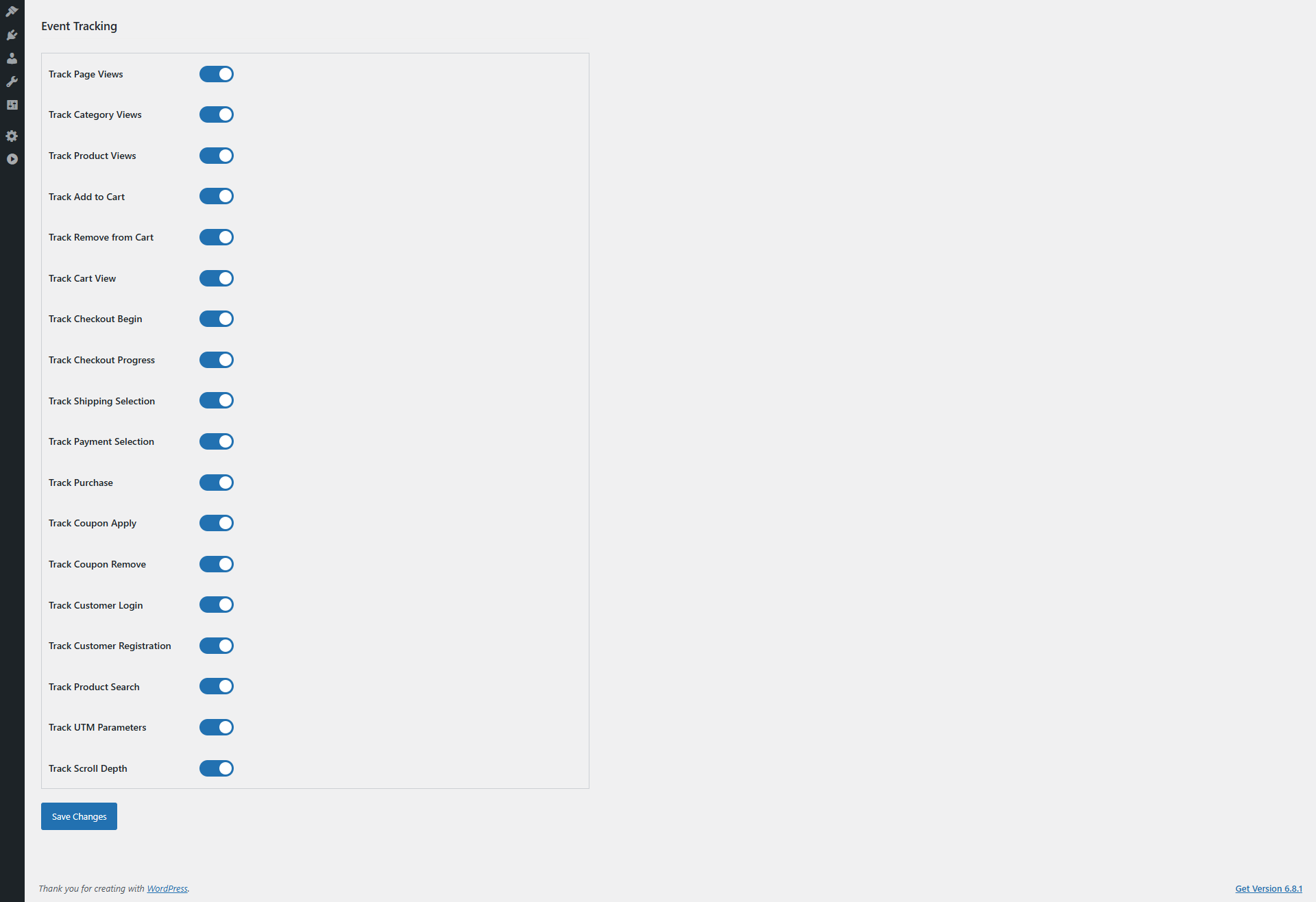
Each event listed below can be individually enabled or disabled based on your store’s specific tracking requirements in the WooCommerce GA4 Integration Plugin. Consequently, this flexibility allows you to tailor the data collection, enabling Google Analytics to provide more relevant insights and helping you make smarter business decisions.

  • Track Page Views
    You can enable or disable the event as per your need. This event tracks every page visit, which helps GA analyze overall site traffic and user navigation patterns. Therefore, it is crucial to understand customer behaviour and optimise your site structure.
  • Category Views
    Enable or disable as needed. Moreover, this tracks visits to product categories, allowing GA to identify popular sections. As a result, you can focus your marketing efforts and manage inventory more effectively.
  • Product Details Page
    Furthermore, you can enable or disable the event as needed. This event in WooCommerce GA4 Integration Extension monitors engagement with individual product pages, providing valuable insights into which products attract the most attention. Thus, it aids in product promotion and stock management.
  • Add to Cart
    Enable or disable as needed. This event in WooCommerce GA4 eCommerce Events tracks when customers add products to their shopping cart, giving GA critical data on purchase intent. Consequently, you can optimize your sales funnel and remarketing strategies.
  • Cart Removal
    Enable or disable as needed. It detects when items are removed from the cart, which helps identify potential obstacles in the purchasing process.  Hence, you can improve the user experience to reduce cart abandonment.
  • Cart Views
    Enable or disable as needed. This monitors how often customers view their cart, providing insight into shopper engagement and possible bottlenecks before checkout.
  • Checkout Start
    Enable or disable as needed. It captures when a user begins the checkout process, allowing GA to track funnel progression. Therefore, you can improve the checkout experience to minimize drop-offs.
  • Checkout Page
    Enable or disable as needed. This tracks detailed interactions on checkout pages, offering valuable data for optimizing conversions at this critical step.
  • Address Selection
    Enable or disable as needed. It monitors when customers add or select shipping addresses, helping identify preferences or issues during checkout.
  • Shipping Method Choice
    Enable or disable as needed. This tracks which shipping options customers select, providing insights into customer preferences and aiding logistics and marketing planning.
  • Order Confirmation
    Enable or disable as needed. The WooCommerce eCommerce Measure Extension’s order confirmation captures successful order completions, the primary conversion event for GA. Consequently, it is essential for accurate revenue tracking and ROI measurement.
  • Customer Login
    Enable or disable as needed. This tracks when users log in to their accounts, offering insights into returning customer behaviour and loyalty program effectiveness.
  • Customer Registration
    Enable or disable as needed. It monitors new account creations, useful for tracking customer acquisition and growth trends.
  • Discount Code Use
    Enable or disable as needed. This monitors the usage of promotional or discount codes, helping assess the effectiveness of marketing campaigns and incentives.
  • Discount Code Removal
    Enable or disable as needed. It tracks when discount codes are removed during checkout, highlighting friction points that may cause cart abandonment.
  • Search Product Tracking
    Enable or disable as needed. This captures the search terms customers enter, offering valuable data to optimize product offerings and merchandising.
  • Capture UTM Parameters
    Enable or disable as needed. It automatically collects UTM parameters from URLs, allowing GA to accurately attribute traffic and conversions to specific marketing campaigns. Consequently, this is essential for boosting your campaign’s ROI.

5.0 Configuration Instructions:

The WooCommerce No-Code Google Tag Manager Integration provides straightforward, beginner-friendly setup instructions—no technical knowledge required. Store admins can easily access the Google Tag Manager and Google Analytics Consoles and follow simple steps to retrieve the necessary credentials for integration.

Moreover, these clear instructions are designed to guide you through the entire WooCommerce gtag Integrator Plugin configuration process with ease.

If you encounter any issues during setup or while using the extension, our support team is here to help. You can contact us by:

GA4 & GTM Events for WooCommerce: Unlock Advanced Tracking with Ease

In today’s competitive eCommerce landscape, data-driven decision-making is key to success. For WooCommerce store owners, understanding customer behavior is critical to optimizing sales and improving marketing strategies. With the right tools, tracking advanced eCommerce events can be a breeze. Introducing Knowband WooCommerce Google Tag Manager Module, a solution that simplifies the integration of GTM and GA4, allowing store owners to unlock the full potential of their analytics.

Why Use Google Tag Manager for WooCommerce?

Google Tag Manager for WooCommerce enables you to manage tags and track events without touching your website’s code. With the WooCommerce GTM Module, you can seamlessly implement and track events like page views, add-to-cart actions, purchases, and more.

Thus, integrating GA4 with your WooCommerce store through the WooCommerce GA4 Integration Module provides deeper insights into user behavior. This data allows you to make informed decisions, create targeted campaigns, and improve your store’s overall performance.

Key Benefits of Using the WooCommerce GTM Extension!

Streamlined Tag Management:

The WooCommerce Google Marketing Integration Plugin simplifies the implementation of tracking tags for your store. Moreover, you can easily manage all your tags from a single GTM interface, saving time and effort.

Advanced Event Tracking:

The Custom Event Tracking WooCommerce Plugin enables you to track specific customer interactions, such as product views, clicks, and purchases. This level of detail helps you understand the customer journey and optimize your sales funnel.

Enhanced Marketing Integrations:

With the WooCommerce Google Marketing Integration, you can connect your store with essential Google tools like GA4, gtag, and Ads. 

Accurate eCommerce Data:

The WooCommerce GA4 eCommerce Events feature allows you to collect accurate data about sales, revenue, and customer behavior. This data is invaluable for improving your store’s performance.

Ease of Use:

The WooCommerce Google Analytics Integration Plugin is designed with user-friendliness in mind. Thus, even if you’re not a tech expert, you can set up and manage the integration with minimal effort.

How the WooCommerce Google Tag Manager Module Works?

The WooCommerce Google Tag Manager Module acts as a bridge between your store and Google’s analytics tools. It allows you to:

  • Add and manage Google Tag Manager snippets to your WooCommerce store.
  • Configure GA4 tracking and events without coding.
  • Track key eCommerce actions such as purchases, cart updates, and product views.
  • Monitor custom events specific to your store’s requirements using the WooCommerce Google Event Tracker Plugin.

Once integrated, the WooCommerce GTM Extension ensures that all tracking data is sent to Google Analytics 4 in real-time. Furthermore, this seamless process eliminates the need for manual tracking setups and reduces errors.

Key Features of the WooCommerce GA4 Integration Addon!

The WooCommerce GA4 Integration Addon comes with several features designed to meet the unique needs of WooCommerce store owners:

Pre-configured Events: Automatically track essential events like product impressions, clicks, and transactions.

Customizable Tracking: Use the WooCommerce gtag Integration Plugin to create custom event tracking tailored to your business goals.

Real-time Analytics: Access real-time data for a comprehensive understanding of user behavior.

eCommerce Reporting: The WooCommerce eCommerce Measure Module provides detailed reports on sales performance, revenue, and conversions.

Multi-platform Integration: Works seamlessly with other Google tools, ensuring your marketing efforts are cohesive and effective.

Integrate Advanced Analytics to Your Store

SHOP NOW

Why Choose the WooCommerce GA4 Integration Plugin?

The WooCommerce GA4 Integration Plugin is a game-changer for eCommerce businesses. By leveraging the power of WooCommerce Google Analytics Integration, store owners can gain a deeper understanding of their customers.
Here’s why this plugin is a must-have:

  • It automates complex tracking processes.
  • It provides accurate insights into customer behavior.
  • It empowers you to create data-driven marketing strategies.
  • It helps you optimize your sales funnel based on real-time data.

Setting Up the WooCommerce gtag Integration Extension!

Getting started with the WooCommerce gtag Integrator is quick and easy:

Install the Plugin: Download and install the WooCommerce gtag Integration Extension from the plugin repository or your provider.

Connect to Google Tag Manager: Link your GTM account to the plugin.

Enable GA4 Tracking: Set up the WooCommerce GA4 Integration Module to track key events.

Customize Events: Use the plugin’s features to track custom events for your store.

Monitor Results: Access detailed analytics in GA4 to monitor performance and make data-driven decisions.

Conclusion!

The GA4 & GTM Events for WooCommerce integration is essential for any store owner looking to optimize their analytics and enhance their marketing efforts. Therefore, by using the WooCommerce Google Tag Manager Module, you can easily track advanced eCommerce events, gain valuable insights, and drive growth.

Whether you’re a small business owner or managing a large-scale eCommerce platform, the WooCommerce Google Analytics Integration Extension empowers you to unlock the full potential of your store’s data. Don’t let valuable insights go untapped—invest in the WooCommerce GTM Module today and take your analytics to the next level.