Now Live: Knowband’s AI Content Generation Plugin for WooCommerce!

Running an online store means creating lots of content. However, writing product descriptions, meta titles, and page content takes time. Fortunately, the Knowband’s WooCommerce AI Content Generator Plugin offers a simple solution. This powerful Plugin helps store owners create quality content quickly and easily.

What Is the AI Content Generator for WooCommerce?

The AI Content Generator for WooCommerce is a smart plugin that writes content for you. Instead of spending hours writing product descriptions, this Plugin does the work in minutes. Moreover, it uses advanced AI technology to create professional content that sounds natural and engaging.

Furthermore, the WooCommerce AI Generator Plugin supports multiple AI engines. This means you can choose from different AI models like ChatGPT, Claude, Gemini, and DeepSeek. As a result, you get content that fits your store’s unique style and needs.

Key Features Of WooCommerce AI Content Generator

The WooCommerce AI Content Creation Extension comes with many helpful features. First, it creates content for products, categories, and CMS pages automatically. Additionally, it generates SEO-friendly titles and descriptions that help your store rank better in search results.

Another great feature is bulk processing. The WooCommerce AI Bulk Content Generator can handle hundreds of products at once. Therefore, even large stores can update their content quickly without manual work.

The plugin also tracks all changes with detailed logs. This way, you can see what content was created and when. Consequently, managing your store’s content becomes much easier.

Multiple AI Engines for Better Results

What makes this Plugin special is its variety of AI options. The WooCommerce AI Content Generator uses Claude AI, Gemini and ChatGPT for natural-sounding content that works best for your products.

Perfect for All Types of Content

The AI Product Description Generator WooCommerce creates compelling product descriptions that sell. These descriptions highlight key features and benefits while using the right keywords. This helps in making your product highlighting to customers.

Not only products pages, the AI CMS Page Content Generator WooCommerce also genrates the content for categories as well as CMS Pages like Privacy Policy, etc. For instance, it can write About Us pages, FAQ sections, and shipping policies. Furthermore, this means your entire website can have professional content without extra effort.

Boost Your SEO Rankings

Search engine optimization (SEO) is important for the success of any online store. It helps your products appear higher in search engine results like Google, making it easier for customers to find you. The SEO Meta Title Generator in the WooCommerce AI plugin helps by creating product meta descriptions and title that include the right keywords.

These titles are not only made to rank well on search engines but are also easy for people to read and understand. This means your products are more likely to be seen, clicked on, and purchased by potential customers.

All-in-One Content Solution

The Multi-engine AI Content Generator for CMS and Products by Knowband combines everything you need in one plugin. Rather than using separate Plugins for different content types, this solution handles everything together. Moreover, this helps in time management and SEO rankings.

The plugin also supports multiple languages, which helps you reach global customers. Furthermore, it follows SEO best practices automatically, so you don’t need to be an expert to get good results.

Simple Setup and Easy Use

Setting up the plugin is straightforward, even for beginners. Once installed, you simply choose your preferred AI engine and start generating content. The user-friendly interface makes the process smooth and hassle-free.

Additionally, the bulk content generation feature allows you to create product content at scale by simply uploading a CSV file with product details. Once uploaded, the AI automatically generates titles, descriptions, and other relevant content for all listed items in one go.

This functionality is especially valuable for WooCommerce stores managing large inventories, saving hours of manual work and ensuring consistent, high-quality content across the catalog.

Benefits of WooCommerce AI Content Generator to the E-Merchants

Time-Saving: Automates content creation, freeing up countless hours for you to focus on other business tasks.

Consistent Quality: Delivers high-quality, professional content across all your product pages.

SEO-Friendly: Generates content optimized for current SEO best practices, helping improve your store’s search engine rankings.

Increased Visibility: Better rankings mean more organic traffic, helping customers find your store without relying on paid ads.

Cost-Effective: Reduces the need for hiring copywriters, cutting down on operational expenses..

Get Started Today

The WooCommerce AI content generation Plugin by Knowband make running an online store much easier. Whether you need product descriptions, meta tags, or page content, AI can help you create everything quickly and professionally.

With multiple AI engines, bulk processing, and SEO optimization built-in, these Plugins provide everything needed for successful content creation. Start using AI content generation today and transform how you manage your online store.

WooCommerce ChatGPT Content Generator Plugin – User Manual

The WooCommerce ChatGPT Content Generator Plugin is an advanced AI-based tool designed to simplify content management for your WooCommerce store. Powered by advanced OpenAI’s ChatGPT technology, this innovative plugin makes bulk content creation effortless, making it an essential resource for modern eCommerce businesses. With this tool, you can quickly craft engaging product and category descriptions, compelling titles, and SEO-optimized content to improve your store’s visibility and enhance customer satisfaction.

Designed to seamlessly integrate with WooCommerce, the plugin streamlines content generation, saving time and effort for merchants. Thus, utilizing the capabilities of ChatGPT Engines 3.5 and 4.0, helps you deliver high-quality content that not only helps you grow your online store’s performance but also saves time in manual content writing.

Key Features of Knowband’s WooCommerce ChatGPT Content Generator Plugin

Effortless Content Creation: Easily generate high-quality product titles, detailed descriptions, and optimized meta tags, ensuring consistent and professional content across your store while saving valuable time.

4 AI Engine Support: Powered by advanced ChatGPT models GPT-4.0, GPT-4-turbo, GPT-4, and GPT-3.5-turbo, the WooCommerce ChatGPT Plugin caters to diverse content generation needs, making it ideal for businesses of all sizes.

SEO-Optimized Output: Create SEO-friendly content effortlessly to enhance your store’s search engine rankings and drive more organic traffic.

User-Friendly Interface: Designed with simplicity in mind, the plugin offers an intuitive setup process, making it accessible for store admins without technical expertise.

Category and Meta Tags Management: Quickly generate category names and meta descriptions for a polished and organized presentation.

Bulk Content Generation: Streamline operations by processing multiple products at once, perfect for stores with extensive catalogs.

Enhanced Store Operations: Simplify content-related tasks to ensure smooth and efficient product updates, optimizing your store’s overall performance.

Global Flexibility: With support for various languages, including RTL scripts, the plugin accommodates businesses targeting diverse markets.

This streamlined tool empowers WooCommerce store owners to create and manage content effectively, enhancing productivity and boosting online presence.Top of Form

Setting Up the ChatGPT Key for Your Plugin

Follow these simple steps to enable ChatGPT functionalities in your WooCommerce plugin:

Step 1: Generate Your API Key

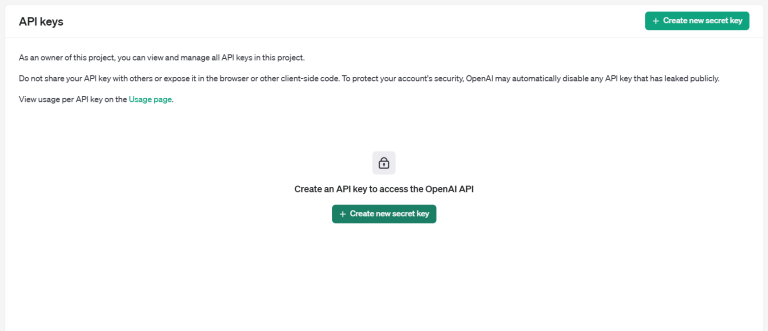
  1. Visit the OpenAI API Key Generation page.
  2. Log in to your OpenAI account or create one if you don’t have an account yet.
  3. Click on “Create new secret key” to generate a unique API key.

Copy and securely save the generated key, as it will be visible only once.

Important: Verify Billing Status

To ensure uninterrupted functionality, confirm that your OpenAI account has an active billing setup and sufficient credits:

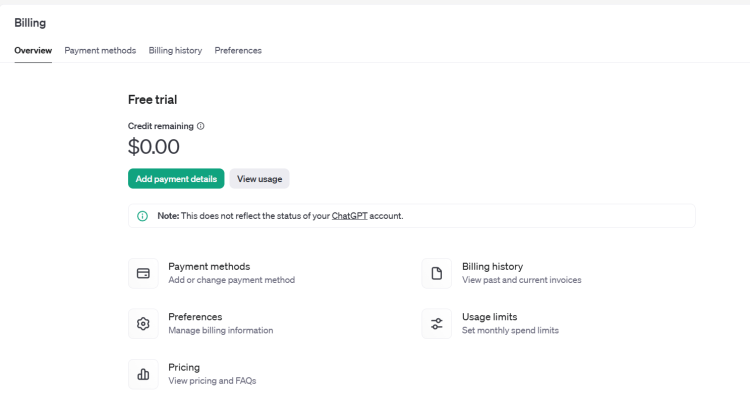
  1. Visit the OpenAI Billing Overview page.
  2. Check your account balance.
  3. Add funds if necessary to prevent API request failures.

Once you’ve set up your API key and verified your billing, your WooCommerce ChatGPT plugin will be fully operational, ready to streamline content generation for your store.

Installation Guide

Follow these simple steps to install the WooCommerce AI Content Generator Module on your WooCommerce site:

Step 1: Purchase the Plugin

Buy the WooCommerce plugin from the Knowband store. Upon purchase, you’ll receive a zipped file containing the module’s source code.

Step 2: Access the WordPress Dashboard

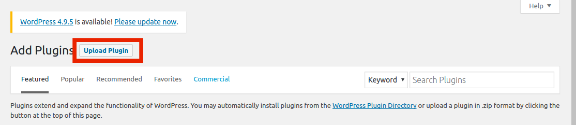
Navigate to your WordPress Dashboard and go to Plugins → Add New.

Step 3: Upload the Plugin

You’ll be directed to a new interface. Click on Upload Plugin.

Step 4: Upload the File

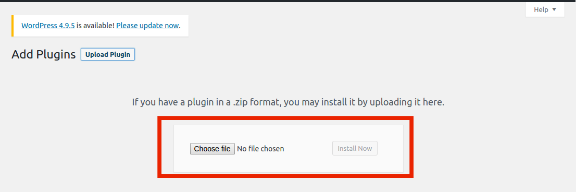
Click Choose File, select the zipped file you received, and upload it.

Once uploaded, activate the plugin, and it will be ready to enhance your WooCommerce site with AI-powered content generation capabilities.

Admin Panel Overview:

The WooCommerce AI Product Description Generator Plugin comes with an intuitive admin dashboard that allows the admin to handle all the content creation tasks efficiently.

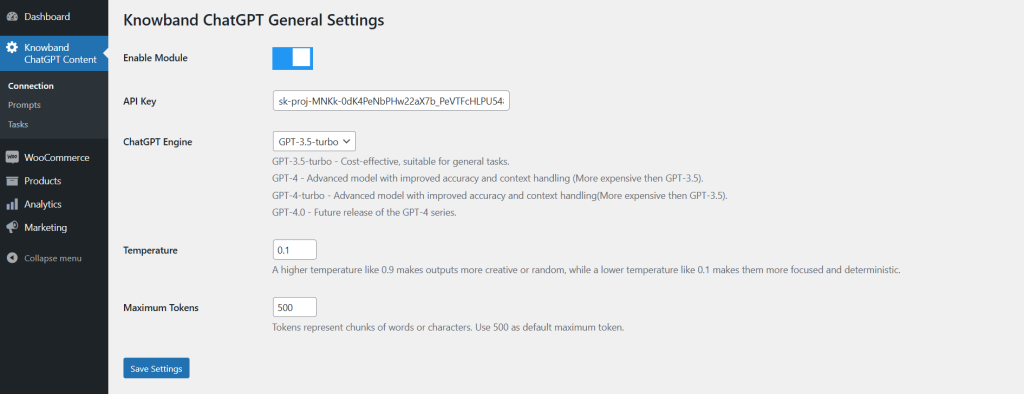
1. Connection Setting:

Enable Module: The store admin can activate/deactivate the extension using the following button.

API Key: Insert the obtained ChatGPT API key in this section. Please follow the steps mentioned above to get the ChatGPT API key for your module.

ChatGPT Engine: The plugin comes with 4 powerful ChatGPT engines to streamline the content management on your store.

  • GPT-3.5-turbo – Cost-effective, suitable for general tasks.
  • GPT-4 – Advanced model with improved accuracy and context handling (More expensive than GPT-3.5).
  • GPT-4-turbo – Advanced model with improved accuracy and context handling(More expensive than GPT-3.5).
  • GPT-4.0 – Future release of the GPT-4 series.

Select the one that suits your needs the best.

Temperature: The following text field accepts values between 0.1 and 0.9. Whereas, the lowest value 0.1 generates more focused and simple content. On the other hand, the highest value 0.9 generates more creative and refined content.

Maximum Tokens: Tokens represent chunks of words or characters. Use 500 as the default maximum token.

Also Available for Prestashop eCommerce Platform

SHOP NOW

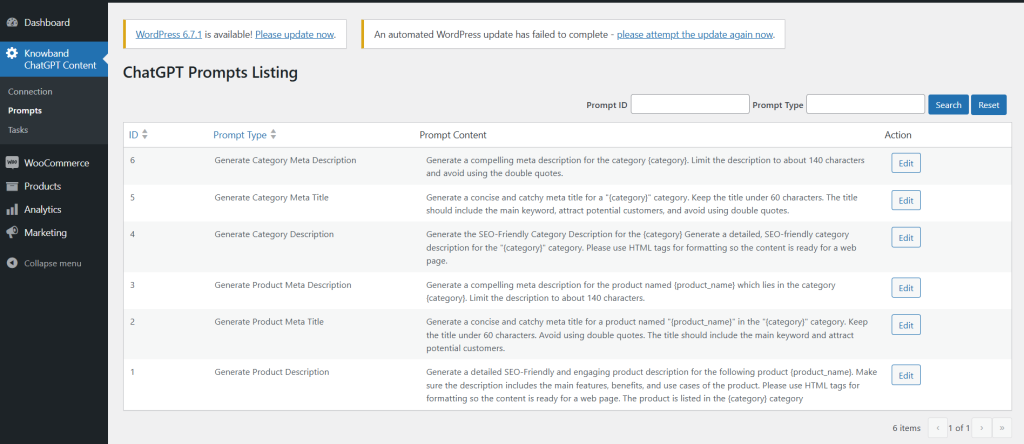
2. ChatGPT Prompts

Generate Category Meta Description: Generate a compelling meta description for the category {category}. Limit the description to about 140 characters and avoid using the double quotes.

Generate Category Meta Title: Generate a concise and catchy meta title for a “{category}” category. Keep the title under 60 characters. The title should include the main keyword, attract potential customers, and avoid using double quotes.

Generate Category Description: Generate the SEO-Friendly Category Description for the {category} Generate a detailed, SEO-friendly category description for the “{category}” category. Please use HTML tags for formatting so the content is ready for a web page.

Generate Product Meta Description: Generate a compelling meta description for the product named {product_name} which lies in the category {category}. Limit the description to about 140 characters.

Generate Product Meta Title: Generate a concise and catchy meta title for a product named “{product_name}” in the “{category}” category. Keep the title under 60 characters. Avoid using double quotes. The title should include the main keyword and attract potential customers.

Generate Product Description: Generate a detailed SEO-Friendly and engaging product description for the following product {product_name}. Make sure the description includes the main features, benefits, and use cases of the product. Please use HTML tags for formatting so the content is ready for a web page. The product is listed in the {category} category.

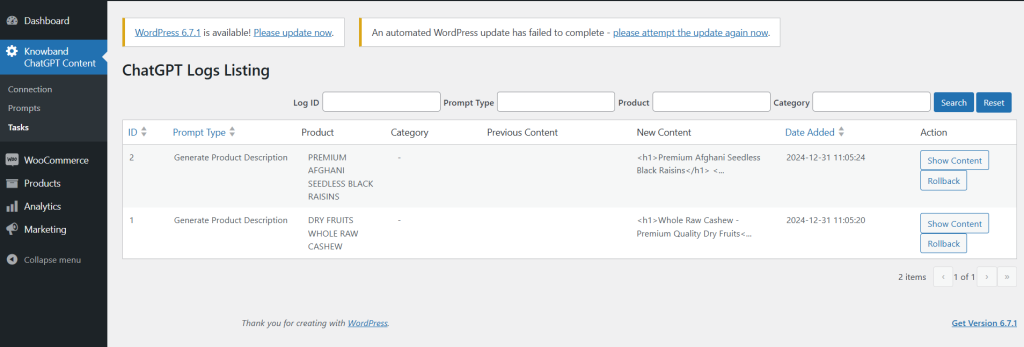
3. ChatGPT Logs Listing

This tab provides the admin with a comprehensive overview of completed tasks. It displays details such as the executed prompt type, product name, product category, previous content, and the newly generated content.

Additionally, the store admin can filter the data using criteria like Filter ID, Prompt Type, and Product Name for easy navigation and organization.

How to Use ChatGPT Prompts

Store administrators can easily utilize ChatGPT prompts by following these steps:

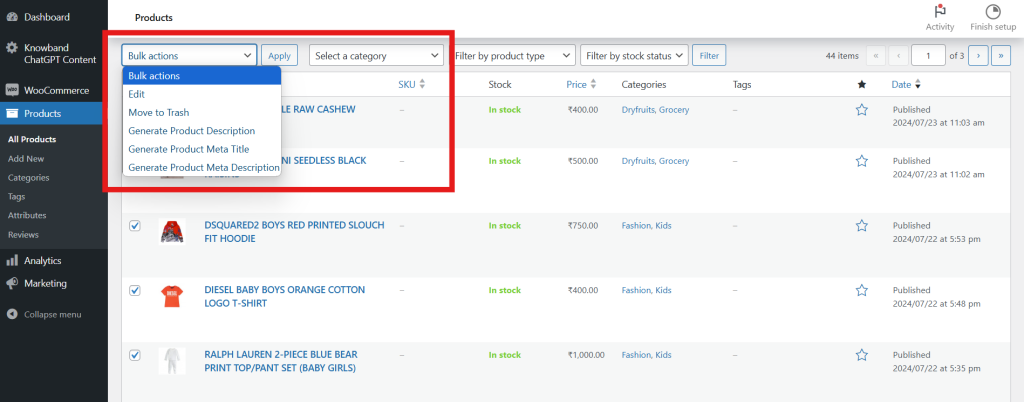
  1. Navigate to Catalog → Products in the admin panel.
  2. Select the desired products from the list.
  3. Access the Bulk Actions tab.
  4. Choose the appropriate prompts to perform actions on the selected products.

This streamlined process enables admins to efficiently generate content for multiple products at once, saving time and effort.