
The PrestaShop LLMs TXT Generator is a must-have plugin designed to generate the llms.txt file for your store. This file contains structured information related to the store catalogue, including products, categories, and CMS pages.
Nowadays, you see customers first ask the query on AI platforms like ChatGPT, Gemini, and many more. People have become dependent on the AI even for the smallest things. So what if ChatGPT starts recommending your products to customers? Is it amazing, right? Therefore, Knowband has designed this Prestashop LLMs TXT Generator, which helps the AI platforms to recommend your products.
The generated llms.txt file from the Knowband Prestashop llms.txt generators helps AI crawlers and AI answer engines to access store content in an organised manner. By placing this llms.txt file on the server, the store expands with modern AI search and product recommendation AI Models such as ChatGPT, DeepSeek, Gemini, Perplexity, and Claude.
Using this AI product recommendation module for PrestaShop helps improve AI product discovery, supports accurate AI-generated responses, and ensures that store content can be correctly identified and referenced when users search for product- or store-related information on AI-driven search platforms.
1.0.0 Highlighted Key Features of Prestashop LLMs TXT Generator Addon
Support for Advanced AI Model Bots
This PrestaShop module supports access for multiple advanced AI crawler bots used by modern AI answer engines and generative AI search platforms.
These supported bots include:
- DeepSeekBot
- GPTBot
- Anthropic AI
- PerplexityBot
- Google-Extended
Supporting these AI bots helps ensure compatibility with AI product discovery and ChatGPT product recommendations to customers.
AI Crawler Access Control
The Knowband PrestaShop LLMs TXT Generator module allows administrators to manage which AI crawlers can access store content through the llms.txt file.
Customisation of llms.TXT files
The PrestaShop LLMs TXT file generator by Knowband allows admins to add additional content to the llms.txt file.
Customisation options are available in PrestaShop LLMs TXT file generator Addon for store descriptions, products llms.txt files, category product llms.txt files, CMS llms.txt files and many more.
Access Control for Content Pages
This Knowband PrestaShop LLMs TXT Generator for AI search engines allows admins to select which content pages should be included in the llms.txt file, such as product pages, category pages and CMS pages.
This feature in LLMs TXT Generator for prestashop ensures that AI engines answer accurately and do not disclose any other content except the selected one.
Product Recommendations Compatibility
The PrestaShop LLMs TXT Generator Addon is designed to develop evolving AI search and AI product recommendations of the ecommerce stores. By creating a structured llms.txt file with additional content and instructions, your content remains synchronised with next-generation AI answer engines like ChatGPT and recommendation platforms.
Content Filtering
The Knowband PrestaShop LLMs TXT File Generator for products allows store admins to filter and select specific products, categories, and CMS pages in the llms.txt file.
This content filtering feature provides full control over which data you can allow to access for Prestashop AI product discovery, AI crawler indexing, and generative AI search by ChatGPT.
2.0.0 Installation Guide for Knowband PrestaShop LLMs TXT Generator Module
Step 1: Purchase and download the Knowband Prestashop LLMs TXT Generator Module.
After the completion of the purchase, you’ll receive the kbllmstxtgenerator.zip file.
Step 2: Click on Module on your prestashop back office left menu, go to module manager, then you will see the click option. Click on the Upload.
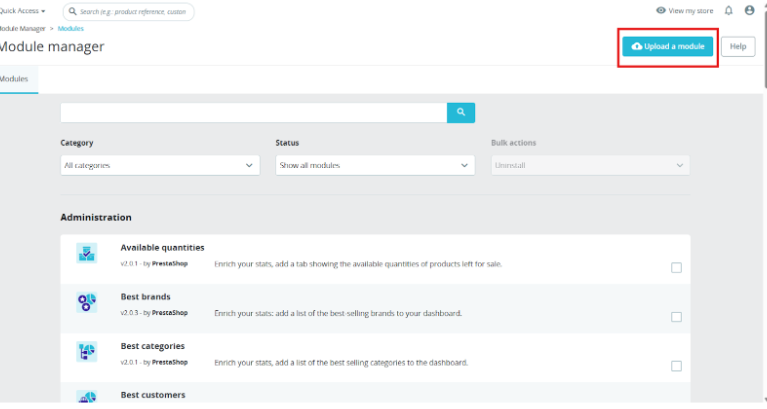
Step 3: Upload and Install the Module. After the complete installation, you have to click on the configuration, and then you will be directed to the configuration page.
Step 4: Now you are ready to configure the LLMs.TXT module.
3.0.0 Backend/Admin Panel of Prestashop Product Recommendation by ChatGPT Module
3.1 General Settings
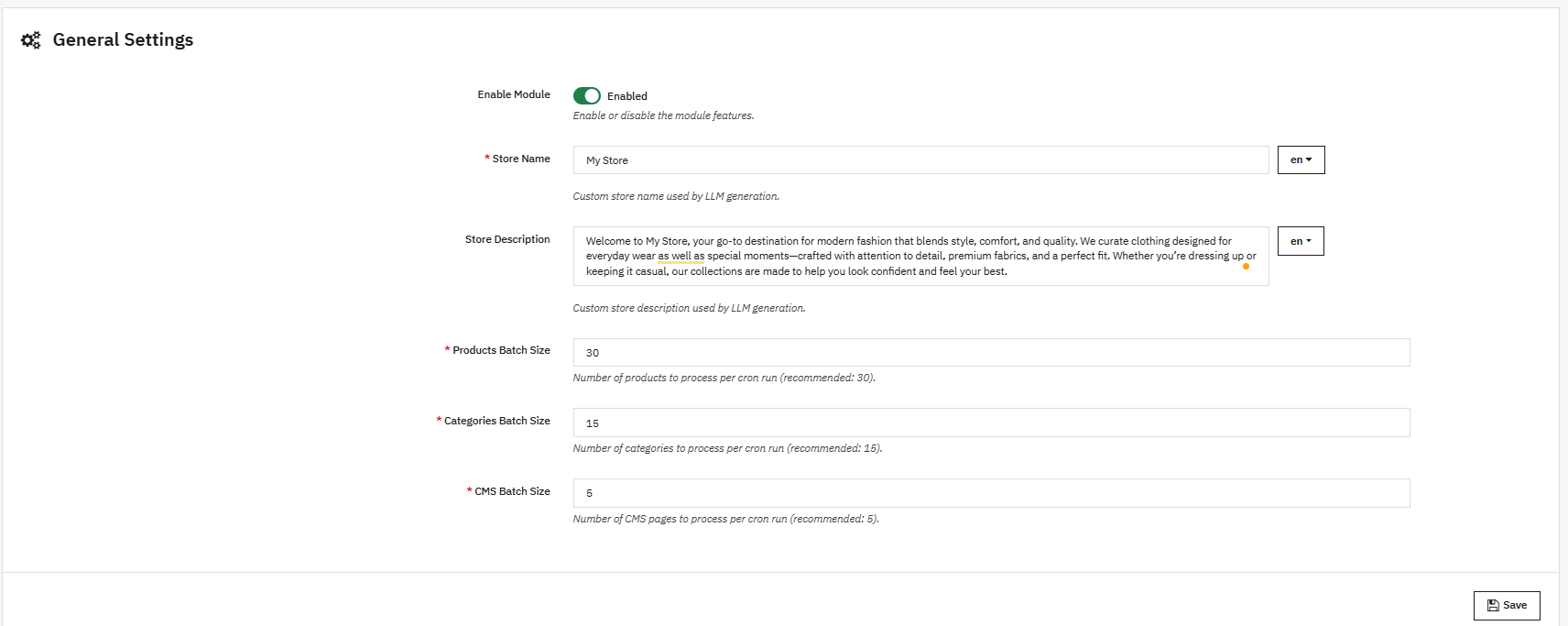
- Enable/Disable Module:
This option in the llms.txt file generator for AI is used to enable or disable the functionality of the PrestaShop LLMs.txt Generator module. - Store Name:
Store admins enter their store name in this field. This Prestashop LLMs.TXT Generator module also supports the languages that are added in the store. - Store Description:
This field is used to add the store description to the llms.txt file generated by the module. Furthermore, it helps to describe the store and its catalogue based on the provided content. - Product Batch Size:
This field in the Prestashop LLMs txt File Generator Addon allows you to define how many products are processed per batch during cron execution. By default, 30 products are processed in one batch. - Category Batch Size:
This field of category batch size allows the cron to process a specified number of categories per batch. - CMS Batch Size:
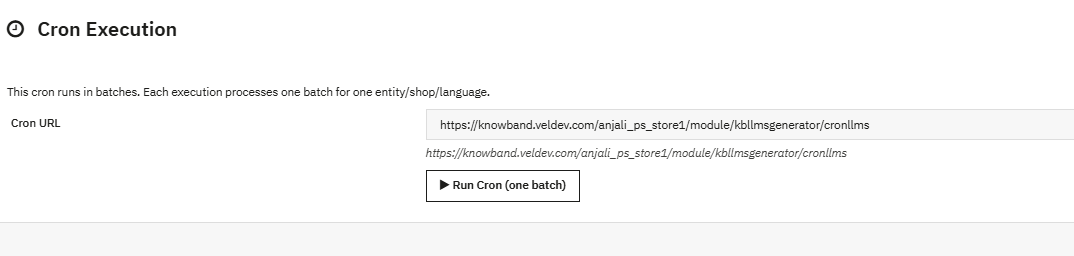
This field allows the cron to process CMS pages per batch. By default, 5 CMS pages are processed in one batch during cron execution in the module. - Cron Execution (Batch Processing): This cron job in Prestashop LLMs TXT generator runs in batches. Each execution processes one batch only, for products, categories and CMS pages. After updating settings like general settings, content filtering and customisation of files, running the cron is necessary to reflect any changes.
3.2 Crawlers Setting
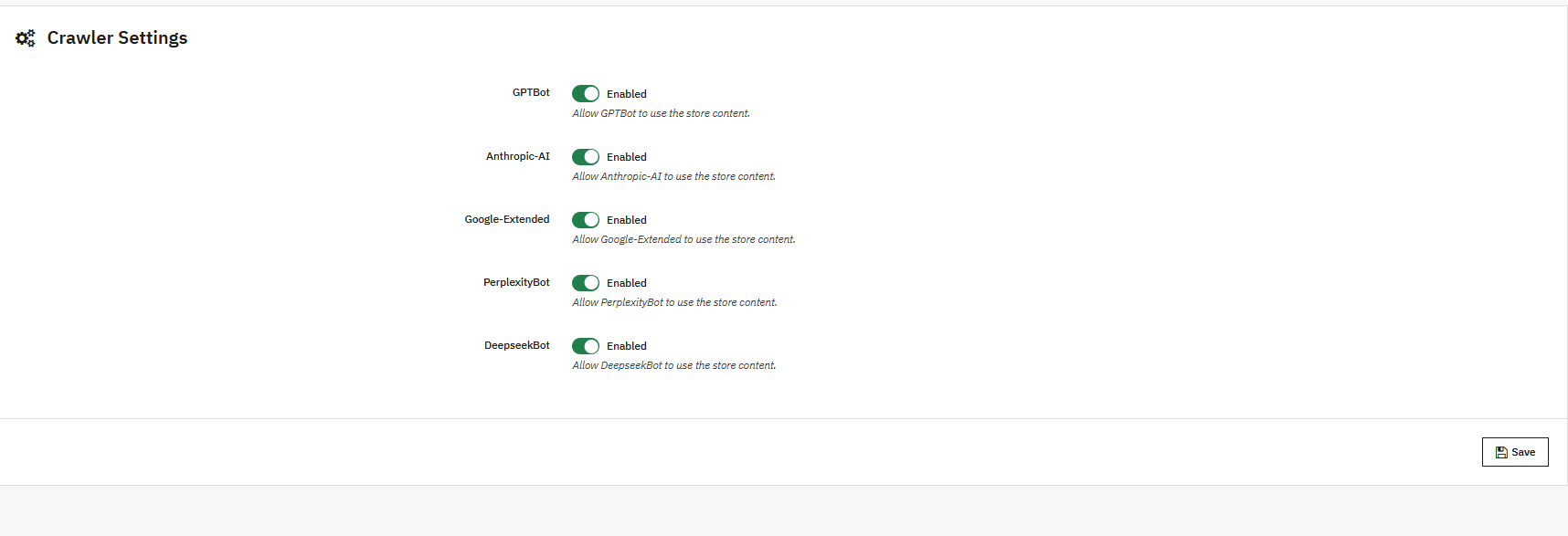
This crawler setting in Prestashop LLMS TXT Generator allows the store owners to manage the AI model’s bots like GPTbot, Google Extended Gemini Bot, DeepSeek and many more
GPTBot: AI Crawler of OpenAI ChatGPT, collects the data to train the ChatGPT AI Models. You can allow or disallow this using the
DeepseekBot: AI crawler bot of deepseek which gathers public web data of the store to train and refine DeepSeek’s large language models
Google-Extended: This Google’s AI-specific crawler (separate from Googlebot) allows the collection of content specifically for training Google’s AI models (like Gemini),
PerplexityBot: This web crawler of perplexity AI is used to fetch up-to-date web content to generate cited answers and summaries
Anthropic-AI: Lastly, this web crawler of Anthropic is used to collect public web data to train and improve Claude AI models. You can enable or disallow all the AI Crawler bots.
3.3 Content Filtering in Prestashop LLMs.txt Generator for AI Tools
The Content Filtering feature allows store admins to control which store content is included in the generated llms.txt file. Furthermore, this helps ensure that only relevant and intended information is processed and shared, while unnecessary or sensitive content can not be exposed.
1. Shop Context
This option in the Prestashop LLM.txt Generator allows you to select the specific shop when you have multiple stores.
If your prestashop store includes multiple shops, you can generate the llms.txt file for a single shop or apply the settings individually to each shop. LLMs TXT files will be generated for each store separately.
2. Product Details

The Product Details content filtering option allows you to control which products are included.
Moreover, store owners can select all products or select specific products for the llms.txt files for the product.
If you want to limit the llms.txt file to featured products, active products, or selected products, while excluding extra items
3. Category Details
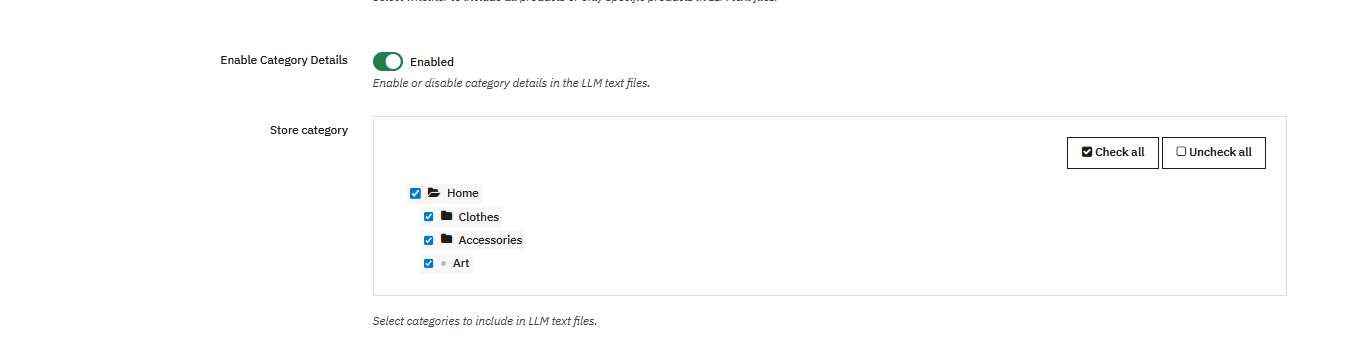
The Category content filtering options allow you to manage category-level items.
This furthermore helps maintain a clean and organised structure by including only relevant categories and excluding the inactive ones.
4. CMS Pages
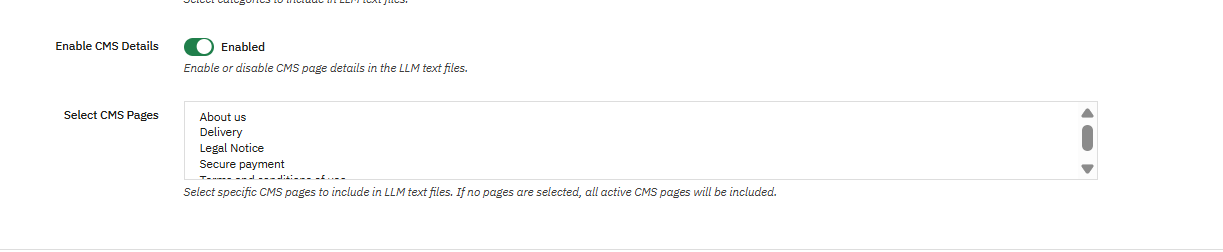
The CMS Pages option allows you to control which CMS content should be included in cms llms.txt file. Furthermore, you can select the pages depending on your needs to avoid the exposure of other CMS pages.
Hence, this feature of Prestashop LLMs.TXT Generator is useful for excluding internal or temporary CMS pages of your store while keeping essential store information available.
4.0 Customisation of Prestashop llms.txt Generator Addon
Customization
The customisation options in the PrestaShop LLMs TXT Generator allow you to add additional content in the llms.txt files. These options help the store add category, product, and CMS data with internal notes or information so it can be clearly understood by crawler bots.
4.0.1 File Boundaries Customisations
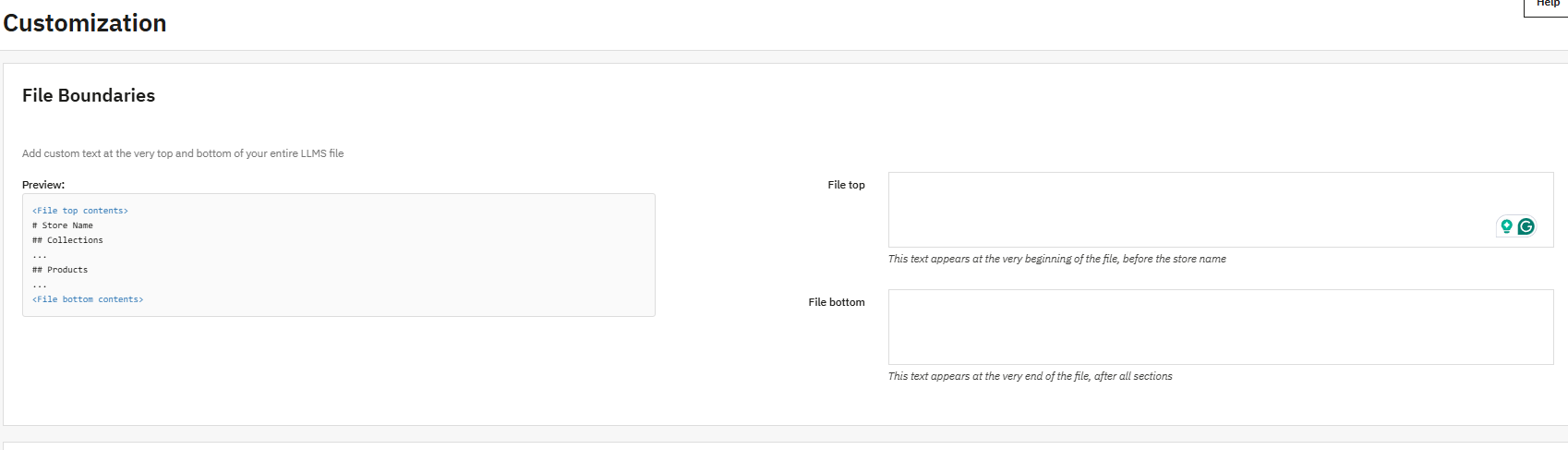
The File Boundaries feature allows you to add custom text at specific locations, like top and bottom, in the llms.txt file. Moreover, this makes it possible to include additional notes or instructions without modifying core store data. This gives a clear idea to the bots to understand the structure of the file.
These fields are commonly used to add general instructions or notes that should be read first or last by crawlers and answer engines.
4.0.2 Store Description
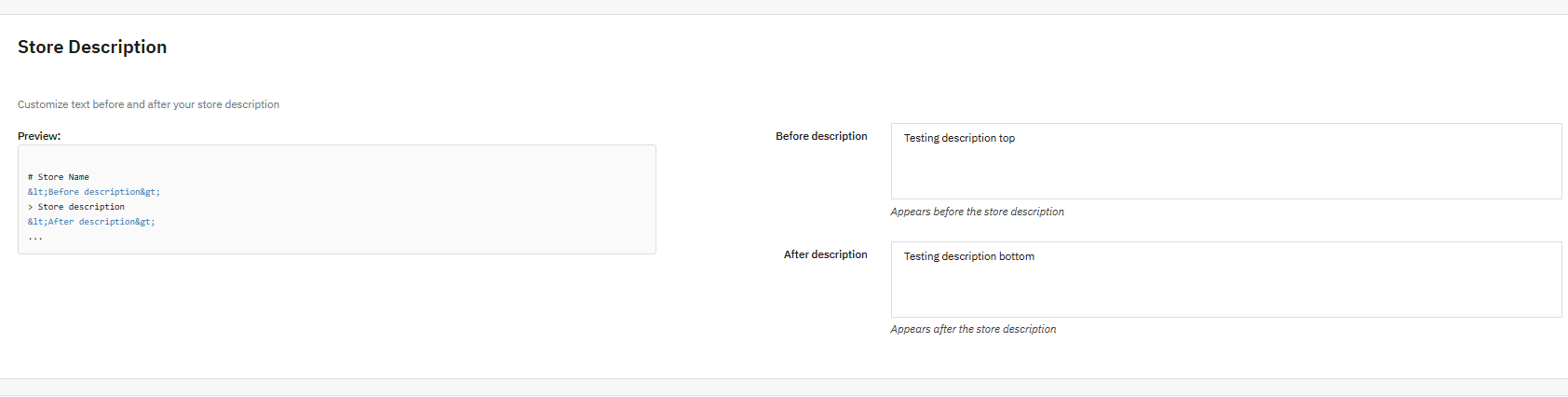
Short description customisation in LLMs TXT Generator for PrestaShop allows you to customise text that shows before and after the store description in the llms.txt file.
By adding contextual information around the store description, merchants can clearly define the store’s descriptions, main catalogue, or special instructions. Furthermore, this helps generative search platforms and search engines to better understand the store when generating responses for customers.
4.0.3 Category Section Customisation
Additionally, store owners can add extra content or text before and after the categories section of the llms.txt file.

Furthermore, this is useful for explaining category structure, naming conventions, or relationships between categories. Also, clear category context improves product discovery and helps crawlers correctly interpret category-level data when indexing your PrestaShop store.
4.0.4 Product Section Customisation
The product section customisation of files allows you to insert text before and after the product details sections.

Furthermore, this can be used to add product-related content or guidelines without changing the actual product information. These additional notes allow the AI models to understand the content easily and improve the recommendations.
4.0.5 CMS Pages Section Customisation

CMS Pages section customization the store owners to add additional notes before and after the CMS Pages section in the llms.txt file.
CMS pages often contain important information such as store policies, shipping details, and FAQs. Furthermore, adding contextual text around this section helps crawlers and answer engines better understand non-product content and supports overall search engine optimisation.
Finally, as AI is evolving, your store should too. Install it on your store, and let AI models recommend to you.
Pro Tip: Keep the SEO of your product pages, category pages, and CMS pages strong to maximise visibility and performance across AI-driven search platforms.
5.0.0 Complete Tutorial of PrestaShop LLMs.txt Generator by Knowband
This complete tutorial of the PrestaShop LLMs.txt Generator module by Knowband covers all major functionalities, including general settings, cron setup, LLMs.txt file generation for catalog pages, content filtering, and file customisation. If you face any issue, kindly contact at support@knowband.com or via knowband tickets.
