Nobody enjoys waiting for a slow website. Your customers will press the back button within seconds. Also, Google now uses speed to rank websites. As a result, you lose both customers and search engine rankings if your PrestaShop store is slow. But don’t worry, this guide will help you fix that issue quickly.
What Are Core Web Vitals? (It’s Actually Simple)
Consider Core Web Vitals to be the Google report card for your website. They gauge the below most crucial elements for your site’s visitors:
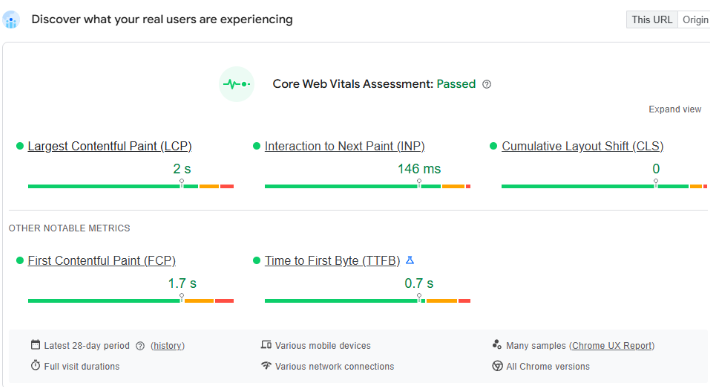
- Largest Contentful Paint (LCP): This measures how long your biggest page element takes to load. Aim to keep it under 2.5 seconds. First impressions matter, so a slow-loading page makes visitors think your site is broken.
- Interaction to Next Paint (INP): This checks how fast your site responds to clicks. Keep it under 200 milliseconds. When people click buttons, they expect an instant response. Otherwise, they get frustrated and leave.
- Cumulative Layout Shift (CLS): An annoying page jump is measured by Cumulative Layout Shift (CLS). You know when you are about to click something and the page shifts? Keep this under 0.1. Nobody likes accidental clicks during checkout.
Time to First Byte (TTFB): This measures how quickly a request is processed by your server. A decent TTFB is less than 200 ms. When TTFB is slow, users have to wait longer for anything to load at all.
If you fix these, you’ll see more sales. Your customers will be happier, and Google will rank you higher.
Your PrestaShop Speed Plan
Ready to transform your slow store? Here’s your action plan.
1. Fix Those Huge Images
Large images are a primary killer of store speed. Here is what works:
- First, convert images to WebP format. This cuts file sizes by 30% without losing quality.
- Then, set up lazy loading. This loads images only when customers scroll to them. As a result, pages load faster upfront. Customers see content immediately instead of blank screens.
2. Leverage a Content Delivery Network (CDN)
A global network of servers is called a CDN. A CDN pulls content from the nearest server when a customer comes into your store. Especially for a worldwide audience, this lowers latency and expedites the delivery of content. Services like Cloudflare offer great CDN solutions that are easy to integrate with PrestaShop.
3. Tame Your Code: CSS and JavaScript Optimization
PrestaShop relies on CSS and JavaScript files. Over time, these files can become large, which can block rendering and delay content loading.
- Minify and Combine: Minifying CSS and JavaScript removes unnecessary characters, reducing file size. There are fewer HTTP requests when several files are combined into one. PrestaShop has a built-in feature for this called “CCC.” You should definitely enable it.
- Defer Non-Essential Scripts: To improve your INP score, defer non-critical scripts. This means loading these files after the main content appears. Consequently, users can interact with your page much faster.
4. Use Smart Caching
Caching is like your store’s memory. Instead of rebuilding pages for every visit, your server remembers and reuses content. To speed things up, set up server caching using tools like Redis or Memcached. These store database results in memory, giving repeat visitors lightning-fast responses.
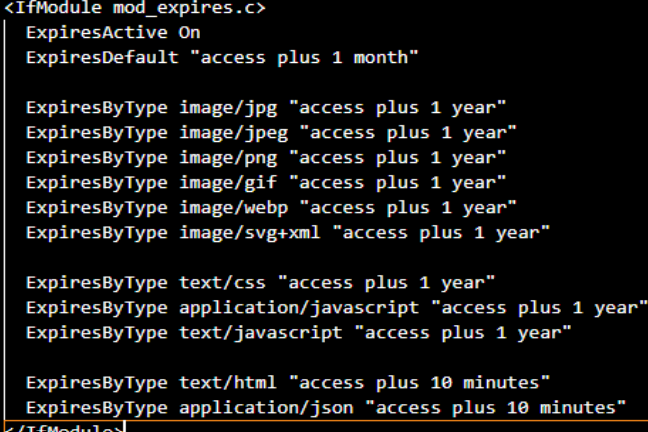
You should also configure browser caching. This tells visitors’ browsers to remember your static files, like images and stylesheets, so they don’t have to download them again in the future. visits. You can set a long cache time for these files via the .htaccess file if you’re using an Apache web server.
5. Regular Audits
Regular audits help identify unnecessary or outdated entries that only consume space and slow down queries. For example, tables like ps_log, ps_connections, ps_connections_page, and ps_guest often grow very large. They store logs, statistics, and visitor data that are rarely used. Similarly, abandoned carts in ps_cart, expired vouchers in ps_cart_rule, and old email records in ps_mail can be removed safely after a certain period.
Tools to Track Progress
You must evaluate your present performance before optimising. You can examine your PrestaShop store’s Core Web Vitals with the aid of a number of effective tools.
- Google PageSpeed Insights: This is the most authoritative tool for measuring CWV. Just enter your URL to get detailed reports for both desktop and mobile performance.
- Google Search Console: This free application keeps track of your CWV continuously.
- GTmetrix: GTmetrix offers detailed performance analysis with visual tools. Using Lighthouse, it generates scores for your pages and offers actionable recommendations on how to optimise.
- Lighthouse: A Google open-source tool that analyses your website’s performance, accessibility, SEO, and best practices. You can use Chrome DevTools or the CLI to run it, and it provides you with scores for every category along with actionable insights.
At Knowband, we guide store owners with best practices to maintain a clean and optimised PrestaShop database. By following systematic audit routines and learning which tables can be safely cleaned, merchants can avoid unnecessary bloat, reduce query load times, and improve overall store performance.