

The release of PrestaShop 9 has brought exciting new features and improvements to the e-commerce platform. However, for module developers, this upgrade presents significant challenges when maintaining backwards compatibility with older versions. Furthermore, the complexity increases when you need to support legacy installations like PrestaShop 1.7.5 while simultaneously preparing for the latest version.
Understanding the Migration Challenge
Upgrading modules from PrestaShop 8 to PrestaShop 9 can introduce unexpected compatibility issues. While a module may function correctly in the latest environment, it may break completely when tested on older versions like PrestaShop 1.7.5.
A common source of these issues is method availability differences across versions. Certain methods available in newer versions may not exist in older ones, leading to fatal errors. Additionally, architectural changes between PrestaShop versions can render previously stable code unusable without adjustments.
The Technical Breakdown: Price Formatting Nightmare
One particularly challenging example involved the getCurrentLocale() method. In PrestaShop 8 and 9, this code works flawlessly:
$formattedPrice = $this->context->getCurrentLocale()->formatPrice($price, $currency);
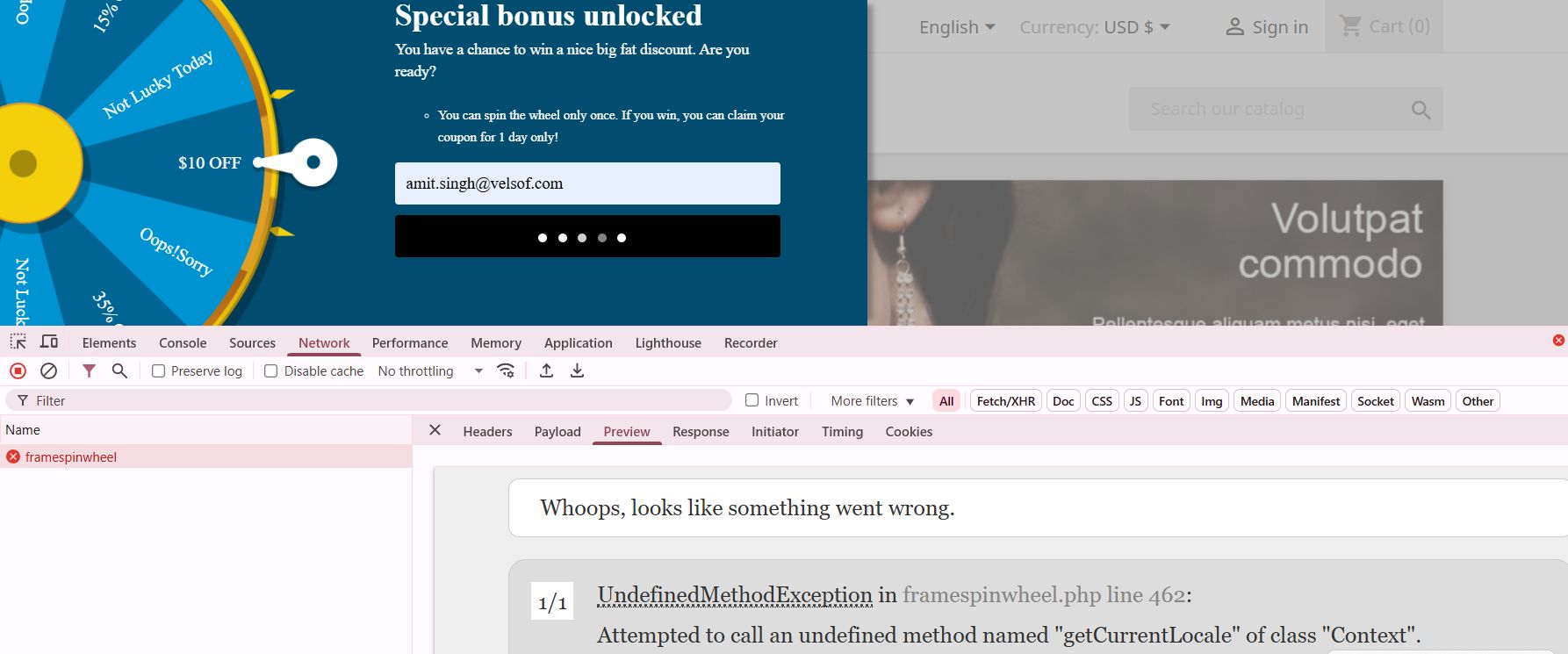
However, when the same code runs on PrestaShop 1.7.5, it throws a fatal error because getCurrentLocale() doesn’t exist. Consequently, the entire module becomes unusable on older installations.
The Solution: Smart Compatibility Detection
To resolve this issue, I implemented a robust compatibility checking system. First, I created a method existence check before calling any potentially unavailable functions:
public function formatPriceCompatible($price, $currency = null) {
if (method_exists($this->context, ‘getCurrentLocale’)) {
// Modern PrestaShop 8+ approach
return $this->context->getCurrentLocale()->formatPrice($price, $currency);
} else {
// Legacy fallback for PS 1.7.x
return Tools::displayPrice($price, $currency);
}
}

Moreover, I extended this approach to version checking for more complex scenarios:
public function getPrestaShopVersion() {
return defined(‘_PS_VERSION_’) ? _PS_VERSION_ : ‘1.6.0.0’;
}
public function isModernPrestaShop() {
return version_compare($this->getPrestaShopVersion(), ‘1.7.6.0’, ‘>=’);
}

Beyond Price Formatting: Other Compatibility Pitfalls
Price formatting isn’t the only area where compatibility issues arise. Similarly, Mobile_Detect integration presents challenges because the library handling differs between versions. Therefore, I implemented a conditional loading mechanism:
public function loadMobileDetection() {
if (class_exists(‘Mobile_Detect’)) {
$this->mobileDetect = new Mobile_Detect();
} elseif (file_exists(_PS_MODULE_DIR_ . ‘your_module/lib/Mobile_Detect.php’)) {
require_once(_PS_MODULE_DIR_ . ‘your_module/lib/Mobile_Detect.php’);
$this->mobileDetect = new Mobile_Detect();
} else {
// Fallback: assume desktop
$this->mobileDetect = null;
}
}
Hook System Evolution
Furthermore, the hook system has evolved significantly between versions. While newer hooks provide better functionality, they’re unavailable in older versions. Thus, I created a hook compatibility layer:
public function registerCompatibleHooks() {
$modernHooks = [‘displayProductAdditionalInfo’, ‘displayAdminProductsExtra’];
$legacyHooks = [‘displayProductTab’, ‘displayAdminProduct’];
if ($this->isModernPrestaShop()) {
return $this->registerHook($modernHooks);
} else {
return $this->registerHook($legacyHooks);
}
}
Best Practices for Multi-Version Support
Essential Strategies for Maintaining Backward Compatibility:
Always test across versions before deploying any updates. Additionally, create a testing environment with multiple PrestaShop versions to catch compatibility issues early.
Use defensive programming techniques. In other words, never assume a method or class exists without checking first. Moreover, implement graceful fallbacks for every modern feature you use.
Document your compatibility range clearly. Therefore, merchants know exactly which PrestaShop versions your module supports.
Create abstraction layers for version-specific functionality. Consequently, your main code remains clean while compatibility logic stays separate.
The Future of Module Development
As PrestaShop continues evolving, module developers must balance innovation with backwards compatibility. Nevertheless, this challenge presents an opportunity to create more robust, flexible modules that serve a broader audience.
The key is building modules that gracefully degrade functionality rather than breaking entirely. Subsequently, merchants can continue using your module regardless of their PrestaShop version, while still benefiting from enhanced features when they upgrade.
Conclusion
PrestaShop 9 brings powerful new capabilities, but successful module development requires careful attention to backwards compatibility. By implementing proper version checking, creating fallback mechanisms, and thoroughly testing across versions, you can build modules that work seamlessly across the entire PrestaShop ecosystem.
Remember, the goal isn’t just to make your module work in the latest version—it’s to ensure it provides value to merchants regardless of their current PrestaShop installation. Therefore, invest time in compatibility testing and defensive programming. Your users will thank you for it.
If you’re looking for reliable PrestaShop plugins or need assistance with migration and compatibility services, our team is here to help. We specialize in delivering seamless solutions tailored to your store’s version—whether you’re on PrestaShop 1.6, 1.7, 8, or migrating to 9. Let us handle the complexity, so you can focus on growing your business with confidence.