

The PrestaShop Claude AI Content Generator Addon is a powerful Plugin that simplifies content creation for PrestaShop store owners. Using advanced AI, the Prestashop Claude AI Content Generator/Translator Addon helps store owners quickly generate high-quality product descriptions, catchy product titles, and SEO-friendly content. As a result, the store can effortlessly attract more visitors and boost sales.
Moreover, the AI Content Generator for PrestaShop integrates smoothly with Claude AI, ensuring a hassle-free experience. The Prestashop Claude AI Content Generator-Translator Addon also includes an SEO Content Generator feature, which guarantees that all content is original, engaging, and optimized for search engines. Additionally, Knowband’s PrestaShop Claude AI Content Translator module allows e-merchant to expand its business internationally with accurate and natural-sounding translations.
Whether you want to manage multilingual content or improve your content strategy, the Claude add-on for Prestashop simplifies the entire process. Moreover, with the PrestaShop Claude AI Content Translator Module, store owners can save time while enhancing the store with high-quality, multilingual content—effortlessly!
1.0. Key Features of Prestashop Claude AI Content Generator/Translator Addon
1. AI-Powered Content Generation: The Prestashop Claude SEO Content Generator by Knowband enables store owners to generate high-quality product descriptions, meta titles, and descriptions. Therefore, by using the advanced AI model Claude, it ensures that the content is engaging, informative, and optimized for search engines.
2. Advanced AI Technology : The AI-powered translation addon for Prestashop leverages Anthropic’s powerful Claude AI models, including Claude 3.5 Sonnet, Claude 3 Opus, and Claude 3 Haiku. Furthermore, with AI engines, you can generate creative content and produce accurate translations depending on your store’s specific needs.
3. AI-Powered Translation : The AI Translation Addon for Prestashop ensures accurate and context-aware translations with minimal effort. Therefore, e-merchants don’t need to manually translate the content of the products.
4. Easy Installation and Configuration – The Prestashop Claude content generator Addon is Designed with an easy-to-use interface. Likewise, the AI content generation Prestashop is simple to install and run, even for store admins who don’t have coding experience.
5. Efficient Bulk Content Creation – Perfect for merchants with extensive product catalogs, the Prestashop Claude content generator excels at generating content in bulk.
6. Multi-Language Compatibility – The module supports all languages, including right-to-left (RTL) scripts, ensuring flexibility for global businesses. Additionally, it is compatible with multiple Prestashop versions, making it a reliable solution for a wide range of stores.
2.0 How to Generate the Claude API Key for Module Configurations?
To enable Claude AI functionality in your PrestaShop module, you must get an API Key.
To use the features of the module, you need to have an API Key. Please follow these steps:
Step 1: Obtain an API Key:
- Access the https://console.anthropic.com/settings/keys to the Claude API Key by logging in or creating an account.
- Click on “Create key”. Copy this key for the next step.

Step 2: Enter the API Key in Your PrestaShop Store:
- In your PrestaShop Store’s Backend, go to the “Knowband Prestashop Claude AI Generator/Translator” General Settings page.
- Paste the API Key into the provided “API Key for Claude” field.

Step 3: Save the Settings:
- After adding the API Key in General Settings, click “Save” to store settings. Now, the Claude AI module will use this key to interact with the Claude API.
3.0 Installation Guide for Prestashop Claude AI Content Generator Module
Knowband’s Prestashop Claude AI Generator Installation Steps
- Access the Store Admin -> Modules and Services.
- Click on “Upload” in the module section. You can simply upload the downloaded zipped file from the system.
4.0 Admin Interface Overview:
4.0.1 General Setting:
The Prestashop Claude Content Translator Module by Knowband allows the admin to configure settings and manage bulk content operations efficiently.

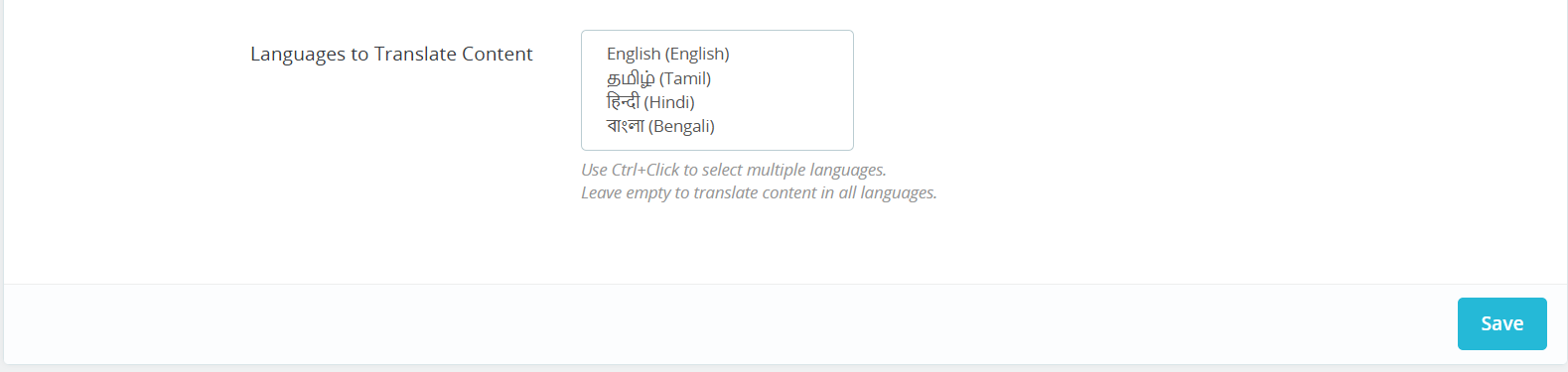
Here is a Brief Overview of the features of the Module
Enable/Disable: You can enable or disable the Prestashop Claude Content Generator.
API Key for Claude: Enter your Anthropic API Key in the designated field.
Claude Model Selection: Choose from Anthropic’s suite of models, including Claude 3.5 Sonnet(new), Claude 3.5 Sonnet(old), Claude 3 Opus, and Claude 3 Haiku, to generate high-quality content tailored to your store needs.
Temperature: Adjust the creativity level – higher values produce more creative content,t while lower values deliver more consistent results.
Maximum Tokens: Set your token limit (default: 2000). Tokens represent text fragments used by the AI model.
Claude Engine for Translations: Select which Claude model to use specifically for translation tasks.
Primary Language: Choose your default language for content generation and translation.
Target Languages: Select which languages you want your content translated into.
4.0.2. Claude Prompts:

The module features 14 pre-configured prompts designed for various e-commerce content needs:
Knowband Prestashop Claude Content Translator AI Prompts
Generate Product Description: Creates SEO-friendly, formatted product descriptions with features, benefits, and use cases.
Generate Product Meta Title: Creates optimized meta titles under 60 characters, incorporating keywords and product categories.
Generate Product Meta Description: Produces compelling meta descriptions limited to 140 characters.
Translate Product Title: Translate product titles to multiple different languages.
Translate Product Description: Translates descriptions while preserving HTML formatting.
Translate Product Meta Title: Translate meta titles to multiple different languages.
Translate Product Meta Description: Translates meta descriptions to multiple different languages.
Generate Category Description: Creates SEO-optimized category descriptions with proper HTML formatting.
Generate Category Meta Title: Produces category meta titles under 60 characters with relevant keywords.
Generate Category Meta Description: Creates category meta descriptions within 140 characters.
Translate Category Title: Translates category titles to multiple different languages.
Translate Category Description: Translates category descriptions while maintaining HTML structure.
Translate Category Meta Title: Converts category meta titles to multiple different languages.
Translate Category Meta Description: Translates category meta descriptions to multiple different languages.
4.0.3. Claude Prompts Task Log
Maintains a comprehensive record of all executed prompts with details like Prompt Type, Product, Category, Language, Previous Content, New Content, and timestamp for easy tracking.
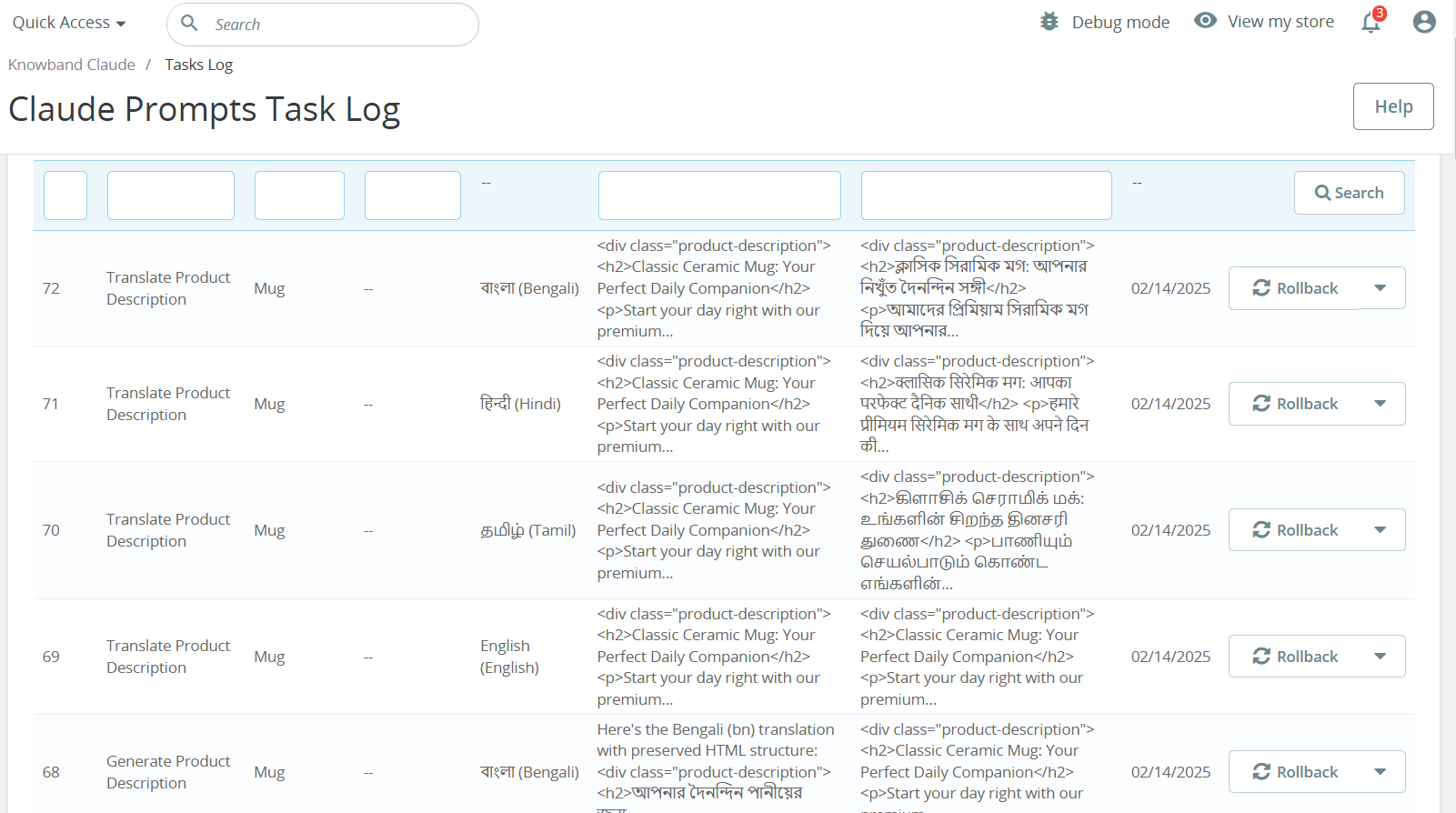

Maintains a comprehensive record of all executed prompts with details like Prompt Type, Product, Category, Language, Previous Content, New Content, and timestamp for easy tracking.
5.0. How to Execute Claude Prompts?

Knowband’s Prestashop Claude Prompt Execution Steps
Select your desired products and access the Bulk Actions menu to choose from various content generation and translation options:
Generate Product Description: Create descriptions for multiple products simultaneously.
Generate Product Meta Title: Bulk create SEO-optimized titles.
Generate Product Meta Description: Generate meta descriptions for multiple different products.
Translate Product Title: Convert product titles to multiple languages.
Translate Product Description: Create multilingual product descriptions for the product.s
Translate Product Meta Title: Convert meta titles to multiple different languages for the products.
Translate Product Meta Description: Translate meta descriptions for bulk products simultaneously.
