

PrestaShop’s override system allows you customize core behavior without touching original files. But used carelessly, it creates fragile stores that break on updates. This guide by Knowband covers how overrides work, when to use them, and three critical gotchas every developer should know.
What Is the Override System?
PrestaShop uses PHP inheritance to let you swap in your own version of any core class without touching the originals. Every core class is named with a Core suffix for example, ProductCore. If you create /override/classes/Product.php with a class called Product that extends ProductCore, PrestaShop loads your version instead. The same applies to controllers.
Only override the specific methods you need to change never copy an entire class file. This keeps your override lean and far less likely to conflict with future updates.
Example, exposing the current controller name to your header template:
Where to Put Your Override Files
Overrides can live in two places. The global /override/ directory at the root of your installation is active immediately after clearing the cache. The better approach is bundling overrides inside a module.
Placing an override inside a module (e.g. /modules/mymodule/override/classes/Product.php) causes PrestaShop to copy it to /override/ on installation and remove it cleanly on uninstall. This is the recommended approach.
A quick example of a class override. Say you want to expose the current controller name to your header template:
// /override/classes/controllers/FrontController.php

class FrontController extends FrontControllerCore {

    public function initHeader() {

        self::$smarty->assign('currentController', get_class($this));

        return parent::initHeader();

    } }

Always call the parent method unless you have a deliberate reason not to. Skipping it will silently break core functionality.
Overriding Module Classes and Controllers
Since PrestaShop 1.6, you can override module classes too. Append “Override” to the class name (e.g. BlockUserInfoOverride extending BlockUserInfo) and place it under /override/modules/. The same pattern applies to module controllers. After any override, clear the cache, specifically delete /cache/class_index.php, or it won’t take effect.
When NOT to Use Overrides
Overrides are exclusive — only one per class can exist. They’re also forbidden in marketplace modules and should be reserved for private store customisations. Before reaching for an override, consider one of these alternatives:
- Hooks: PrestaShop triggers hook events across every page load — you can tap into them from a module to run custom code or push content into the page without going anywhere near a core class.
- Symfony Service Overrides: Parts of PrestaShop that have been migrated to Symfony give you a cleaner path through the service container. You decorate or replace a service rather than stomping on the class itself.
- Custom ObjectModel: Need to add fields to a core entity? Build your own ObjectModel with its own table rather than patching the existing one.
Keeping Overrides Safe Through Updates
PrestaShop updates can silently change method signatures, leaving your override running on stale assumptions. Treat every override as something to revisit after each update. Comment what you changed and why, check the changelog, and keep the override as small as possible. A narrow, well-commented override that calls parent methods properly survives upgrades. A full class copy is a bug waiting to surface.
The “Ghost” Cache: Why Your Override Seems Invisible
The number one reason developers think their override is broken: PrestaShop doesn’t scan /override/ on every request. It compiles a class map into /cache/class_index.php, and until that file is deleted and regenerated, your override is invisible, no matter how correct the code. Clearing the Smarty cache is not enough. Delete class_index.php manually via FTP/SSH, through Advanced Parameters > Performance in the back office, or via the Symfony console.
Figure 1: The PrestaShop override system flow and the role of /cache/class_index.php.

The Symfony Wall: Legacy Overrides Don’t Work for Modern Controllers
This legacy PHP system only works on PrestaShop’s older ObjectModel layer. From PS 1.7 onward, key back office areas, including the new Product Page and Order screens — have been rewritten in Symfony. The PHP override system does not affect these Symfony controllers. For those, use Service Decoration, wrapping or replacing a service via your module’s services.yml file. If an override has no effect even after clearing class_index.php, the controller is likely Symfony-migrated.
Conflict Resolution: When Two Modules Want the Same Class
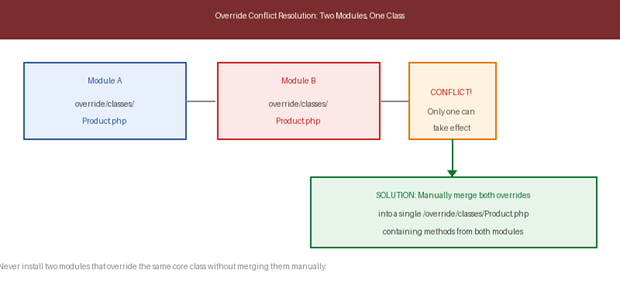
When two modules both override the same class, PrestaShop throws an error on the second installation and leaves its override inactive. The fix is manual: open both files, merge all methods into a single /override/ file that extends the Core class, then delete class_index.php. Add comments identifying which module contributed each method. This is why overrides are banned in marketplace modules, conflicts become the merchant’s problem. If building for others, use hooks.
Figure 2: How override conflicts arise when two modules target the same class, and the manual merge resolution.
About Knowband
Knowband is a trusted eCommerce plugin and extension provider with years of experience helping online merchants build faster, smarter, and more feature-rich stores. Whether you run your store on PrestaShop, OpenCart, Shopify, WooCommerce, Magento, or any other major platform, Knowband offers a wide range of ready-to-use plugins and extensions that help you enhance functionality, improve performance, and deliver a better shopping experience, without needing to build from scratch.