Launched in April 2019, Eddie Sale is a growing UK-based electronics store that offers affordable, reliable gadgets and tech products. Founded by Amanda White, the store was built on the OpenCart platform to avoid the high monthly fees of SaaS-based eCommerce solutions.
As the online marketplace grew more competitive and customer expectations changed, Amanda realized the store needed smarter solutions to stay ahead. That’s when she discovered Knowband’s Opencart plugins, which ended up revolutionizing how the business operates.
“I spent hours writing product descriptions, but I was still not happy when I read the content of the products.” Amanda White said.
Mobile App Revolution
Amanda used the OpenCart Mobile Builder App which helps her to launch her own app for the store without any coding expertise. Additionally, Amanda revealed that more than 65% of her traffic now comes from mobile devices. “We were totally missing the mobile traffic before” she admitted.
The team took a chance on Knowband’s Mobile App Builder without huge expectations. The results surprised everyone with how quickly things changed.
Results were amazing:
Mobile orders jumped 40% in just two months
Average session time went from a measly 2 minutes to over 6
The Knowband’s OpenCart ChatGPT AI Content Generator Module helps the store to generate the product description as well as meta details and obviously category details. Moreover, this module became a game-changer for Eddie Sale, especially when it came to handling product and category content.
Before using the AI content generator, Amanda had to manually write every single product description, category text, and SEO meta detail.
Implementing Knowband’s AI Content Generator:
Generated and translated the content for products
They expanded into 3 new language markets almost accidentally
The team reclaimed 40+ hours monthly for customer service
Organic traffic climbed 28% from the SEO benefits
Moreover, Amanda’s take was refreshingly honest: “The content was very informative and good. When I first read the description of my own products, it really looked motivating”
Smart Cross-Selling That Actually Works
Cross-selling pr showing related products was once a tough task by manual process that required constant updating and monitoring. Also, since downloading Knowband’s Automatic Related Product module, customers now seamlessly see relevant suggestions based on their browsing history and cart items or the product that they want.
Results:
Average cart value increased by $23.40 (28%)
Customers spent longer exploring the site
Their electronic sections, like audio gadgets, previously underperforming, started connecting with their customers
Opencart Visual Appealing Stickers Plugins
Meanwhile, by using Knowband’s Opencart Product Sticker Module, Eddie Sale strategically added visual labels like “Hot,” “New,” “Limited Stock,” and “Sale” to highlight top products and create a sense of urgency. This visual enhancement strategy led to:
Get 25% more clicks on products with stickers
Help customers decide faster
Reduce the time it takes to make a purchase
Make the store look more attractive and professional
Eddie Sale is an online electronics store started by Amanda White in April 2019. Amanda wanted to run her store without paying monthly fees, so she chose OpenCart, a platform that gave her full control.
The store offers a variety of affordable gadgets, tech accessories, and smart devices. Amanda’s goal was to make good tech products easy to find and easy to buy. Furthermore, instead of hiring expensive teams, she used smart tools from Knowband to automate tasks like writing product descriptions, translating content, and improving SEO. Significantly, the Opencart ChatGPT Module helped her grow the store faster and save time
With Knowband’s OpenCart extensions, Amanda transformed her store’s operations:
Delivered a smooth, app-like mobile shopping experience that increased mobile conversions.
Eliminated the guesswork and repetitive tasks of manually adding the content and around translating product content and SEO.
Entered new markets effortlessly by auto-translating content into different languages.
Boosted average cart values with smart cross-selling, showing customers what they didn’t know they needed.
Captured attention and drove urgency with clean, strategic product stickers that increased click-through Rate
She improved organic discoverability through AI-enhanced metadata and keyword-rich content
Final Thoughts:
Running an online store isn’t easy — it takes time, effort, and the right tools to stand out in a competitive market. However, as Amanda’s story shows, with the help of smart solutions like Knowband’s OpenCart plugins, even a small team can achieve big results.
Whether you’re just starting your eCommerce journey or you’re ready to take your store to the next level, these extensions can help you work smarter, not harder. Moreover, these tasks take care of repetitive tasks, improve user experience, and give you more time to focus on what matters — growing your business.
The OpenCart AI Content Generator Extension is a powerful plugin designed to create and translate content for OpenCart store owners. By seamlessly integrating the advanced capabilities of Claude AI, ChatGPT API, DeepSeek API and Gemini API, the AI Content Generator and Translator for OpenCart enables store owners to generate high-quality, SEO-optimized product content. The OpenAI Content Translator Extension includes descriptions, titles, category content, meta titles, and meta descriptions, all while preserving authenticity.
Moreover, the OpenCart AI-powered Translator Plugin by Knowband provides seamless translation services across multiple languages, ensuring your OpenCart store can effectively reach global markets. As a result, store owners can generate professional content effortlessly, saving countless hours of manual writing and editing work. Additionally, the Extension enhances efficiency, as it streamlines both content creation and translation processes.
Furthermore, the OpenCart AI Bulk Content Generator Extension integrates smoothly with all three AI platforms (Claude, Gemini, DeepSeek, and ChatGPT). Whether you’re creating new content or translating existing product information, the extension ensures accuracy, consistency, and speed. Likewise, it minimizes errors, maintains brand voice, and improves content quality.
Meanwhile, the OpenCart SEO Content Generator Plugin ensures all content strictly follows SEO best practices. Consequently, this helps improve search rankings on Google and other search engines. In turn, better rankings lead to higher visibility, more traffic, and increased conversions. Thus OpenCart AI Content Extension is an essential plugin for OpenCart store owners who want to enhance productivity and maximize their reach.
AI-Powered Content Generation- The OpenCart AI Content Generator and Translator Extension automatically creates high-quality product and category descriptions, meta titles, and meta descriptions by leveraging advanced AI technology, including DeepSeek, ChatGPT, Claude, and Gemini.
Seamless Multilingual Translation- Translate the content into multiple languages while maintaining accuracy and cultural relevance, allowing e-merchants to expand into international markets without hiring expensive translation services.
Enhanced SEO Performance- All generated and translated content is optimized for search engines, improving your store’s and product rankings and boosting store visibility through strategic keyword placement and best SEO practices.
Flexible AI Model Selection- The OpenCartAI Content Generator Extension provides a variety of AI models for both content creation and translation. Store owners can select from ChatGPT options like GPT-3.5 and GPT-4.0, Claude models such as Haiku 3, Haiku 3.5, Sonnet 3.5 (Old), and Sonnet 3.5 (New), along with Gemini variants, including Gemini 1.5 Pro, 1.5 Flash, 1.5 Flash-8b, 2.0 Flash, and 2.0 Flash – Lite Preview as well as DeepSeek Chat & Reasoner.
User-Friendly Interface- No technical expertise is required. The OpenCart AI Content Generator Extension provides an intuitive interface that makes content generation straightforward and informative, allowing even non-technical store owners to create professional content with just a few clicks.
Bulk Processing Capabilities- The perfect solution for stores with large product catalogues, enabling you to generate content for multiple products simultaneously and saving hours of manual work.
Comprehensive Activity Tracking- Records every action taken within the plugin, including timestamp and summary of changes, providing clear logs of all content generated and translated modifications.
Smart Product Categorization- Intelligently suggests appropriate product categories based on descriptions, helps in organizing your store more efficiently and ensures products appear in the most relevant sections.
Market-Specific Content Adaptation- Adjusts content for different target markets by considering local preferences, language, and cultural differences to make it more relevant and increase conversions.
Time Savings- OpenCart Claude Content Translator Plugin quickly generate high-quality content in minutes, reducing manual effort. Focus on core business tasks instead of content creation.
SEO Improvements- AI-optimized content enhances search engine rankings and increases organic traffic. Ensure product descriptions and meta tags follow SEO best practices.
Global Reach- Translate your entire store into multiple languages effortlessly using OpenCart Content Translator & Generator Plugin. Expand into international markets and reach a wider audience.
Content Quality- OpenCart Content Translator & Generator Plugin allows the e-merchant to generate professional, engaging, and well-structured product descriptions. AI ensures accuracy while maintaining brand consistency.
Cost Efficiency- Save money on hiring copywriters and translators. AI Content Generator for OpenCart AI Content Translator reduces operational costs without compromising quality.
Competitive Advantage- Utilize advanced AI technology to stay ahead of competitors. Improve efficiency and offer better product information than rivals.
Enhanced User Experience- Detailed and engaging content helps customers make informed decisions. Improve conversions with clear and compelling product descriptions.
Performance Tracking- Monitor AI-generated content with a built-in task log. Keep track of past changes and refine content strategy over time
Automate the Content Generation and Translation on Your Prestashop Store
3.0.0 Installing the OpenCart AI Content Generator Plugin
Setting up the OpenCart AI Content Translator Plugin is simple. Follow the steps below to install and configure it easily.
What You Receive Upon Purchase:
A zipped file containing the OpenCart AI Content Translator extension.
A user manual to guide you through installation and setup.
Follow these steps for Installation
Step 1. Unzip the Downloaded File Go to My Account > Downloads, locate the zipped file, and extract it. Once unzipped, you’ll see relevant folders.
Step 2. Transfer Files to the Root Directory
Use an FTP manager to copy the extracted files to your OpenCart root directory.
Step 3. Complete the Installation The plugin is now installed and ready for configuration.
Step 4. Access and Configure the Extension Go to Admin Panel > Main Menu > Extensions, select AI Content Generator Plugin by Knowband and click Edit to customize settings.
4.0 How to Generate the API Key for Knowband’s OpenCart AI Content Translator Plugin
Make sure to copy the key immediately and store it safely.
Important- Billing Requirements
To generate a ChatGPT API key for the Knowband AI Content Translator Plugin, store owners need to set up billing in their OpenAI account. This means adding a payment method and ensuring you have enough credits or an active subscription to use the API. Without a billing setup, the API key won’t work.
Steps to Generate DeepSeek API for OpenCart DeepSeek AI Plugin
Access the Deepseek platform via this URL https://platform.deepseek.com/api_keys to generate the API Key. Login or Signup to generate API Key
Click on Create API Key after adding the key name.
Copy or store the key to enable functioning of DeepSeek AI Content Generator Plugin
5.0.0 Admin Interface of OpenCart Gemini AI Content Generator Extension
Enable/Disable- Turn the extension on or off as needed, allowing you to manage AI-generated content effortlessly.
API Key Configuration- Enter and store API keys for all AI engines, including Claude, ChatGPT, and Gemini, ensuring smooth functionality.
Enable/Disable the Claude- Easily activate or deactivate the Claude AI Engine with a single click.
API Key for Claude- Provide the required API key to unlock Claude AI’s content generation and translation features.
Select Claude Model for Generation- Choose from multiple Claude AI models, including Haiku 3, Haiku 3.5, Sonnet 3.5 (Old), and Sonnet 3.5 (New), for AI-powered content creation.
Select Claude Model for Translation- Pick the most suitable Claude AI model for translations, such as Haiku 3, Haiku 3.5, Sonnet 3.5 (Old), or Sonnet 3.5 (New).
API Key Configuration-Store and manage API keys for Claude, ChatGPT, and Gemini AI engines to enable seamless content generation and translation.
Enable/Disable the ChatGPT-Turn ChatGPT AI Engine on or off to control AI-generated content in your store.
API Key for ChatGPT- Enter the ChatGPT API key to activate content generation and translation capabilities.
Select ChatGPT Model for Generation- Choose between ChatGPT 3.5 and ChatGPT 4.0 for generating high-quality, SEO-friendly content.
Select ChatGPT Model for Translation- Select either ChatGPT 3.5 or ChatGPT 4.0 to translate content accurately while maintaining context.
Enable/Disable the Gemini AI- Activate or deactivate the Gemini AI Engine to manage content creation and translation efficiently.
API Key for Gemini- Provide the necessary API key to enable the Gemini AI Engine’s functionality.
Select Gemini Model for Generation- Select from various Gemini AI models like Gemini 1.5 Pro, 1.5 Flash, 1.5 Flash-8b, 2.0 Flash, or 2.0 Flash – Lite Preview for generating content.
Select Gemini Model for Translation- Pick a suitable Gemini model—1.5 Pro, 1.5 Flash, 1.5 Flash-8b, 2.0 Flash, or 2.0 Flash – Lite Preview to translate content seamlessly.
Enable/Disable the DeepSeek: Turn DeepSeek AI Engine on or off to use this AI mode.l
API Key for DeepSeek- Enter the DeepSeek API key to activate content generation and translation.
Select DeepSeek Model for Generation- Choose between Deepseek Chat or DeepSeek Reasoner for generating the content for the products and categories.
Select DeepSeek Model for Translation- Select either Deepseek Chat or DeepSeek Reasoner to translate content accurately while maintaining context.
Model Selection– Easily select from available models across Claude, ChatGPT, DeepSeek and Gemini AI for content generation and translations.
Temperature Control- Adjust the AI creativity level using temperature settings (0.0 to 1.0). Higher values make content more creative, while lower values keep it consistent.
Token Limit- Set a maximum token limit for content generation across Claude, ChatGPT, DeepSeek and Gemini AI models
Primary Language- Define the main language for AI-generated content and translations to ensure consistency.
Target Languages- Select multiple languages for translations to reach a wider audience and enhance global accessibility.
Generate Category Description – Develop category content with proper HTML formatting.
Generate Category Meta Title – Creates keyword-rich category titles under 60 characters.
Generate Category Meta Description – Produces concise category descriptions within 140 characters.
Translate Category Title – Converts category titles to multiple languages.
Translate Category Description – Translates category descriptions with HTML formatting.
Translate Category Meta Title – Converts category meta titles to selected languages.
Translate Category Meta Description – Translates category meta descriptions across languages.
5.0.3 Task Log System of OpenCart AI Content Extension
The OpenCart AI Content Generator and Translator extension records all AI-generated and translated content, including prompt type, language, product/category, timestamp, status, previous content, and new content. This log helps track changes, review past updates, and monitor content evolution.
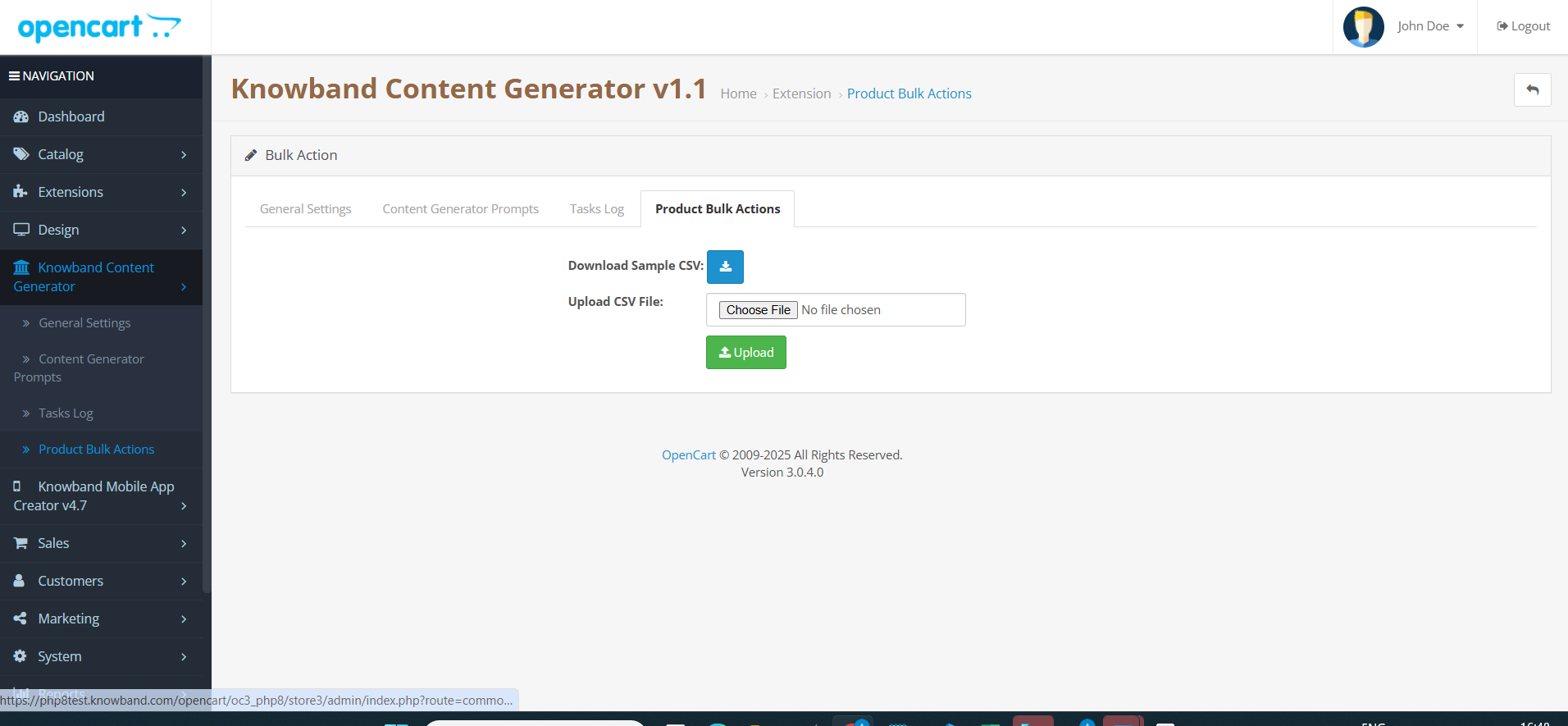
6.0 Bulk Content Generation by OpenCart AI Content Generator
The AI Content Generator Extension for OpenCart allows the store admin to upload the CSV File which will contain the product id with with 67columns of Prompts like Generate Product description, Generate Product Meta description, Generate Product meta description, Translate Product Description, Translate Product Titles, Translate Product Meta Description and Product meta title translation.
Moreover, the extension follows this algorithm if the generate product description will contain 1 in field then the content will be generated.
To generate or translate content using OpenCart DeepSeek Content Translator Extension
Navigate to Products or Categories in your admin panel.
Select the items you want to work with.
Click on the Bulk Actions menu.
Choose the desired AI operation (Description, Meta Title, Translation, etc.).
Select which AI engine to use for the task.
Click the prompt you want to execute.
Review and approve the generated content.
7.0 Tutorial: Watch the Video Guide
To help you set up and use the Opencart AI Content Generator, we have created a comprehensive YouTube tutorial. This step-by-step video guide walks you through the installation process, configuration options, and how to effectively translate & generate the content on your store.