1.0 Introduction
As a shopper, you must have seen many of the online stores provide their customers with additional income from the store by providing them the option to become affiliate customers and invite new customers to the store. So, there are several tools out there to provide affiliate customer and referral commissions to the customers. However, with the OpenCart Affiliate Program extension, the admin allows the customers to become an affiliate and earn a commission whenever a new customer registers using the affiliate customer’s referral code or order products. And even can customize the commission rate globally or individually for an affiliate customer and so on.
2.0 Salient Features of OpenCart Affiliate and Referral module
- Users can register as affiliates to earn commissions on referrals.
- The admin can enable or disable the new affiliate register option.
- Admin can select the referral methods which will be available on the affiliate customer dashboard by which affiliate can invite customers.
- The admin can enable or disable the social sharing for Facebook, Twitter, and Pinterest.
- Admin can set if the affiliate is permanent or it will auto become a normal customer after input days.
- The admin can set if the affiliate always gets commissions for orders from the referrals or the commission will be closed after how many orders.
- Admin can set when the referral will be counted for commission.
- The admin can view affiliate customers and edit and update their details like commission rate and all.
- The admin can view the list of referrals that have been entered by the customer. Moreover, he can approve and reject them for commission.
- Admin can see the total commission earned by the affiliate customer and his commission history.
- The admin can see the lists of payout requests and can accept and reject them.
- Users can see the list of all the commissions earned by him/her, also can see the commission is from order or user register.
- Users can pay out the commission using vouchers and direct payout requests.
3.0 Installation Guide
Before starting the installation process, you have to buy the Affiliate & Referral Program Extension by Knowband. Once purchased, you will receive the following files in your registered email.
- Source code of OpenCart Affiliate & Referral Program extension in zipped file format.
- User Manual of OpenCart Affiliate & Referral Program extension.
- Now to install this on your online shop, follow the given steps:
Step 1: Unzip the zip file. You will get the folders as shown in the image below

Step 2: Copy the content of one of the folders as per your OpenCart version. You will get the following files inside.

Step 3: Copy these folders to the root folder of your website. In case of any issue, you can reach us.
Step 4: After copying this go to your admin panel and install the module with the modification file.

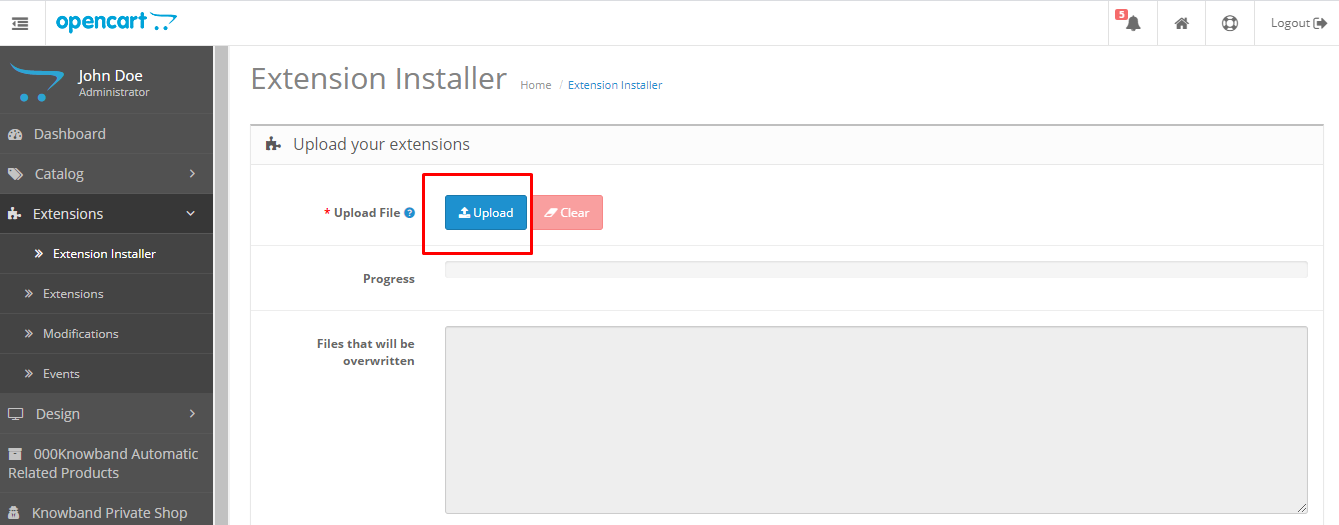
Step 5: After uploading the ocmod file your module will be ready to use. You can go to the extensions and install and configure the module as per your need.

4.0 Admin Interface of OpenCart Affiliate Program
To configure the OpenCart Affiliate Program extension you can navigate to the module configuration page either by clicking on the Knowband Affiliate Program menu in the side menu.
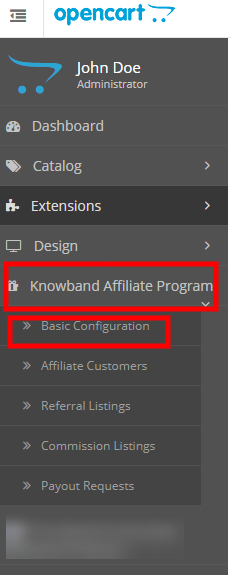
Or you can go to the Extensions > Modules > Knowband Affiliate Program.

In the admin you will see the following main settings tabs those are:
- Basic Configuration
- Affiliate Customers
- Referral Listing
- Commission Listing
- Payout Requests
4.0.1 Basic Configurations
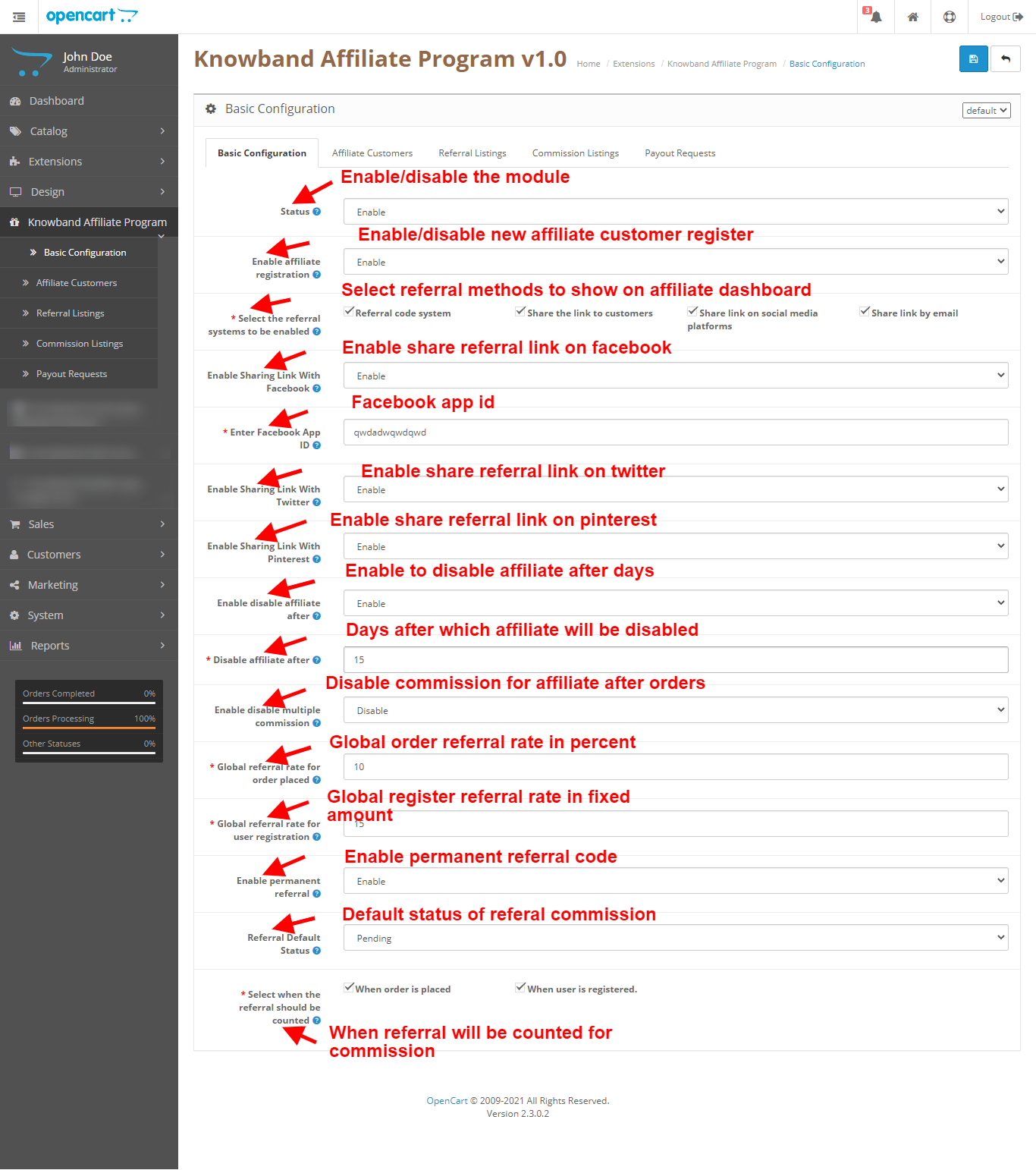
These are the basic settings that you can apply regarding the referral rates, referral methods, and module settings. Here you have the option to enable disable the module and much more.
4.0.1.1 Status
Enable/Disable this module.
4.0.1.2 Enable affiliate registration
Enable the option for normal customers to become affiliate customers and get a chance to earn a commission.
4.0.1.3 Select the referral systems to be enabled
Referral methods to show on affiliate customer dashboard using which he/she can share the referral link and get commission.
4.0.1.4 Enable Sharing Link With Facebook
Enable to show share on Facebook in referral methods on affiliate customer dashboard.
4.0.1.5 Enable Sharing Link With Twitter
Enable to show share on Twitter in referral methods on affiliate customer dashboard.
4.0.1.6 Enable Sharing Link With Pinterest
Enable to show share on Pinterest in referral methods on affiliate customer dashboard.
4.0.1.7 Enable/disable affiliate after
Enable to disable the affiliate customer after the number of days.
4.0.1.8 Disable affiliate after
Several days after which affiliate gets disabled.
4.0.1.9 Enable/disable multiple commission
Enable this to disable affiliate commission after several orders.
4.0.1.10 Disable commission after
The number of orders after which the affiliate gets disabled.
4.0.1.11 Global referral rate for orders placed
Input the global rate for orders placed which the affiliate customer will get as a commission, will be treated as a percent of order value.
4.0.1.12 Global referral rate for user registration
Input the global rate for user registers which the affiliate customer will get as a commission will be treated as a fixed amount.
4.0.1.13 Referral Default Status
Default status of referral and commission when a new referral is entered into the system.
4.0.1.14 Select when the referral should be counted
Options when the referral and commission will be counted.
4.0.2 Affiliate Customer
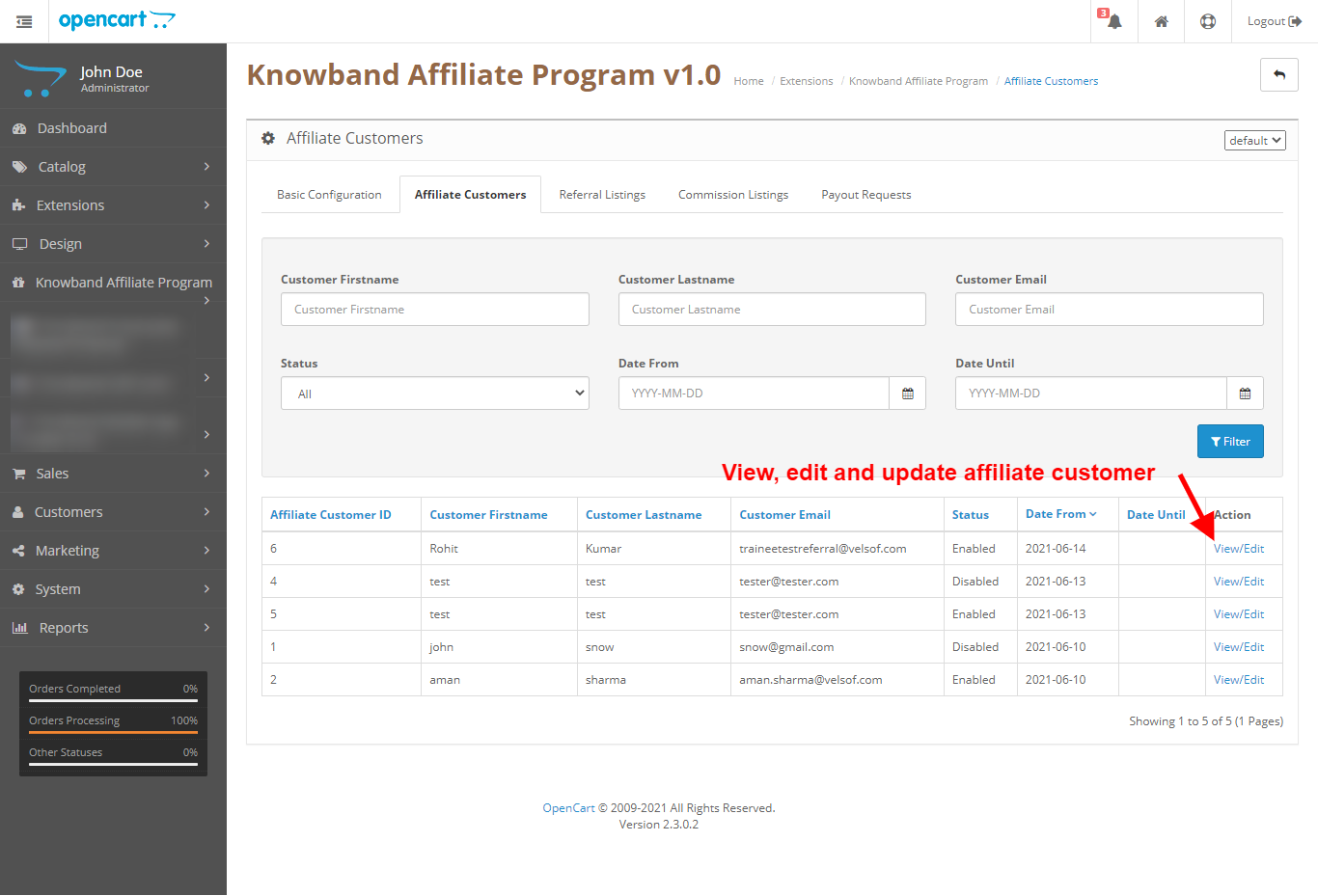
In this tab, the admin can view the list of affiliate customers with their status and also have the sorting functionality and filters.
In the list of customers, the admin has the option to sort the columns on the and have the options to filter data based on customer first name, customer last name, customer email, customer status, customer date from, and customer date until.
Also, the admin has the link to the customer view/edit page.
4.0.3 View/Edit Affiliate Customer
On this page of the OpenCart Affiliate and Referral program extension, the admin can view the details of the individual affiliate customer and can edit them individually.
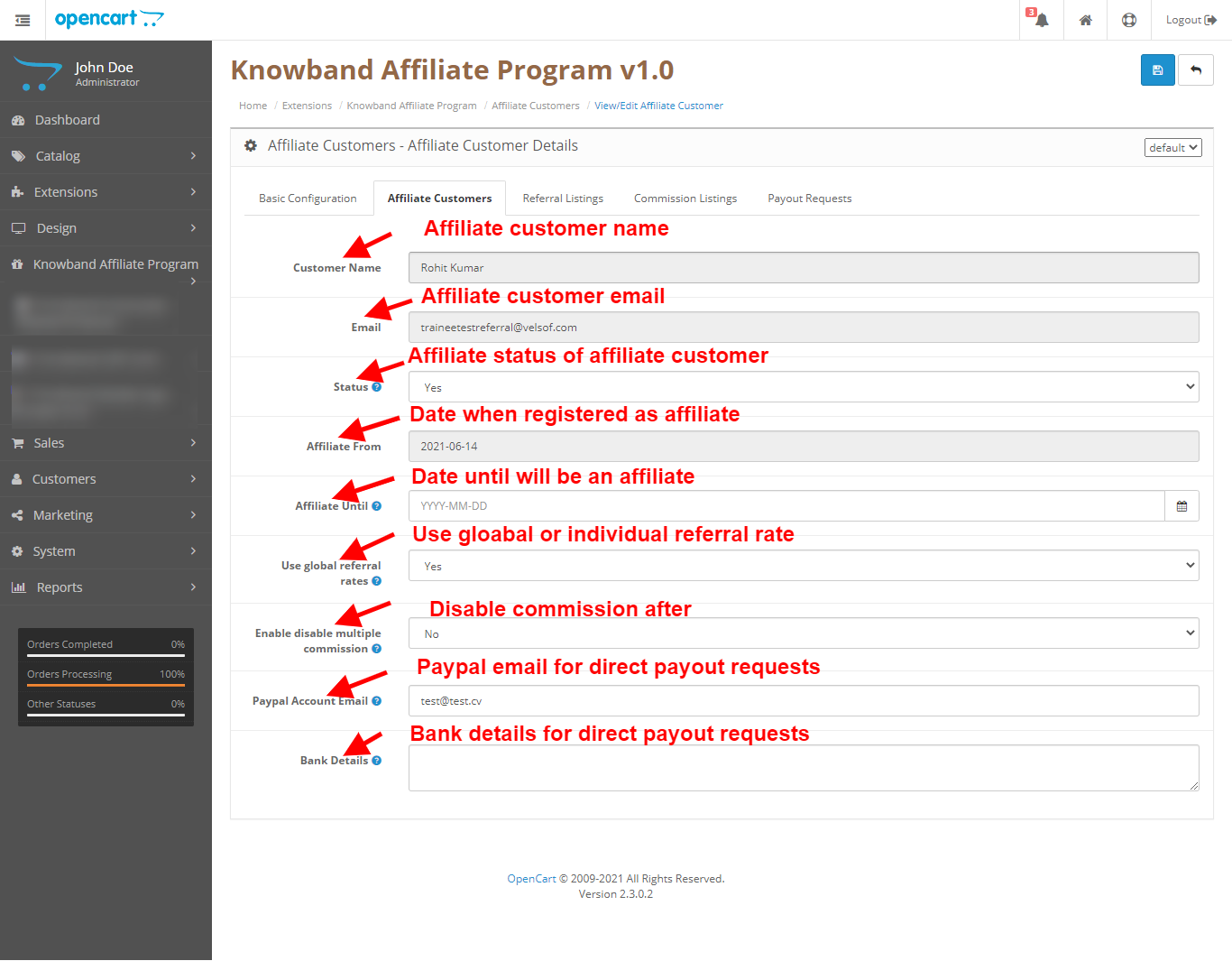
4.0.3.1 Customer Name
Affiliate customer name.
4.0.3.2 Email
Affiliate customer email.
4.0.3.3 Status
Affiliate customer status.
4.0.3.4 Affiliate From
Date when customer joined as an affiliate customer.
4.0.3.5 Affiliate Until
Date till when the customer will be treated as an affiliate customer.
4.0.3.6 Use global referral rates
Option to set whether to use global rates for orders defined in basic configuration or use individual affiliate customer rates.
4.0.3.7 Paypal Account Email
Paypal email to send approved payout request amount directly to the customer Paypal account(manually).
4.0.3.8 Bank Details
Bank details to send approved payout request amount directly to the customer bank account(manually).
4.0.4 Referral Listing
In this tab of the OpenCart Affiliate Program extension, the admin can view the list of referrals that have been interacted after getting the referral code from the affiliate customers.
In the list of customers, the admin has the option to sort the columns on the and have the options to filter data based on customer first name, customer last name, customer email, and customer status.
Also, the admin has the link to the referral view/edit page.

4.0.5 View/Edit Referral
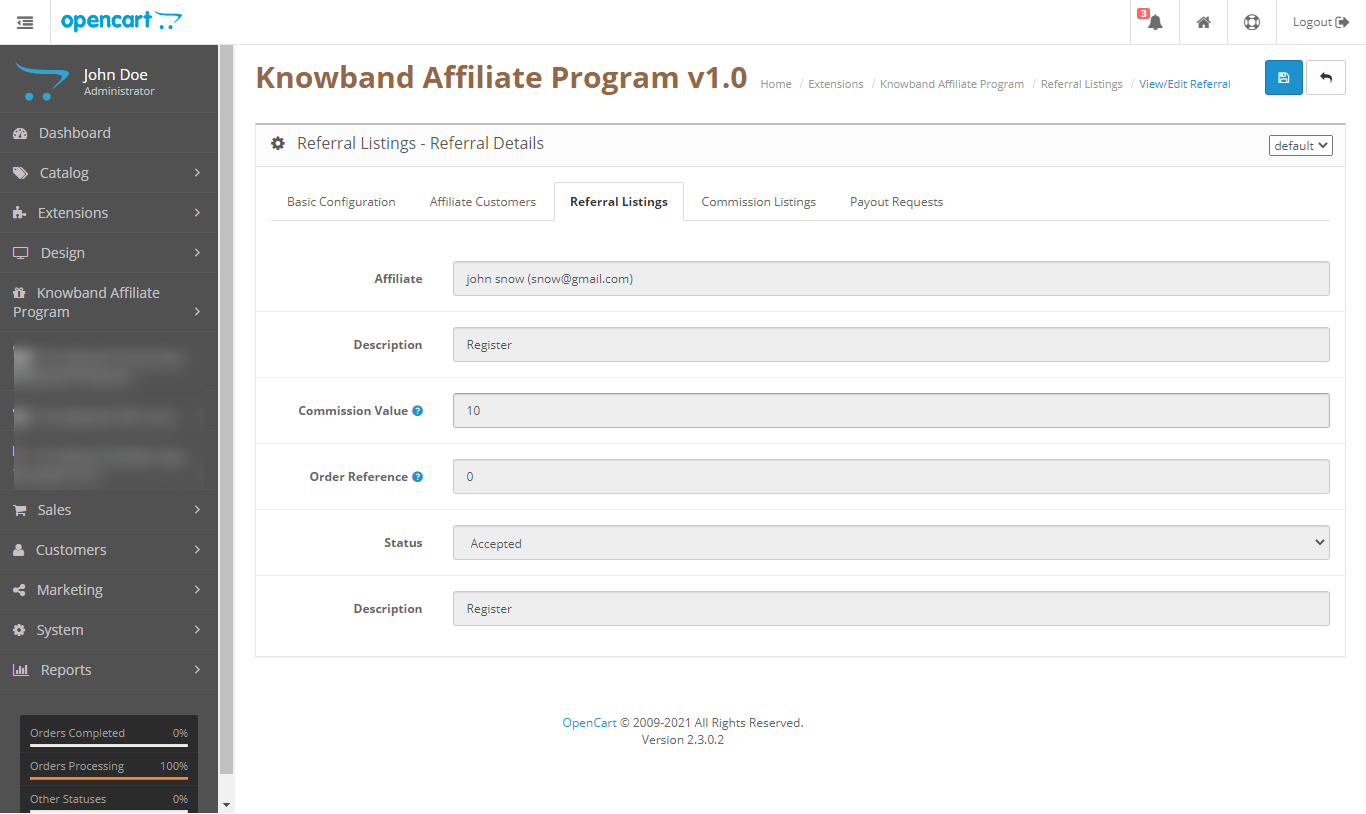
In this tab of the OpenCart Referral Program extension, the admin can view the referral and edit their status only when it is not accepted, once accepted nothing can be changed.
4.0.6 Commission Listing
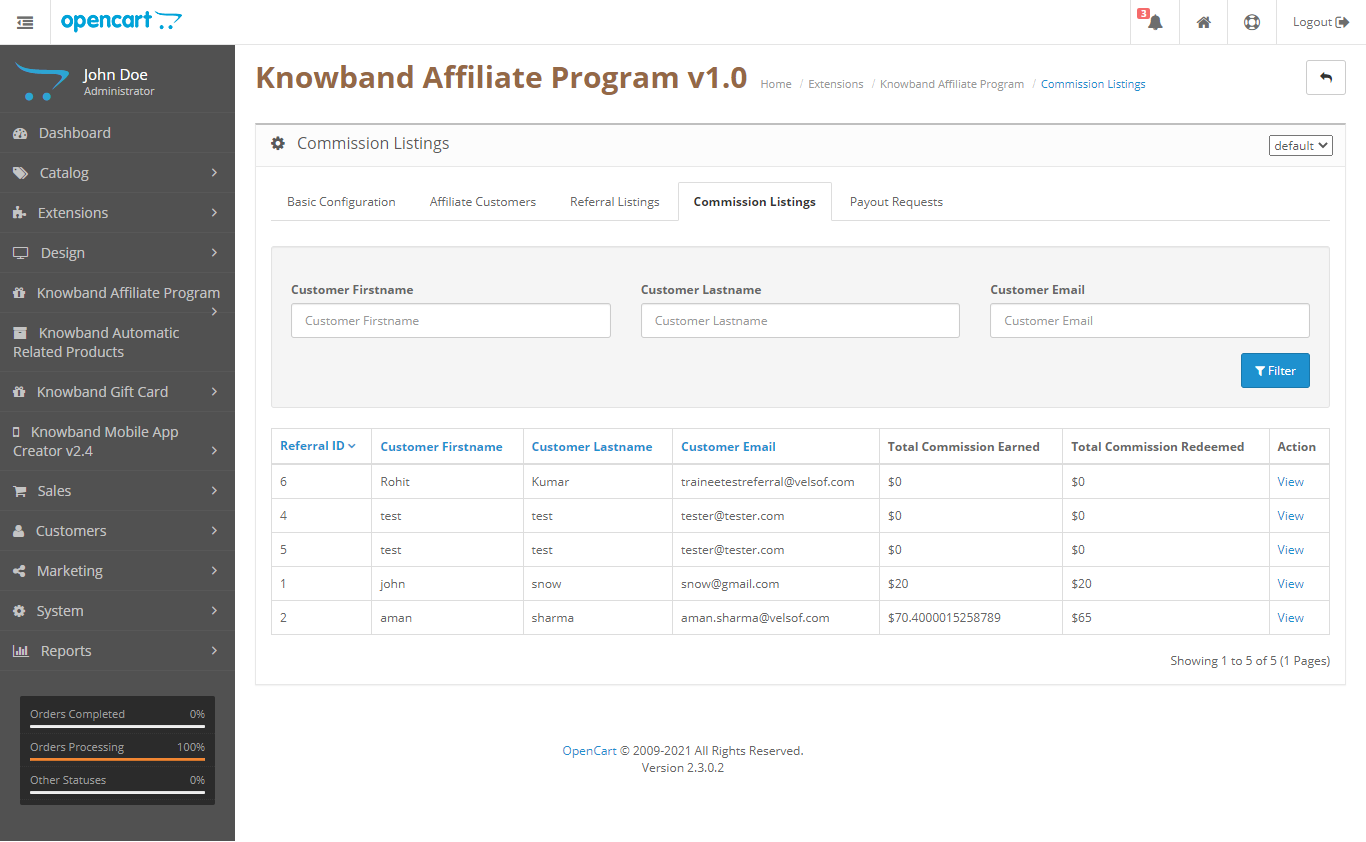
In this tab, the admin can view all the affiliates with the data like how much in total they have earned as commission and how much they have redeemed.
Also, they have the link to view the commission history as per each referral for that affiliate customer.
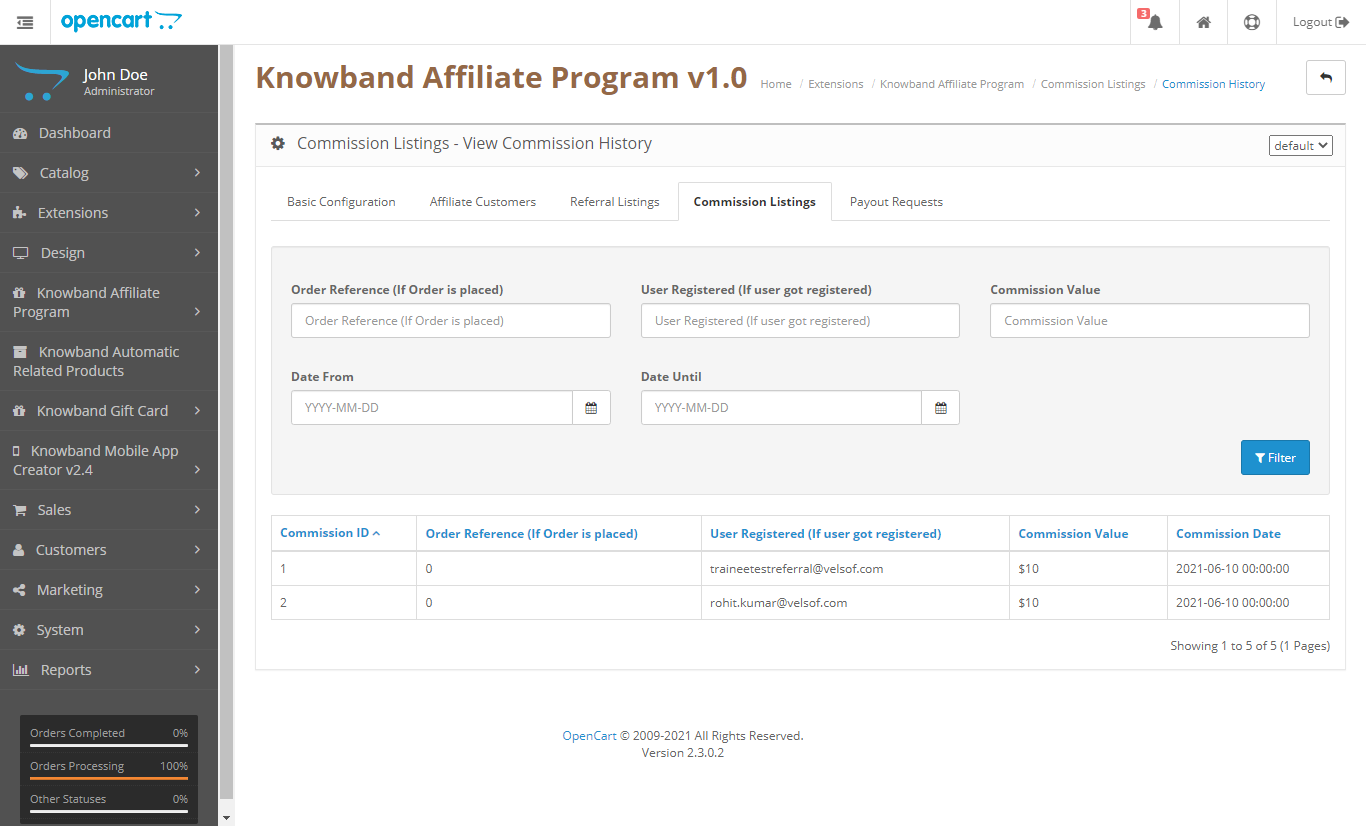
4.0.7 View Affiliate Commission History
In this tab, the admin can view the commission history of the individual affiliate.
4.0.8 Payout Requests
In this tab of the OpenCart Affiliates module, the admin can view the payout request from the affiliate customers and can accept them and reject them.

5.0 Front End Interface for the OpenCart Affiliate Program
On the front end, we will have a separate dashboard for the affiliate customers in which we have the following tabs:
- Affiliate Dashboard
- Referral Methods
- Commission Listing
- Payouts:
- Voucher
- Payout
5.0.1 Affiliate Dashboard
In the affiliate dashboard, customers can see his statistics as the affiliate customer like how much commission he has earned till now, how much he has redeemed, how much is not accepted yet, and how much payment request is not accepted yet.
Also, there is a graph that shows the last 8 day’s commission earned statistics.

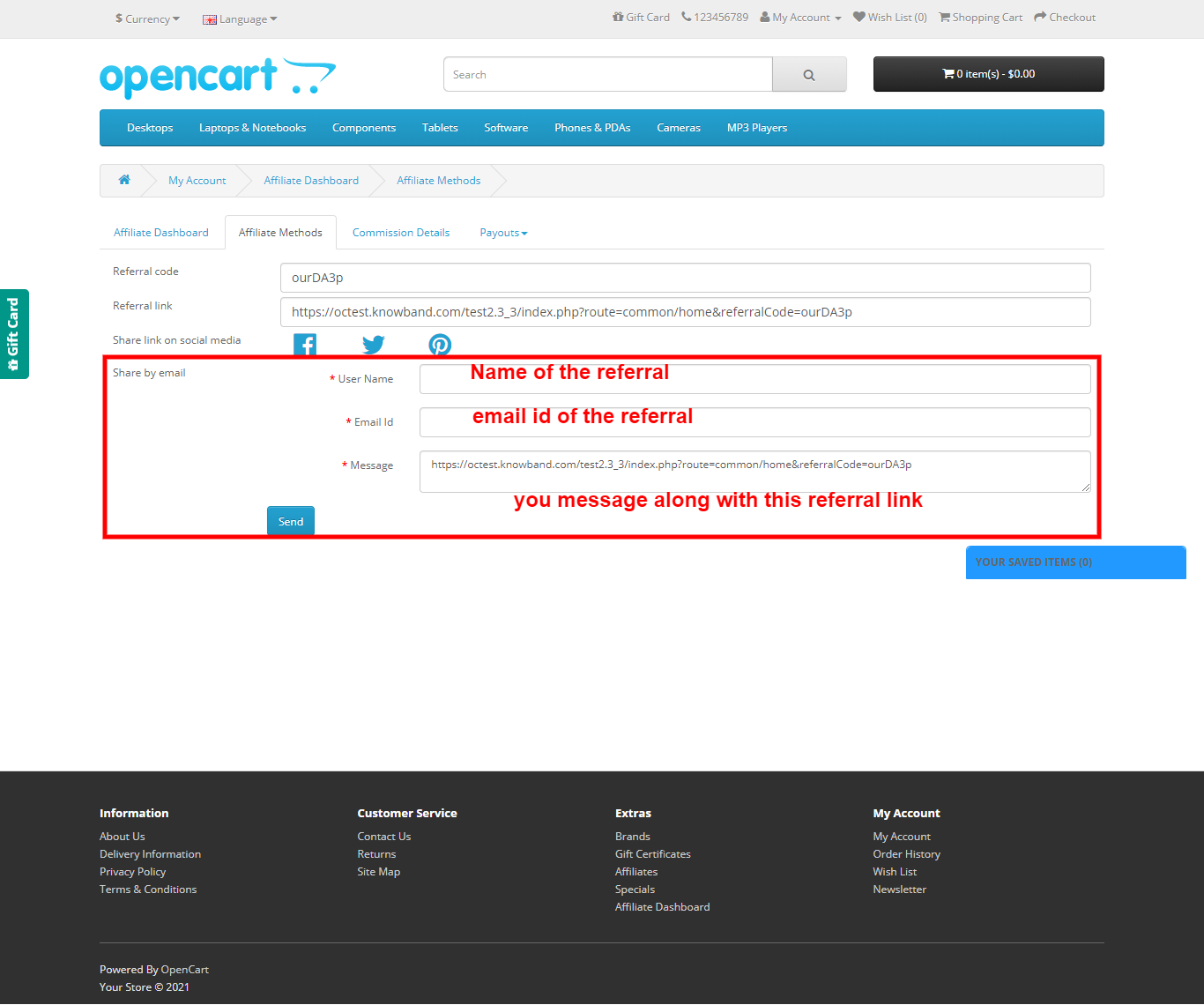
5.0.2 Referral Methods
In this tab of the OpenCart Referrals plugin, we have all the options listed that were selected as the referral system in the basic configuration settings of the OpenCart Affiliate and Referral module.
In this, you can directly copy the referral code and referral link and give it to your friends.
Also, you have the option to share the referral code on social media.
Moreover, you have the option to share the referral code by email.
5.0.3 Commission Details
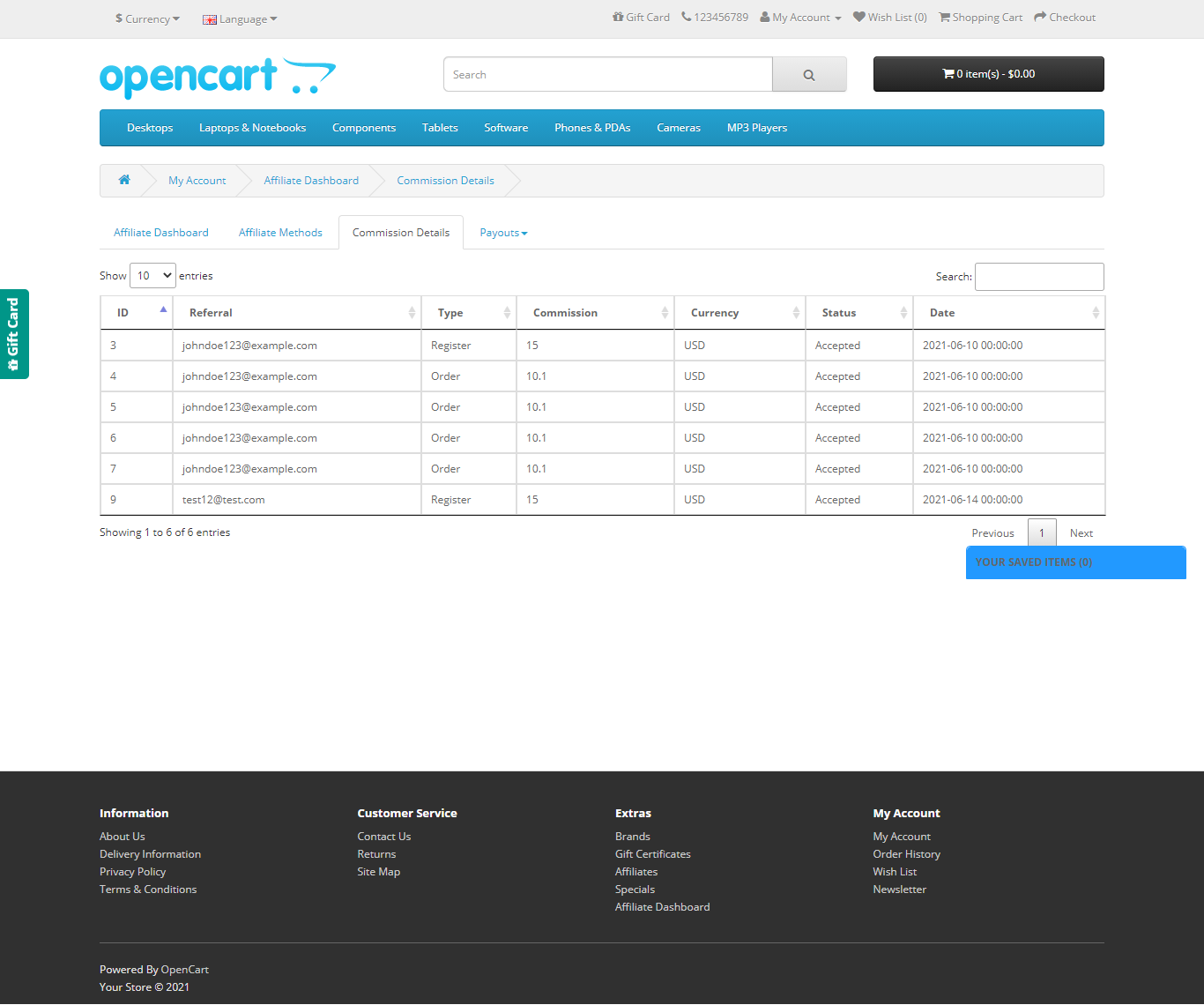
In this tab of the OpenCart Referral Program extension, we have all the details of the commission for the affiliate customer which he has earned with their status even if they are accepted or not yet.
5.0.4 Payout > Vouchers
In this tab, we have all the details of the coupons that were generated by the affiliate customer to redeem his commission in the form of vouchers to use on the site.
Also, affiliate customers can generate vouchers from this page and will receive those on their email.

5.0.5 Payout > Payout
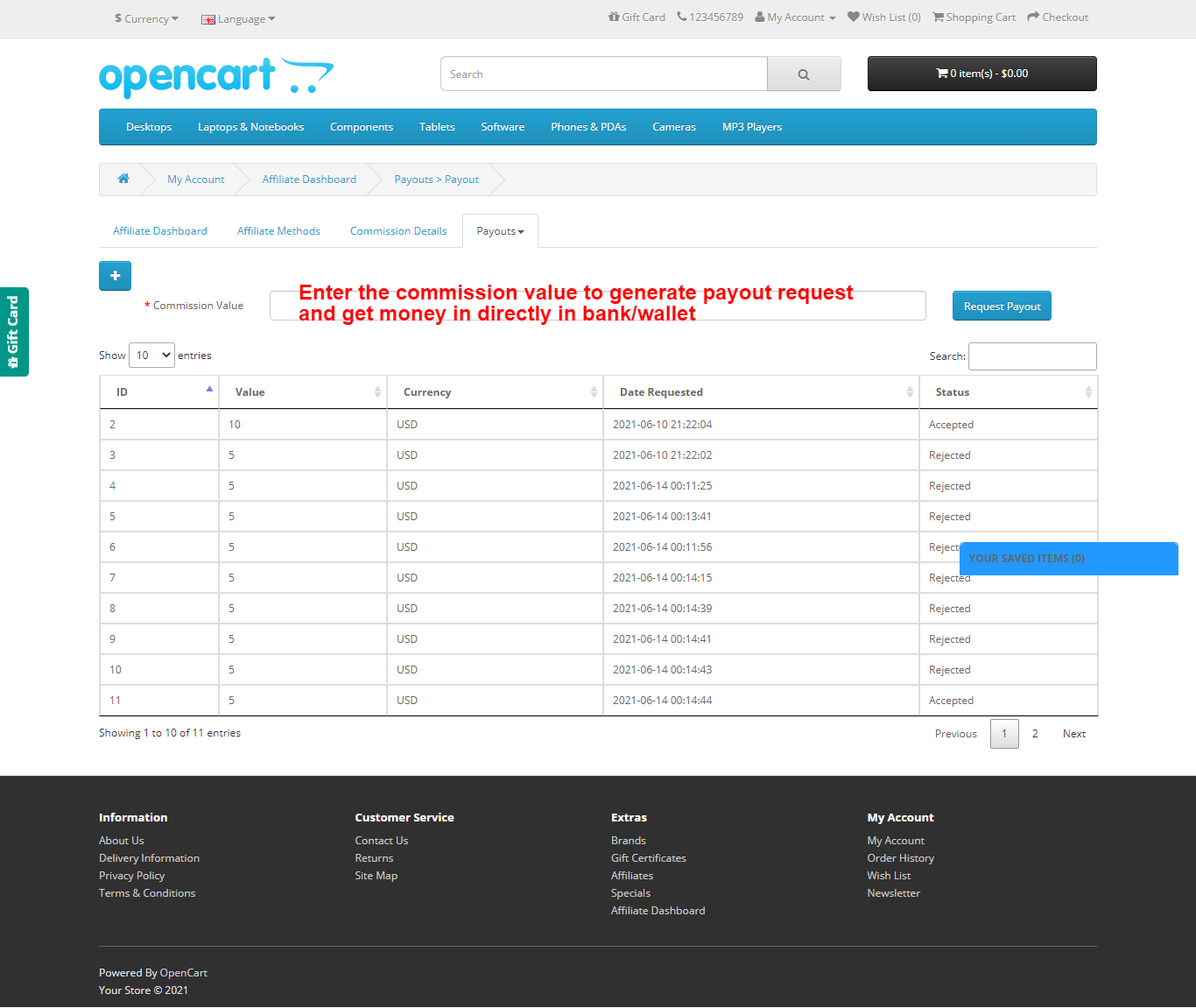
In this tab of the OpenCart Affiliate and Referral module, we have all the details of the payout request. Further, the details the affiliate customer made to get the commission amount directly into his bank account/wallet.
Affiliate customers can request payout requests and their status and payout request will be visible in the list.
For more details, click below:
Knowband’s OpenCart Affiliate and Referral module Product Link
OpenCart Affiliates module Marketplace Link
The OpenCart Referrals plugin Admin Demo
OpenCart Affiliate and Referral module Front Demo