

Knowband’s Magento 2 Gemini AI Content Generator/Translator Extension helps store owners create and translate content quickly using Google’s Gemini AI technology. With the Magento 2 Gemini AI Extension, store owners can easily generate product descriptions, meta titles, meta descriptions, category descriptions, meta titles, meta descriptions and SEO content without spending hours writing.
The Magento 2 Gemini AI Extension also translates your content into different languages, helping you reach customers worldwide. It’s easy to use and works for all types of online stores, whether you have a small shop or a large marketplace.
The Magento 2 Gemini AI Extension saves you time and ensures all your product listings look professional and appealing to both customers and search engines. Simply install the extension, and you can start generating high-quality content right away. The Gemini AI Extension for Magento 2 utilizes Google’s advanced Gemini AI models, including Gemini 2 Flash, Flash Light Preview, Gemini Flash 1.5, Gemini Flash 8B, and Gemini 1.5 Pro, which generate and translate SEO optimized content.
2.0.0 Key Features of the Knowband’s Magento 2 Gemini AI Content Generator/Translator Extension
Automated Content Generator: The Magento 2 Gemini AI Content Generator/Translator allows the admin to generate SEO Optimized content for the products.
Focused Content Translator: The Magento 2 Gemini AI-powered content Translator translates the generated content as well as product titles. Additionally, the Magento 2 Gemini Powered Translator Extension supports all the languages that are listed on your store.
Gemini Engines: The Gemini AI Extension for Magento 2 uses Google Gemini AI models, including Gemini 2 Flash, Flash Light Preview, Gemini Flash 1.5, Gemini Flash 8B, and Gemini 1.5 Pro, which generate and translate focused and SEO optimized content.
Bulk Product Content Generator: The Knowband’s Magento 2 Content Generator Extension can generate SEO-optimized content and translate the content into multiple languages with the focused content.
User-Friendly Interface: The Magento 2 Gemini AI Content Generator provides a user-friendly interface for the store admin as it doesn’t require any coding knowledge.
Global Market Reach: The Magento 2 Gemini AI Plugin benefits the user by increasing international sales by providing SEO-optimized and focused content translation in all the store’s languages.
Accurate Translation: The Magento 2 Gemini AI plugin translates the generated content and product title accurately into multiple languages.
3.0 Steps to Generate the Gemini API Key to Enable Knowband’s Magento 2 Gemini AI-Powered Content Generator Plugin
To enable Gemini AI functionality in your Magento 2 Gemini AI Extension, follow these 3 steps to get your API key.
Step 1: Obtain an API Key
- Visit the Google AI Studio to generate the API Key
(https://aistudio.google.com/app/apikey)
- Click on “Create new secret key”. Make sure to copy the key.

Step 2: Add the API Key to the Magento 2 Gemini
- In Magento 2 Backend, go to the “Knowband Gemini” General Configuration page.
- Add the Gemini API Key into the provided “API Key ” field.

Step 3: Save the Settings:
- After pasting the API Key in General Settings, click “Save”. Now, you can use Knowband’s Magento 2 Gemini Module Extension.
4.0 Admin Interface Panel
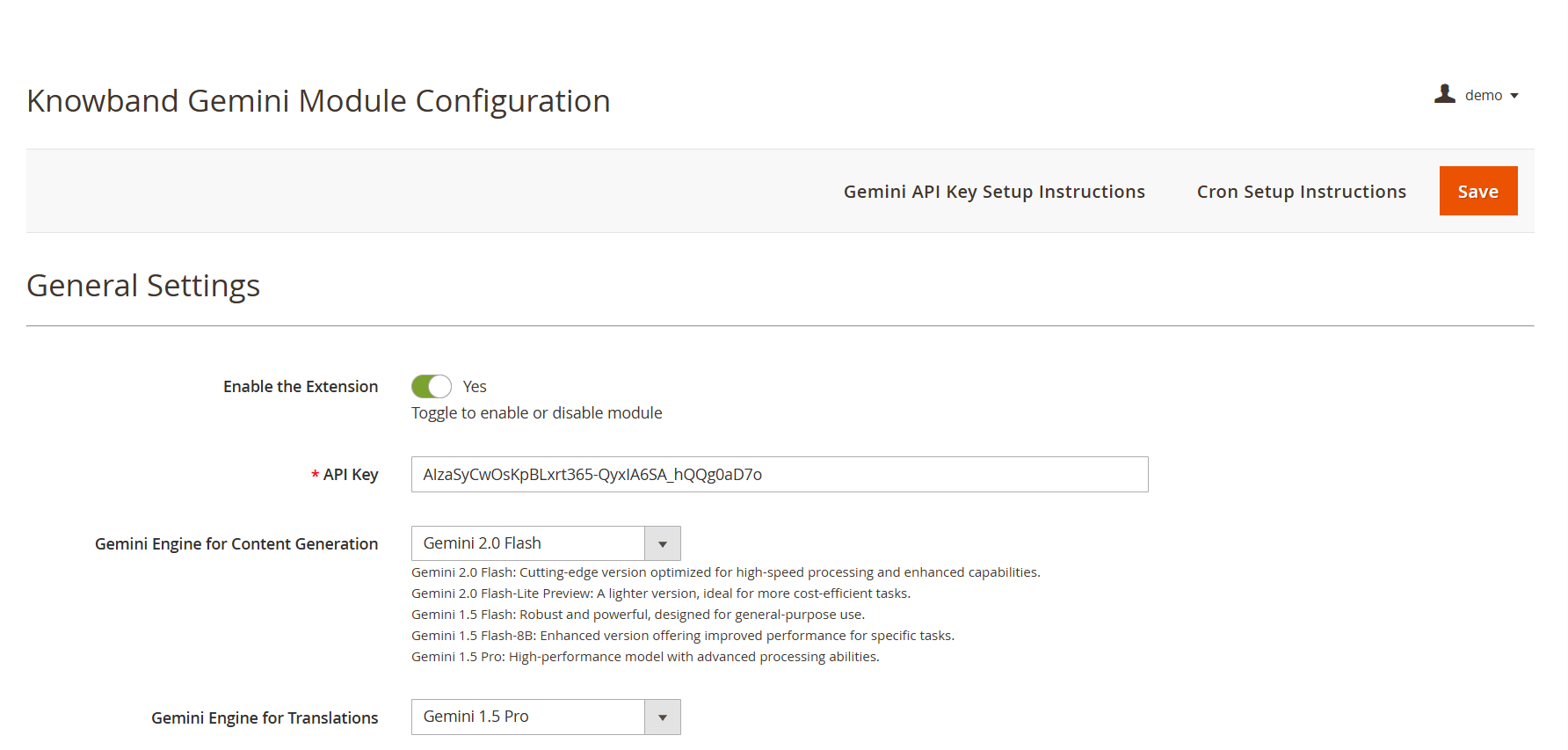

API Key: Add your API KEY from Google AI Studio in the required field.
Gemini AI Model Selection: The Magento 2 Content Generator Extension offers Google’s latest Gemini AI models, including Gemini 2 Flash, Flash Light Preview, Gemini Flash 1.5, Gemini Flash 8B, and Gemini 1.5 Pro to generate the content.
Temperature: The e-merchants can adjust the temperature from 0.0 to 1.0 – higher values represent more creative content, while lower values represent more accurate content.
Maximum Tokens: The Knowband’s Magento 2 Gemini Content Generator allows the admin to set a token limit (default: 500). The token represents the number of words that the AI Model can generate.
Gemini AI Engine for Translations: The Magento 2 Gemini Translator Extension provides various Gemini AI Models, including Gemini 2 Flash, Flash Light Preview, Gemini Flash 1.5, Gemini Flash 8B, and Gemini 1.5 Pro, to select the model that the store owners want.
Primary Language: The admin can select the store’s default language for content generation and translation of the products
Target Languages: The Magento 2 Gemini Translator Extension provides the option for store owners to select which languages they store owners want their content to be translated into.


4.0.2. Gemini AI Prompts:
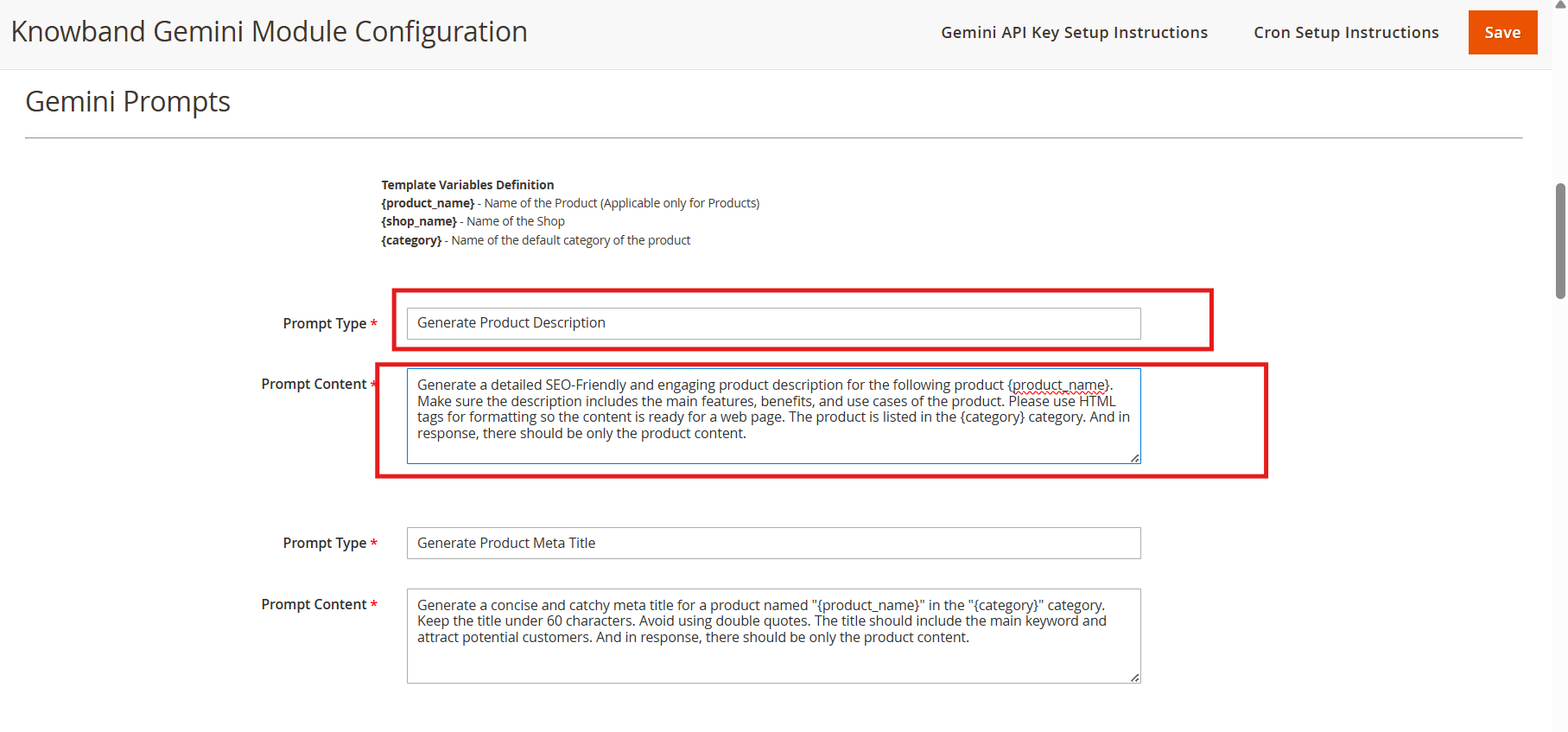
The Magento 2 Gemini AI Content Generator Extension features 14 pre-configured prompts designed for various e-commerce content needs. Also, the store owner can change the content of the prompts based on their needs.
Knowband Magento 2 Gemini AI Content Translator AI Prompts
Generate Product Description: Generate the description based on the product name and category. The store owner can also change the content for the Generate Product Description prompt.
Generate Product Meta Title: Generates SEO- optimized meta titles under 60 characters, including keywords and product categories to increase the search rank.
Generate Product Meta Description: The prompt generates the product meta descriptions of the product within 140 characters maintaining accurate and context-aware information according to the product.
Translate Product Title: Translates the product titles or names to multiple languages selected on the store.
Translate Product Description: The prompt translates the product descriptions while preserving HTML formatting and focused content.
Translate Product Meta Title: Translate Product Meta Titles to multiple languages according to the store theme.
Translate Product Meta Description: The prompt translates Product meta descriptions to multiple languages,, maintaining translated content focused and accurate.
Generate Category Description: The Generate Category Description prompt generates a category description while preserving the formatting and information of the product.
Generate Category Meta Title: Translate category meta titles within 60 characters with keywor,ds maintaining the category meta title SEO Optimized and focused.
Generate Category Meta Description: Translates category meta descriptions within 140 characters, focusing on the generated meta keywords.
Translate Category Title: The prompt is to translate category titles into multiple different languages based on the needs of the store.
Translate Category Description: Translates category descriptions in the multiple languages selected on the configuration of the extension while maintaining the HTML structure and generated category descriptions.
Translate Category Meta Title: Translates category meta titles to multiple languages keeping the accurate translation of generated or added meta titles.
Translate Category Meta Description: Translates category meta descriptions to multiple languages, focused on the prompt’s content.
4.0.3. Gemini AI Task Log:
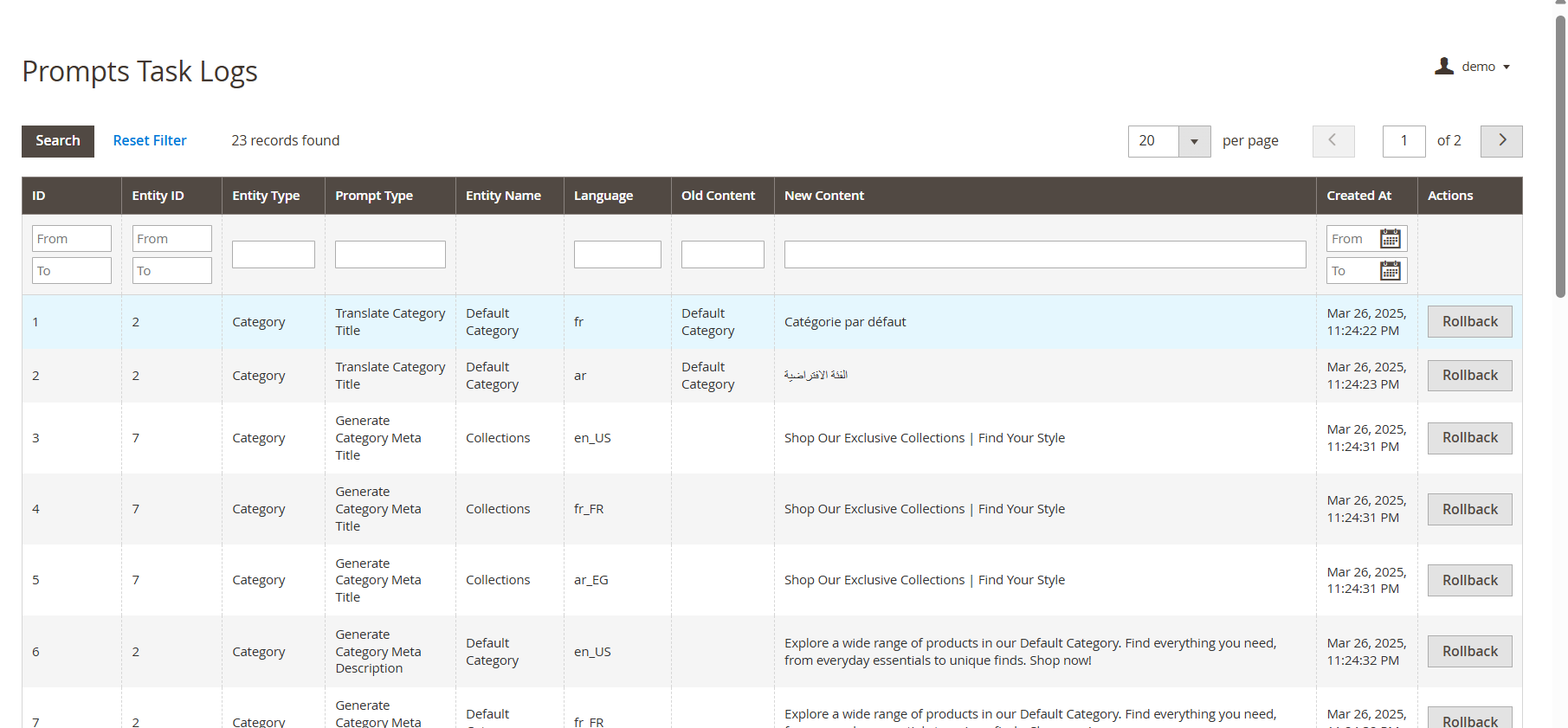
The Task Logs keep a record of all changes and actions performed within the store. Additionally, Knowband’s Magento 2 Gemini AI Extension maintains detailed logs, allowing store owners to track modifications, review past actions, and, if necessary, undo or revert changes for better control and accuracy.
4.0.4 Pending Task Logs
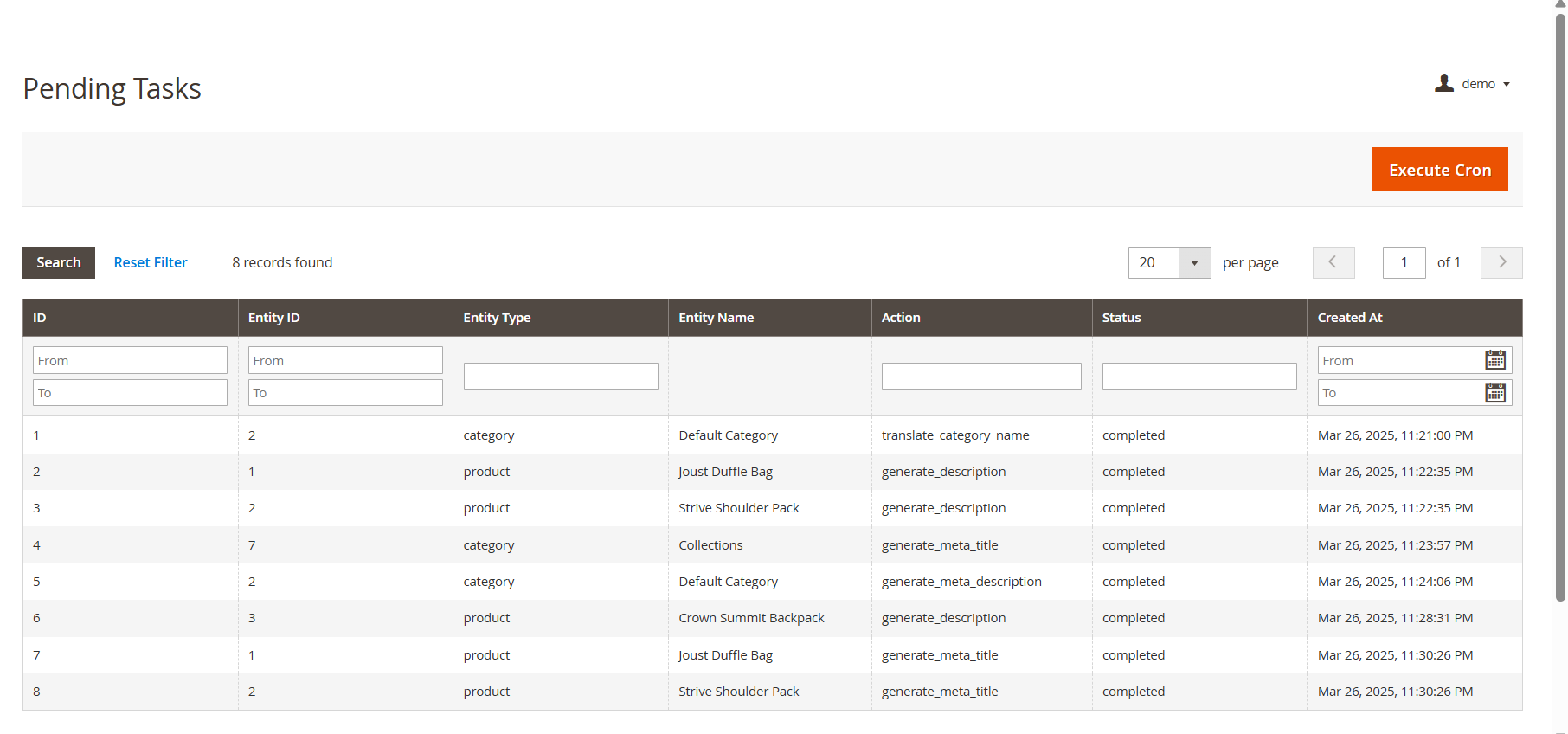
The Pending Task Logs feature in Knowband’s Magento 2 Gemini Content Generator Extension allows users to efficiently manage and monitor content generation tasks before execution. When users initiate a content generation request, it does not get processed immediately. Instead, all tasks are first stored in the Pending Task Logs, providing a tab “ Execute Cron” to execute pending tasks.
5.0. Steps to Execute the Prompts 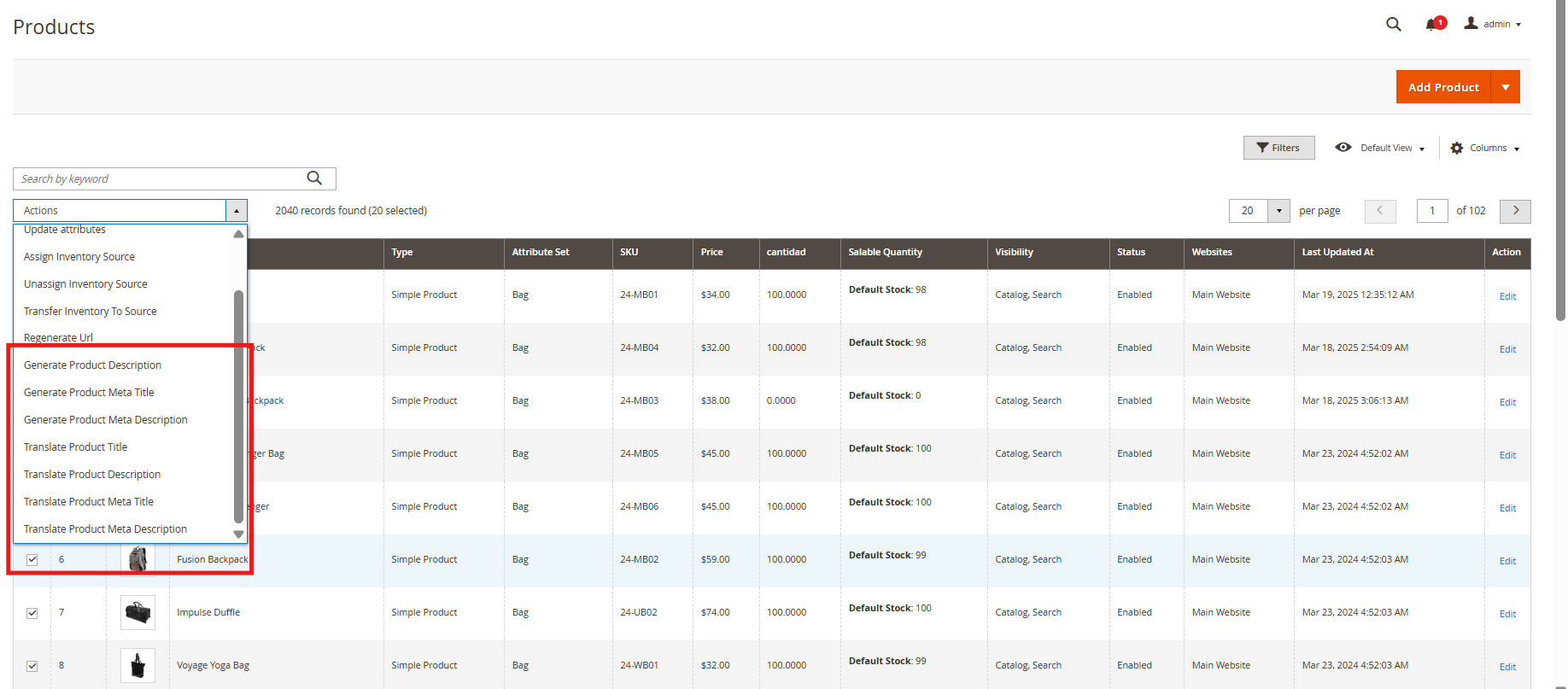
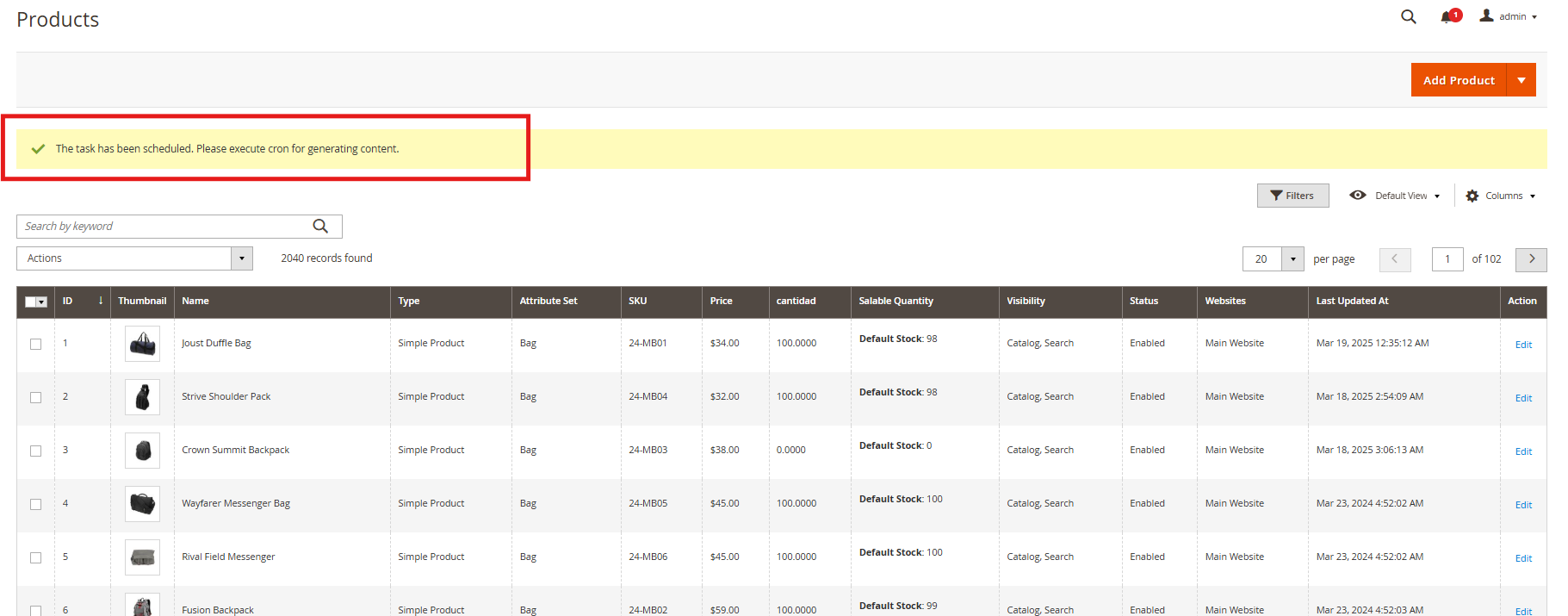
The Knowband’s Magento 2 Gemini Content Generator Extension provides an efficient way to manage content generation tasks through a structured process. The key steps involved in this feature are:
- Product Selection: Users start by selecting the products for which they want to generate or translate AI-powered content, such as product or category descriptions, titles, meta titles, and meta descriptions.
- Executing the Task: After selecting the products, users execute the task, which sends all content generation requests to the Pending Task Logs section.
- Managing Pending Task Logs: All pending tasks are stored in the log, allowing users to review, modify, or remove any task before final execution.
- Executing the Cron Job: To complete the process, users run a cron job that automatically processes all pending tasks and applies the generated content to the respective products.
