The Magento 2 Claude AI Content Generator/ Translator Plugin is a cutting-edge solution designed to streamline content creation and generation for Magento 2 store owners. Powered by Claude AI, the Magento 2 Claude AI Translator module enables merchants to generate high-quality SEO optimized product descriptions, engaging product titles, category descriptions, meta titles and meta descriptions for both product and category as well. As a result, businesses can attract more visitors, improve search engine rankings, and boost conversions effortlessly.
Moreover, the Claude AI Content Generator for Magento 2 integrates seamlessly with Claude 3 Haiku, Claude 3.5 Haiku, Claude Sonnet old and Claude Sonnet new AI engines, ensuring a smooth and hassle-free experience. The Magento 2 SEO Content Translator Plugin is a SEO Content Generator, guaranteeing unique, compelling, and search engine-friendly content. Additionally, Knowband’s Magento 2 Claude AI Content Translator Extension allows merchants to expand globally with accurate and natural-sounding translations.
1.0 Key Features of Magento 2 Claude AI Content Generator/Translator Extension
AI-Powered Content Generation: The Magento 2 Claude SEO Content Generator/Translator Plugin by Knowband enables merchants to create compelling product descriptions, meta titles, and SEO-friendly content effortlessly. By leveraging the advanced Claude AI model, the extension ensures that all content is engaging, informative, and optimized for better search engine rankings.
Cutting-Edge AI Technology: The AI-driven translation extension for Magento 2 utilizes Anthropic’s latest Claude AI models, including Claude 3.5 Sonnet new and old, and Claude 3 Haiku new and old. Moreover, with these advanced AI engines, merchants can generate high-quality content and precise translations, enhancing the store’s global reach.
Smart AI-Powered Translation: The Magento 2 AI Translation Extension guarantees accurate and contextually relevant translations with minimal effort. As a result, merchants no longer need to translate product details manually, saving time while ensuring linguistic accuracy across different markets.
User-Friendly Installation & Configuration: Designed for seamless integration, the Magento 2 Claude AI Content Generator Extension features an intuitive interface. Additionally, even store admins with no coding experience can easily install, configure, and start using the extension without any hassle.
Bulk Content Creation for Large Catalogs: Ideal for businesses with a vast inventory, the Claude AI Content Generator for Magento 2 can generate content in bulk. Furthermore, this automation eliminates the need for manual content creation, streamlining product management and enhancing efficiency.
Global Language Support: Magento 2 AI Content Generator Plugin supports multiple languages, including right-to-left (RTL) scripts, catering to international businesses. Furthermore, the extension is compatible with various Magento 2 versions, making it a reliable and versatile solution for online merchants.
2.0 Steps To Generate Claude AI API For Magento 2 Claude AI Generator
To activate the Magento 2 Claude AI Content Generator Plugin in your Magento 2, you must first generate an API Key. Follow these steps to integrate it seamlessly:
Step 1: Claude API Key Generation
- Generate an API Key by visiting https://console.anthropic.com/settings/keys.

- Select “Create Key” to generate a unique API key.
- Copy the generated key for later use.


Step 2: Configure the API Key in Magento 2
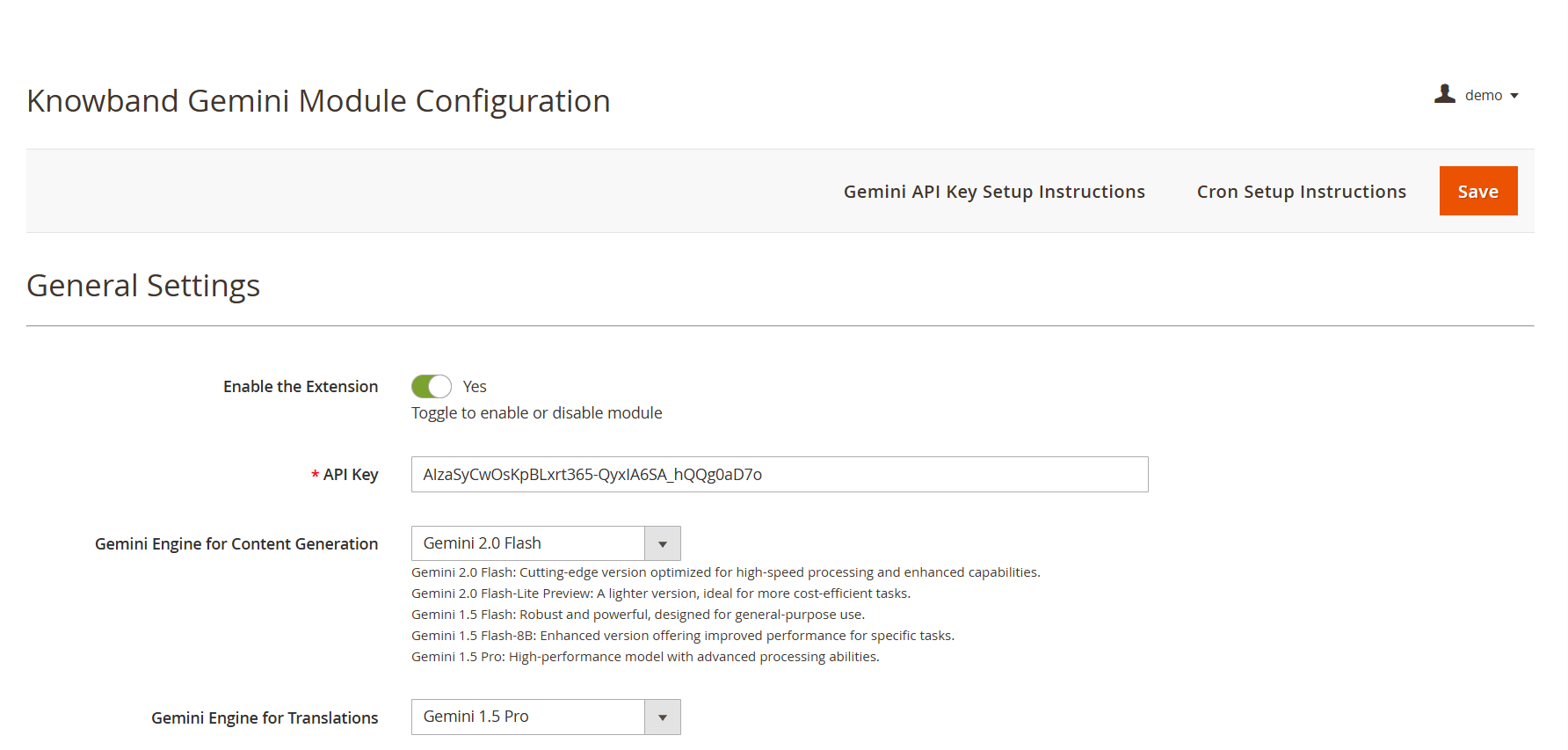
- Access your Magento 2 Admin Panel and navigate to Stores → Configuration → Knowband → Magento 2 Claude AI Generator/Translator.
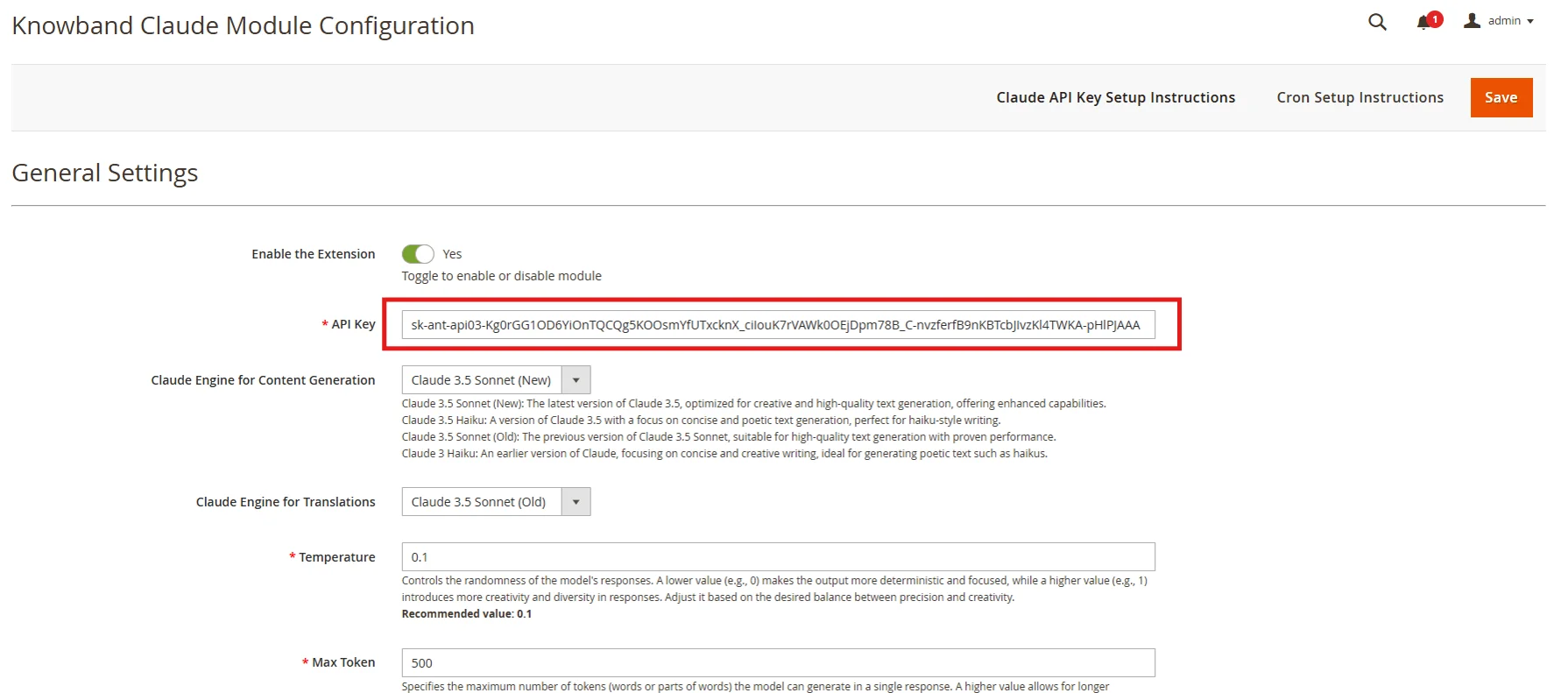
- Find the “API Key for Claude” field and paste the copied key into it.
Step 3: Save the Settings:
- After adding the API Key in General Settings, click “Save” to store the settings. The Claude AI module will now use this key to interact with the Claude API.


3.0 Admin Interface Overview:
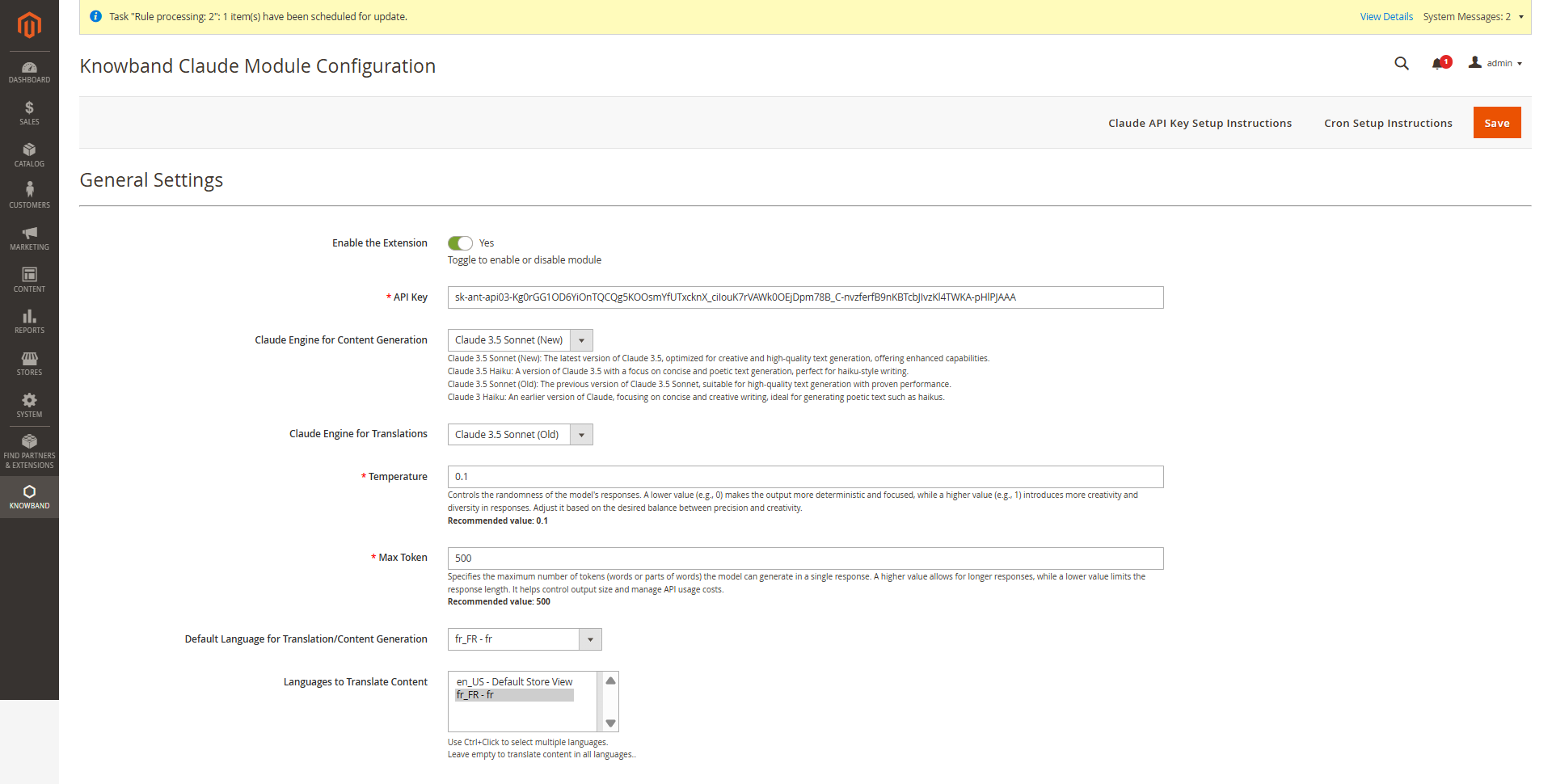
The Magento 2 Claude Translator Extension by Knowband provides store admins with an intuitive interface to configure settings and efficiently manage bulk content generation and translation.
3.0.1 Key Configuration Options
Enable/Disable – Activate or deactivate the Magento 2 Claude Content Generator with a single tab.
API Key for Claude – Enter your Anthropic API Key(Claude API Key) in the provided field to enable the functioning of the Knowband AI-powered content generator/Translator Module
Claude Model Selection – Choose from Claude 3.5 Sonnet (New), Claude 3.5 Sonnet (Old), and Claude 3.5 Haiku as well as Claude 3 Haiku, to generate content based on your store’s requirements.
Temperature: Adjust the creativity of the content —higher values generate more creative content, while lower values ensure consistency and focused content.
Maximum Tokens: Set a token limit (default: 500), representing text fragments used by the AI.
Claude Engine for Translations: Choose from Claude 3.5 Sonnet (New), Claude 3.5 Sonnet (Old), Claude 3.5 Haiku and Claude 3 Haiku to generate content tailored to your store’s needs.
Primary Language: Set your default language of the store for content generation and translation in the general settings.
Target Languages: Choose multiple target languages to expand your store’s global reach and improve accessibility for international customers.
3.0.2 Magento 2 Claude AI Content Generator Prompts
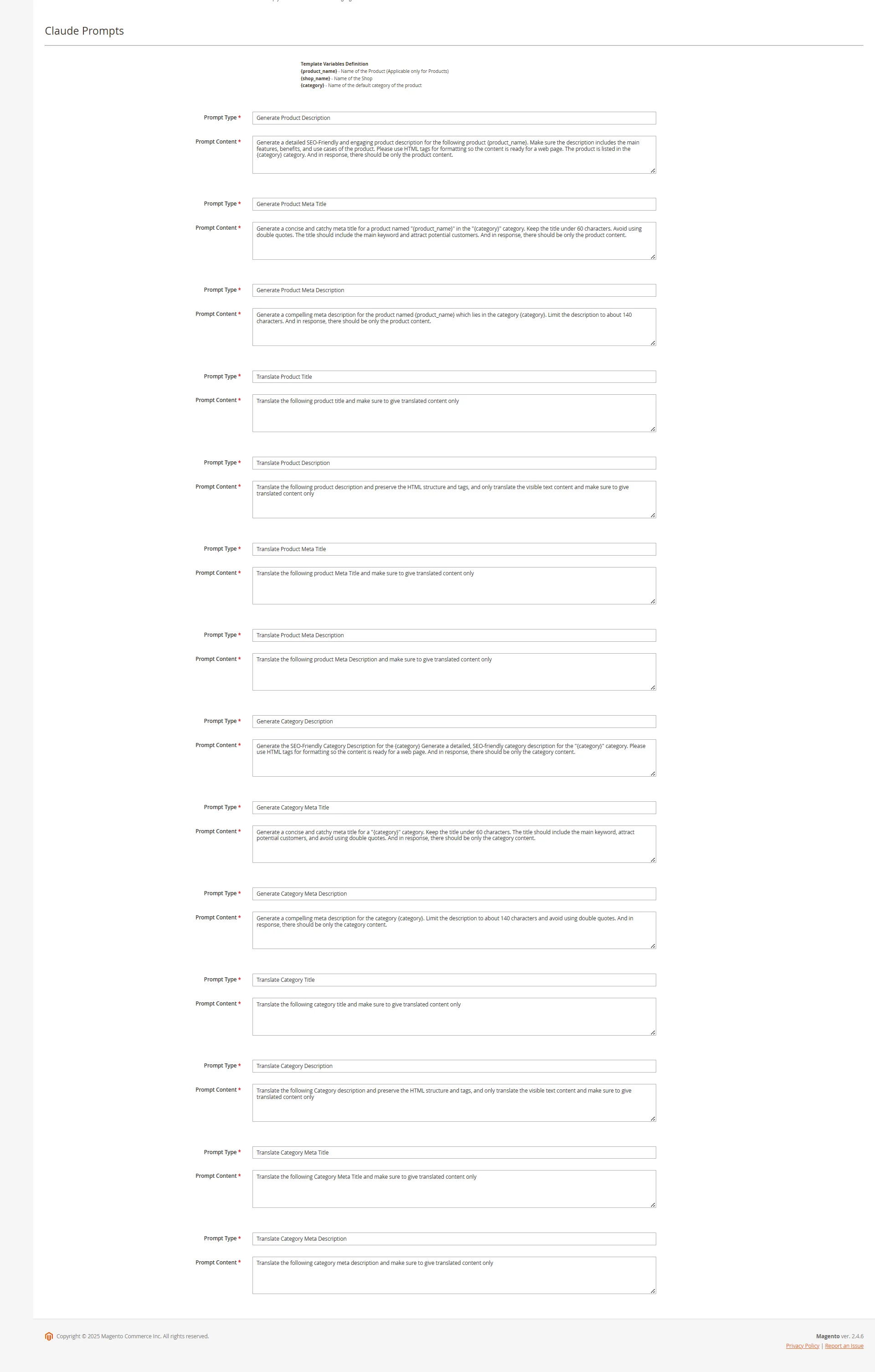
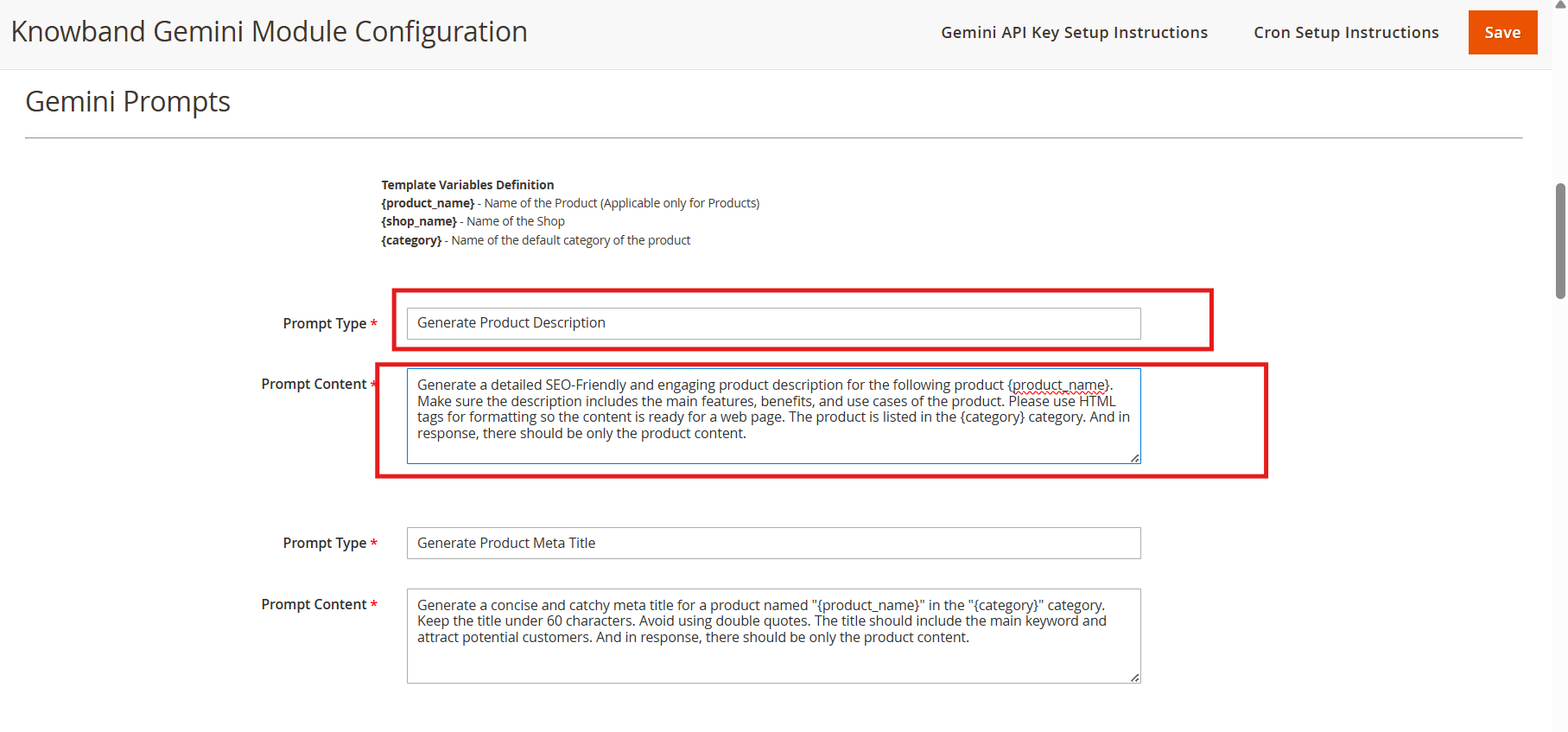
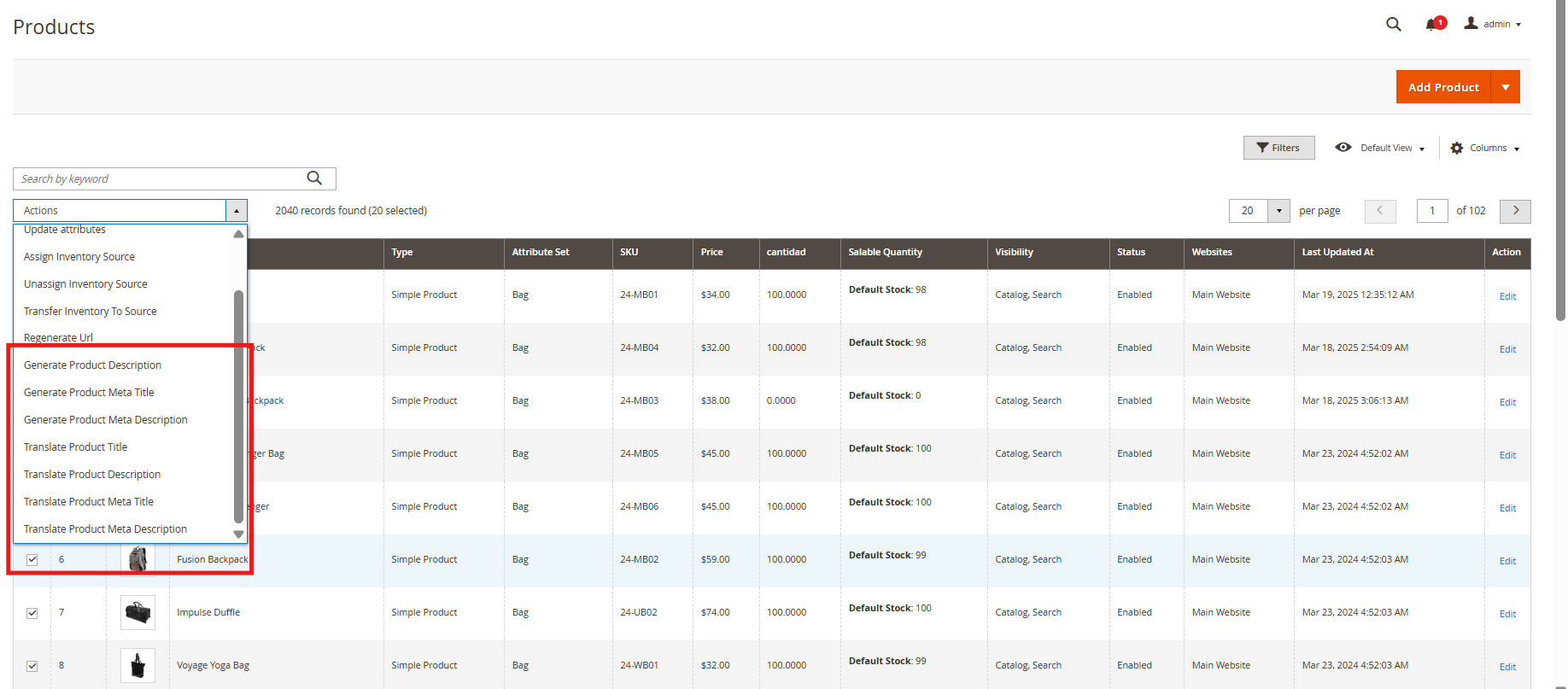
The Magento 2 Content Generator Module includes 14 pre-configured prompts tailored for various e-commerce content needs.
Knowband Magento 2 Claude Content Generator Extension AI Prompts
Generate Product Description: Creates SEO-friendly, formatted descriptions for products, ensuring the generated data is accurate and in context.
Generate Product Meta Title: Crafts optimized meta titles (under 60 characters) with relevant product and category keywords.
Generate Product Meta Description: Produces engaging meta descriptions within 140 characters.
Translate Product Title: Converts product titles accurately into multiple languages.
Translate Product Description: Accurately translates product descriptions while retaining HTML formatting.
Translate Product Meta Title: Converts meta titles into multiple languages with precision.
Translate Product Meta Description: Provides accurate translations of meta descriptions across various languages.
Generate Category Description: Creates SEO-optimized category descriptions with proper HTML structure.
Generate Category Meta Title: Generate concise, keyword-rich meta titles (under 60 characters).
Generate Category Meta Description: Creates compelling meta descriptions (within 140 characters).
Translate Category Title: Converts category titles, descriptions (maintaining HTML structure), and meta details into multiple languages.
Translate Category Description: Translates accurate category descriptions while maintaining HTML structure.
Translate Category Meta Title: Converts category meta titles into multiple languages with precision.
Translate Category Meta Description: Delivers accurate translations of category meta descriptions across various languages.
3.0.3. Knowband’s Magento 2 Claude Prompts Task Log

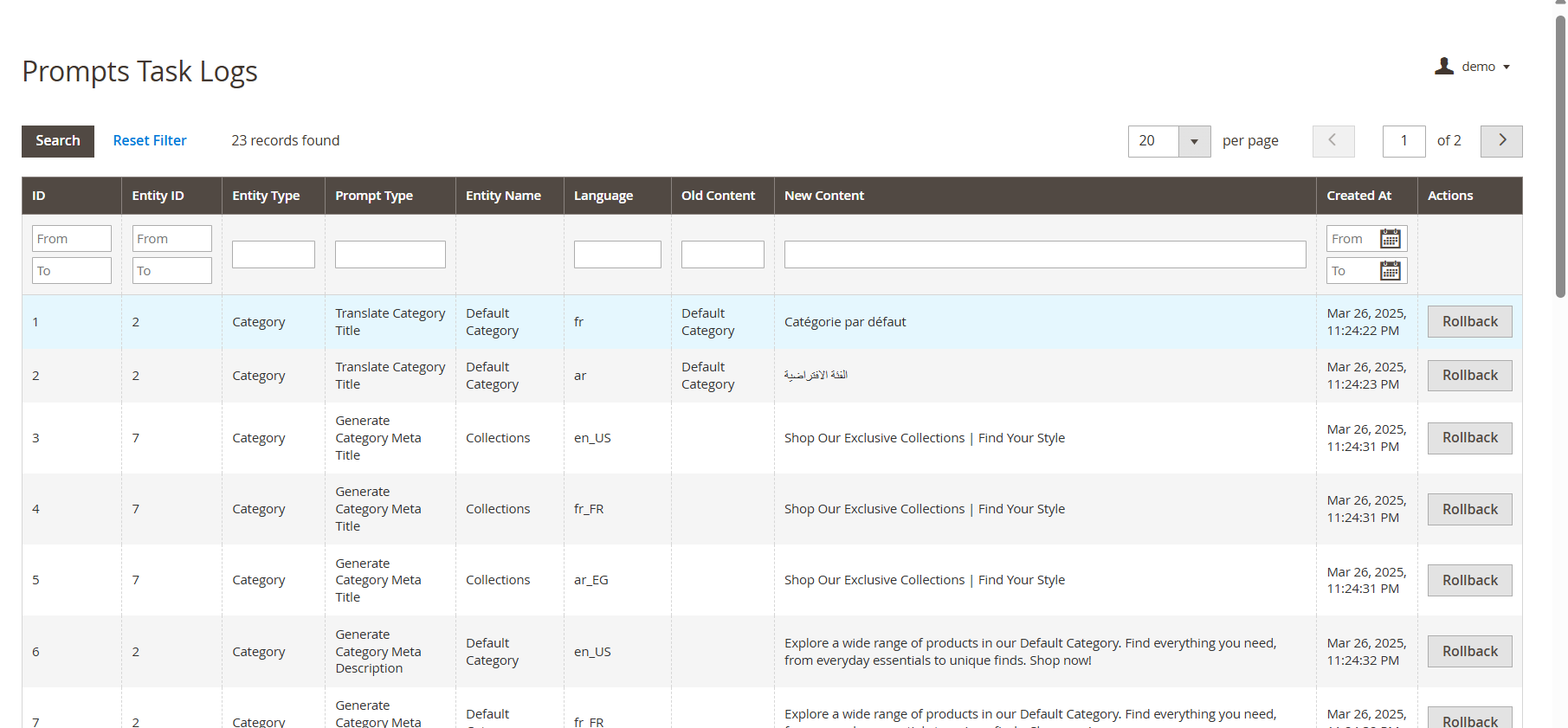
The Magento 2 Claude AI Content Generator/ Translator maintains a detailed activity log of all executed prompts, allowing users to track content generation and translation tasks efficiently.
The task log includes:
Prompt Type: Specifies whether the task involved content generation or translation.
Product/Category: Identifies the associated product or category.
Language: Displays the source and target languages for translations.
Previous Content: Shows the original content before modification.
New Content: Records the updated or translated content.
Timestamp: Logs the date and time of execution for tracking and auditing purposes.
RollBack Feature: Enables users to restore previous content instantly if the new version is unsatisfactory. Moreover, this feature ensures flexibility by allowing store owners to revert to the last saved version with a single click, maintaining content quality and accuracy.
4.0 Pending Task Logs of Magento 2 Claude AI Plugin
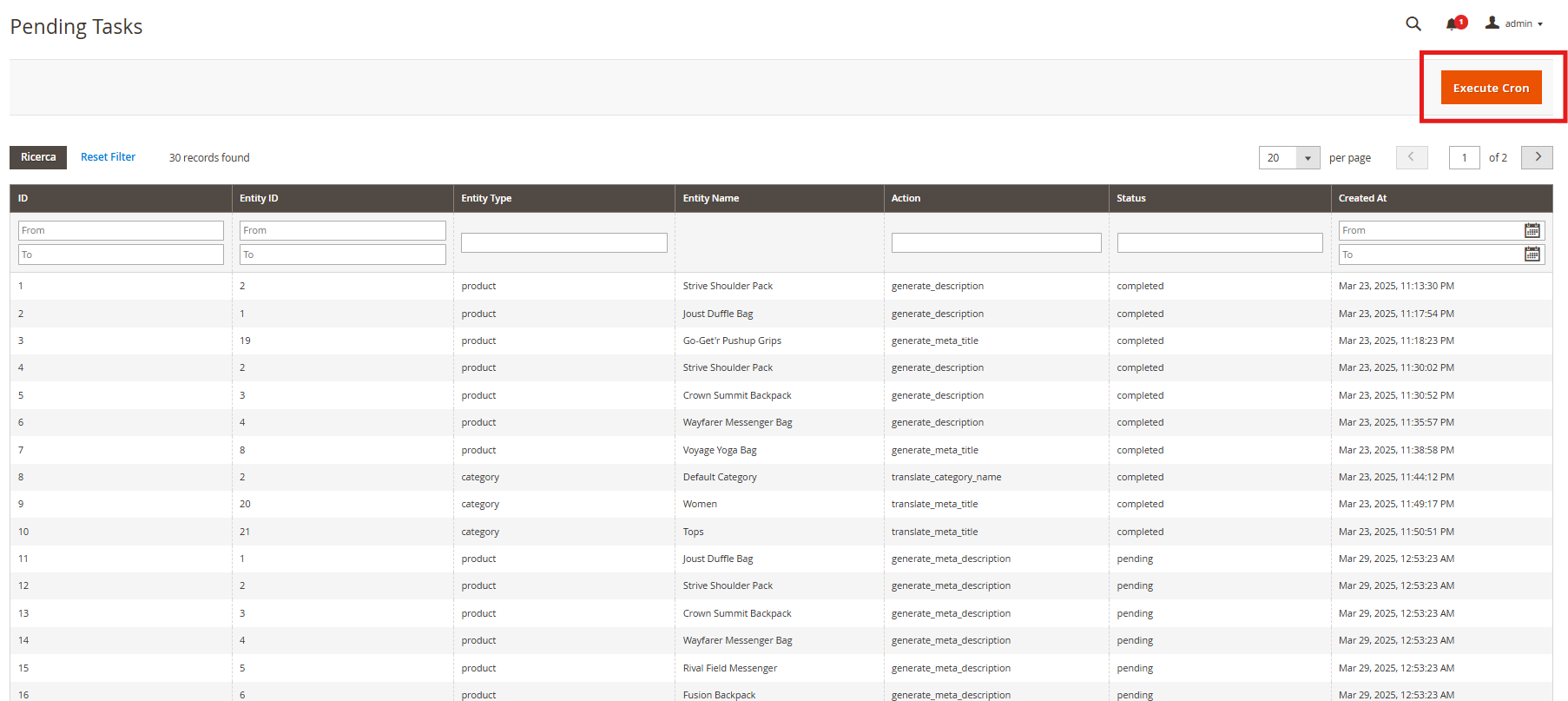
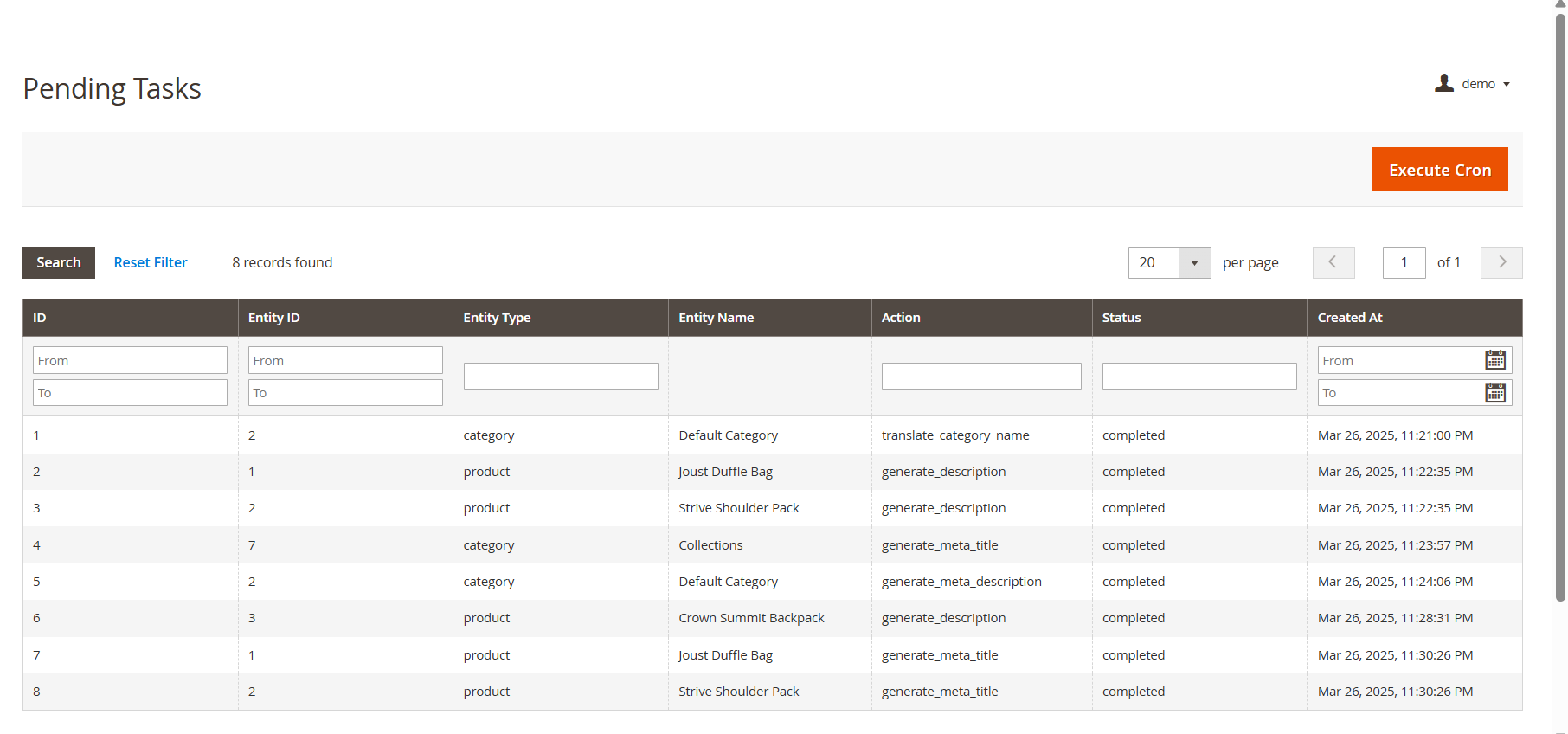
The Pending Task Logs feature in Knowband’s Magento 2 AI Content Generator Extension allows users to efficiently manage and monitor content generation and translation tasks before execution.

How Pending Task Logs Work
When a content generation or translation request is initiated, it is first stored in the Pending Task Logs section. Users can review, modify, prioritize, or delete tasks before execution. Moreover, the “Execute Cron” tab allows manual or scheduled processing, ensuring accuracy and efficient workflow management.
5.0. Steps to Execute the Prompts
The Knowband PrestaShop Claude AI Content Translator module streamlines content generation and translation through a structured process.
Follow these steps to execute prompts efficiently:
Step 1: Product/Category Selection: Choose the products or categories for which you want to generate or translate AI-powered content.
Content includes product descriptions, category descriptions, titles, meta titles, and meta descriptions.
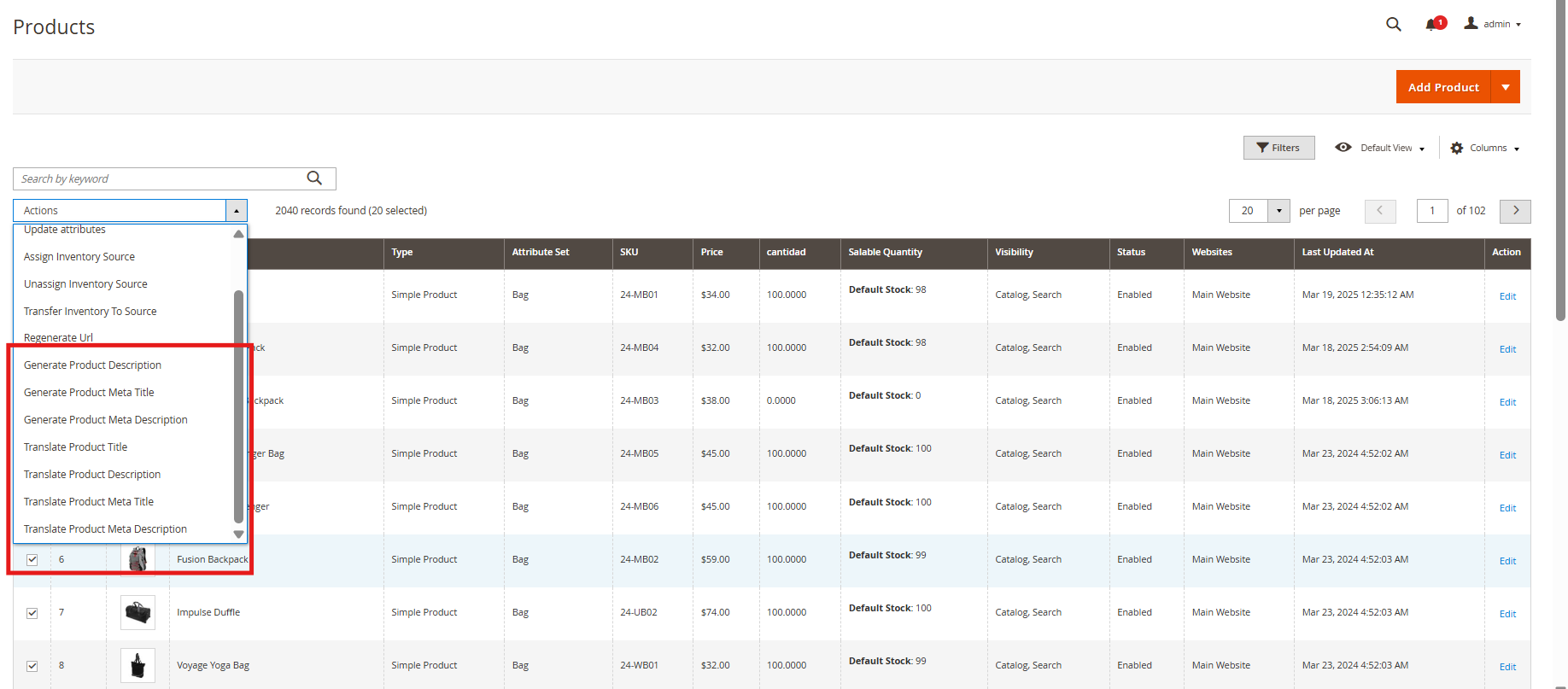
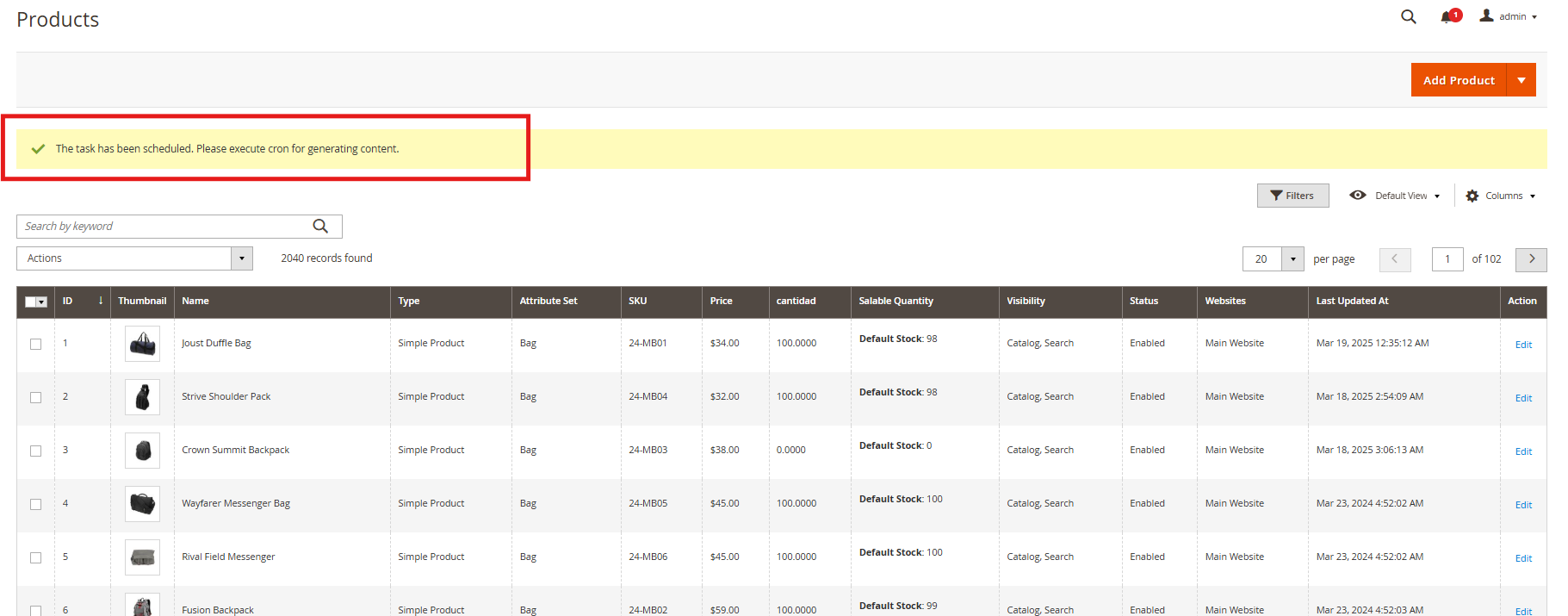
Step 2: Task Execution: Once selections are made, the system sends the content generation or translation requests to the Pending Task Logs for processing.
Managing Pending Task Logs: Review, modify, or remove pending tasks before execution, ensuring accuracy and preventing unnecessary content changes.

Step 3: Executing the Cron Job: Run the cron job to process all pending tasks automatically.
The generated or translated content is applied to the respective products/categories seamlessly.