Getting Started with Knowband’s VideoMate for WooCommerce: Complete User Manual

Elevate your online store with the WooCommerce VideoMate Plugin—a powerful, all-in-one solution designed to seamlessly integrate eye-catching video content throughout your e-commerce experience. Whether you want to enhance product pages, create immersive landing sections, or boost buyer engagement, this Video Manager for WooCommerce helps you tell your brand story in the most captivating way. From increasing dwell time to converting views into sales, it’s the ultimate plugin for visual-driven growth.

You can easily showcase promotional clips, product tutorials, reviews, or user-generated content. Add videos to any part of your site—homepages, product listings, or category pages—without compromising your theme or layout. The plugin’s intuitive interface gives you full control over video placement and presentation, helping you align visuals perfectly with your branding strategy.

Moreover, this WooCommerce Video Manager plugin supports popular formats like Instagram reels, YouTube shorts, and TikTok clips, making it simple to upload downloaded trending social media video content that resonates with today’s shoppers. With built-in upload validation, your files are checked for compatibility and size before processing, ensuring smoother performance and a hassle-free experience. Best of all, everything is managed directly from your WordPress dashboard—no coding is needed.

In short, whether you’re running product launches, educational campaigns, or testimonial-driven marketing, the WooCommerce product video Manager extension makes it easy to turn video content into a sales-driving force. Fully responsive and customizable, it’s the perfect tool to craft a visually rich shopping journey that not only grabs attention but keeps customers coming back. Let your videos do the talking and elevate your brand with one smart plugin.

1.0 Transform Your Store with Dynamic, Customizable Video Features

Transform Your WooCommerce Store with Dynamic Video Content: Start by energising your storefront with the WooCommerce VideoMate Plugin—a powerful video manager for integrating engaging, conversion-ready video content. Moreover, this all-in-one WooCommerce video plugin helps present products, share brand stories, and drive sales with ease.

Streamlined Video Uploads and Management: Upload and organize reels, clips, and video assets directly from your WordPress dashboard. The built-in video uploader WooCommerce Plugin offers simple, drag-and-drop management with no technical skills required.

Strategic Placement Across Store Pages: Map videos to specific product pages, categories or home pages. Whether using the WooCommerce product video Extension, you can tailor content placement for maximum visibility.

Responsive, Interactive Displays: After that, showcase content using the WooCommerce video carousel Extension or the sleek WooCommerce floating video widget Plugin. These responsive elements make it easy to highlight tutorials, promos, or featured products in an engaging layout.

Full Customisation and Mobile Optimisation: Moreover, customise autoplay, headers, video counts, and layout styles to match your store’s branding. The entire WooCommerce VideoMate Extension is mobile-optimised and built to deliver a smooth, consistent experience on all devices.

Make Your Homepage Work Harder: In addition, grab attention from the start with the WooCommerce homepage video Extension. Use it to introduce your brand, showcase promos, and product reviews or tell your story right on your storefront’s first impression.

Bring in Social Proof with Ease: Further, integrate trending formats like reels and shorts using the WooCommerce Instagram Video  Manager Plugin or embed content from platforms like TikTok and Twitter. Boost credibility with real-time customer engagement without redirecting visitors offsite.

Centralised Admin Control: Lastly, streamline your workflow with one unified dashboard. Whether you’re adjusting a single clip or managing a full library, the WooCommerce Video Manager Plugin simplifies your video strategy

2.0 Installation Guide for WooCommerce VideoMate Plugin

Step 1: Download the Plugin

After purchase completion, download the wcvideomate.zip file, which contains the complete video manager plugin for WooCommerce.

Step 2: Upload via WordPress Plugin Installer


Click on “Upload Plugin” and select the wcvideomate.zip file from your device.
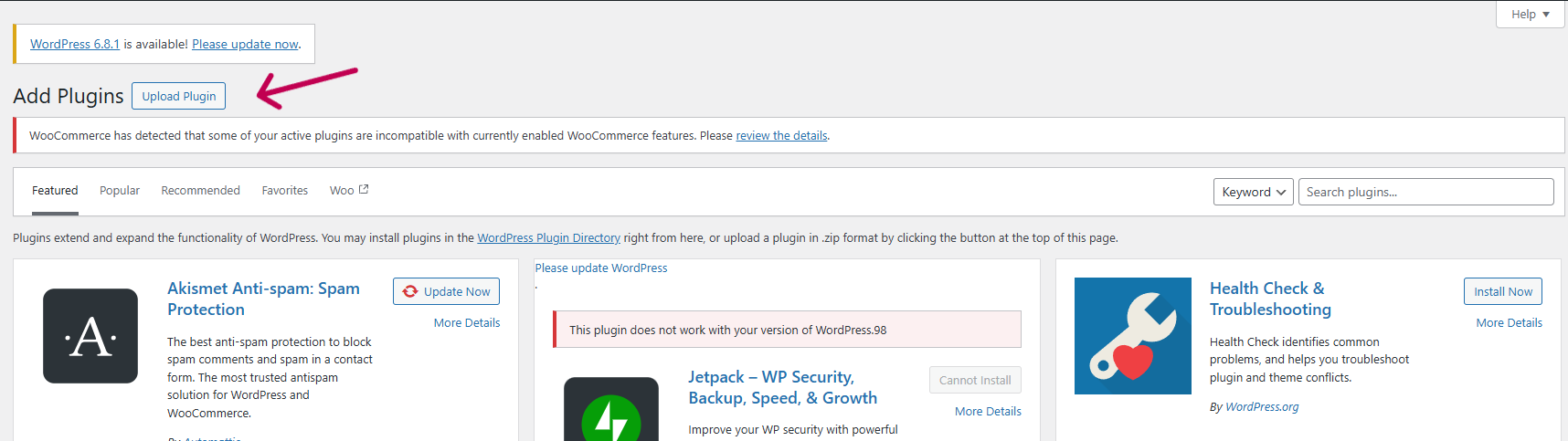
 

Upload the zipped file and click “Install Now” to begin the installation process.

 

After the installation is complete, click “Activate Plugin” to start using it on your WooCommerce store.

Step 3: Access the Plugin

Navigate to WooCommerce > VideoMate in your WordPress admin dashboard to begin configuration.

3.0 Backend Setup Guide for WooCommerce Video Manager Plugin

3.1 General Settings
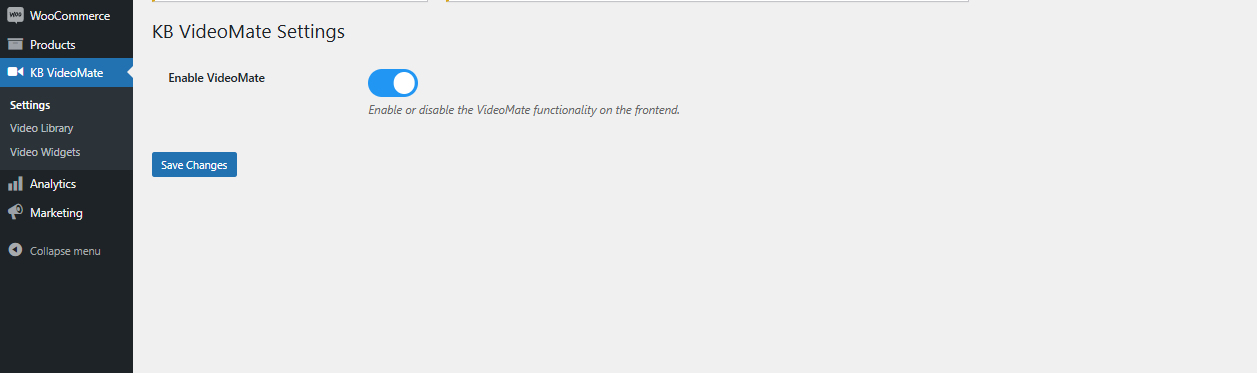
Enable/Disable Plugin: Easily turn the WooCommerce video plugin on or off with a single toggle—no complicated setup needed.

3.2 Video Library Management
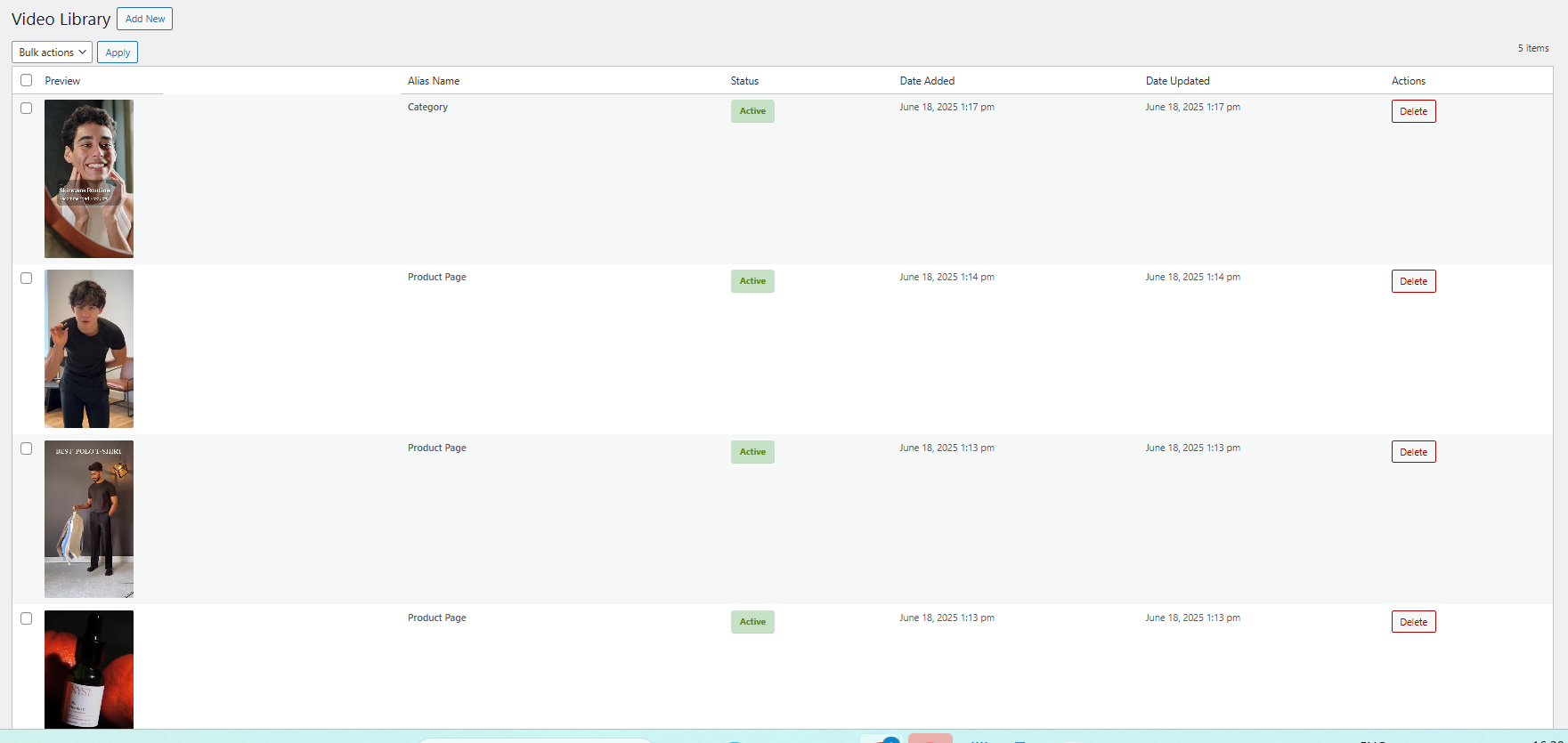
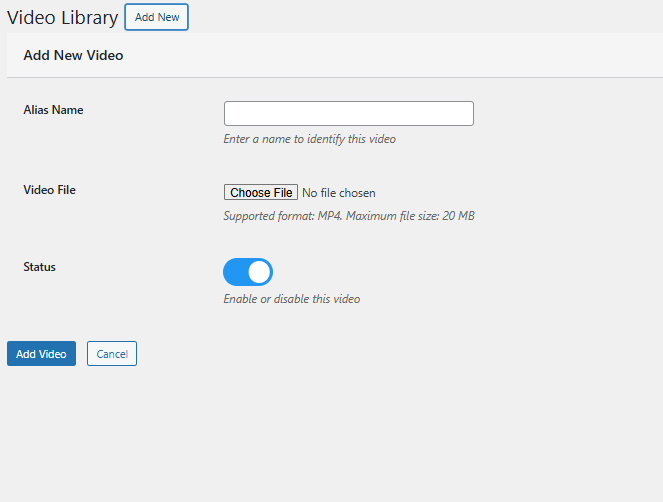
Add New Video: Upload files and assign descriptive names. Furthermore, store administrators can preview videos before configuring widgets using the WooCommerce Video Integration Plugin.

Alias Name: Add the alias name corresponding to the video for identification.

Status Management: Effortlessly enable or disable any video, reel, or clip within the Video Library using the edit option.

Upload: Seamlessly upload saved Instagram or TikTok reels and clips to showcase them on your store using the Social Media Video Plugin for WooCommerce.
Content Removal: Delete any videos you no longer require with a single click—quick and efficient.

3.3 Video Widget Configuration

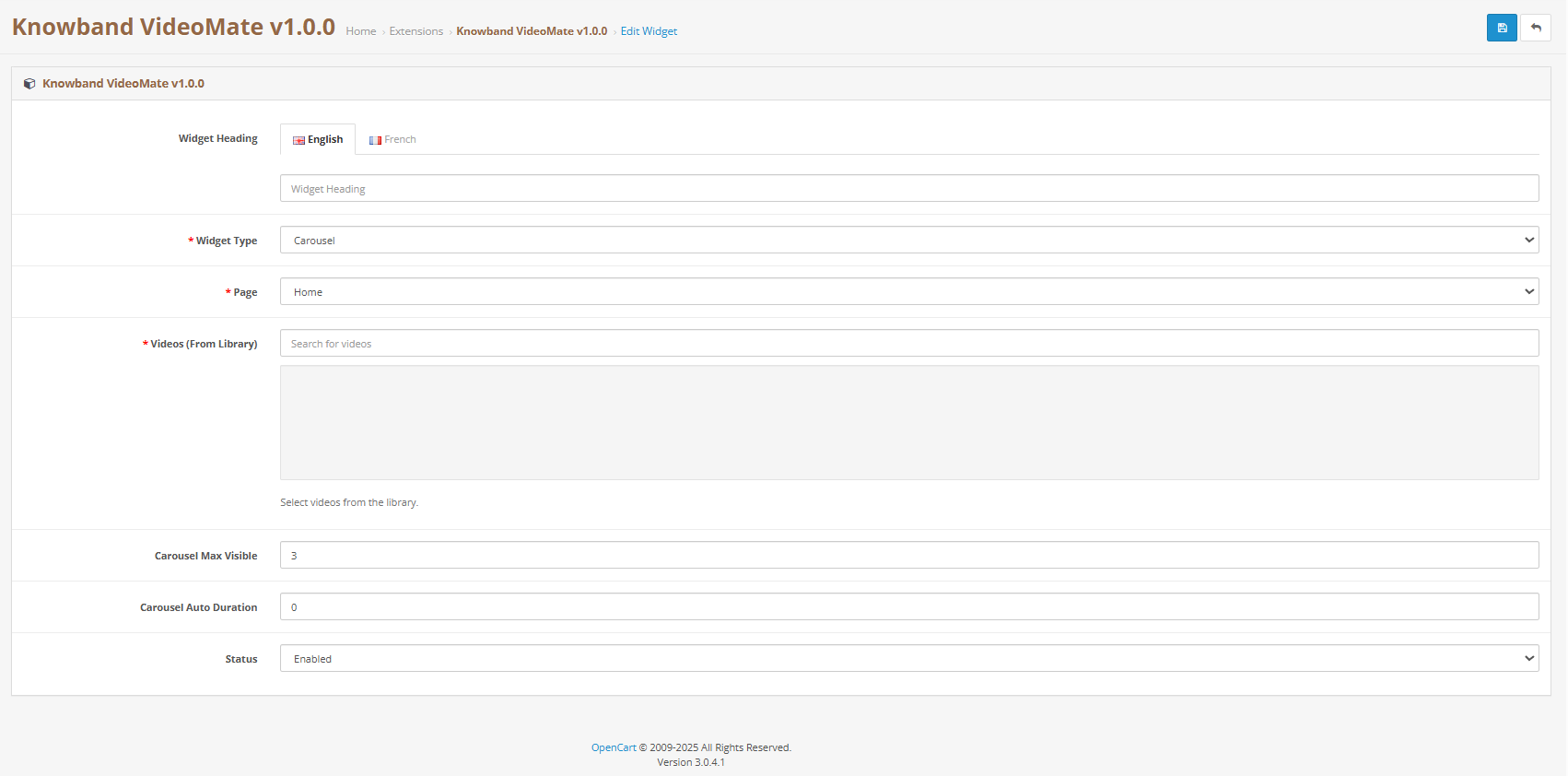
Widget Title: Set a custom title for your video widget to align with your store’s theme and engage your visitors effectively.

For example, use titles like “Customer Favourites”, “Product Showcases”, or “Tutorial Videos” to guide your customers and create a more personalised experience.

Create a New Widget:
Easily configure a new video widget to showcase content on product pages, category listings, or the homepage.

Select Page Type:
Choose where the widget will appear—whether on the homepage, specific product pages, or category sections.

Map to Products or Categories:
Assign your videos or clips to selected products or categories for targeted and relevant video placement.

Widget Type: Select either a carousel or a floating video widget, depending on your store’s layout, customer browsing habits, or visual design preferences.

Carousel Display: Create engaging multi-video sliders effortlessly with the WooCommerce Video Manager Extension. Use the video carousel feature to showcase several videos in a sleek, scrollable layout. Simply choose the clips you want to feature—ideal for promoting products, highlighting offers, or sharing brand stories in a single interactive view.
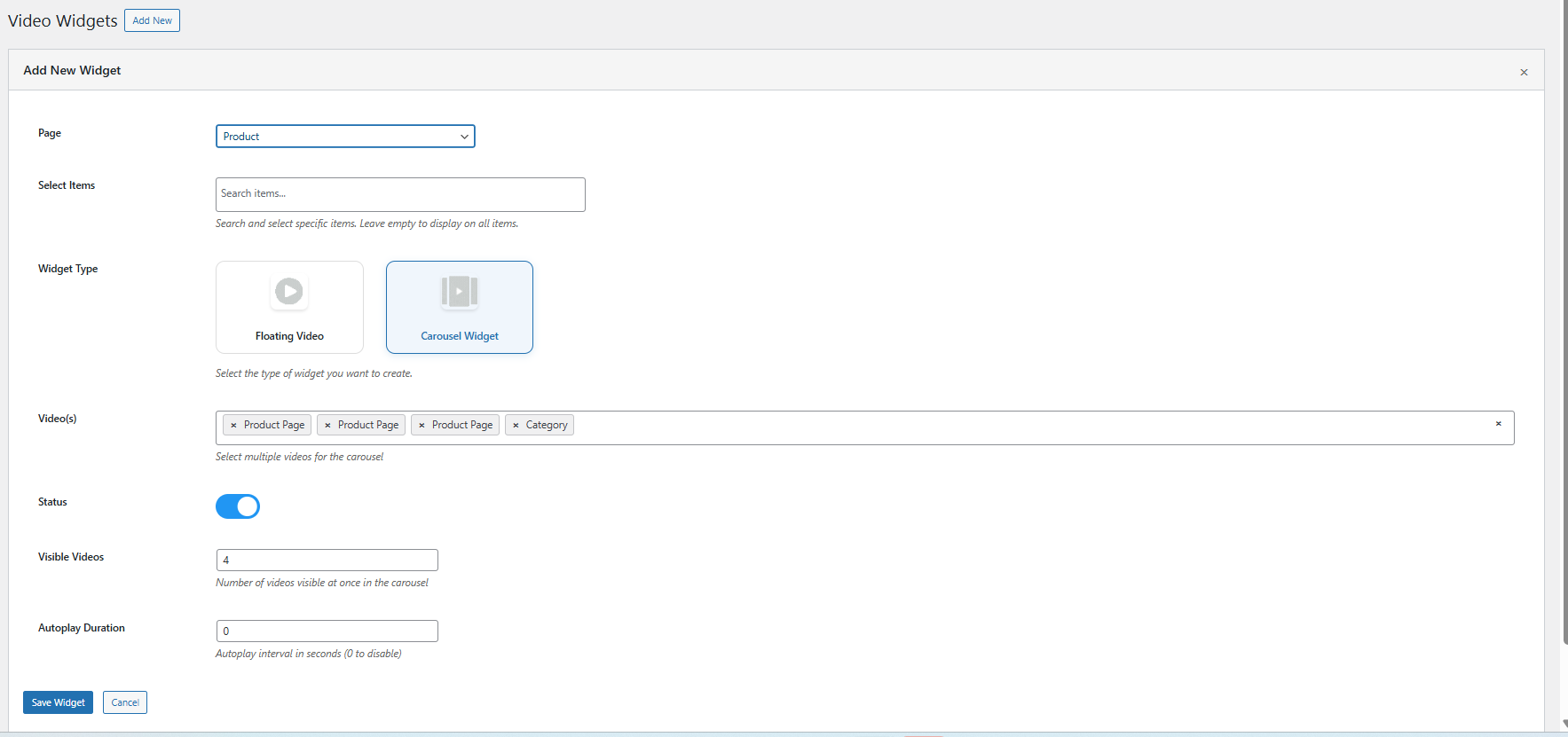
 

Floating: Add a floating widgets for video via the WooCommerce floating video widget extension.


Autoplay Configuration: Adjust how long each video plays automatically by setting a specific timer value in seconds for every widget. This feature ensures videos begin automatically after a specified delay, helping to capture attention without user interaction.

Display Positioning: Customize the exact placement of your floating video to align perfectly with your store’s layout and visual design.

Maximum Video Limit: Limit the video count in the carousel to keep your storefront organized and visually appealing.

Widget Visibility Control: Effortlessly enable or disable individual widgets with a simple toggle. This flexibility is ideal for seasonal campaigns, limited-time offers, or experimenting with different layouts

4.0 Benefits of Using WooCommerce VideoMate Plugin

Keep Customer Hooked with Engaging Videos

To begin with, using video through the WooCommerce product video Extension or product video WooCommerce Extension encourages shoppers to stay longer, explore deeper, and make better-informed buying decisions. As a result, it enhances user experience and reduces bounce rates significantly.

Turn Views into Sales with Video Conversions

Additionally, the WooCommerce VideoMate Plugin is a powerful solution for implementing effective video marketing on WooCommerce stores. By demonstrating product value through in-store video content, you can create emotional connections, build trust, and ultimately drive higher conversion rates.

Place Videos Where They Convert Best

In addition, with the WooCommerce Video Manager Plugin, you can position content exactly where it matters most. Whether it’s on your homepage, product pages or in collections via the WooCommerce video Plugin, your videos remain both strategic and impactful. Plus, display content elegantly using the WooCommerce video carousel Extension for an engaging visual layout.

Plug in Social Proof with TikTok & Reels

Furthermore, enhance your storefront with dynamic, real-time video content using the WooCommerce VideoMate Extension. Easily upload trending TikTok videos and embed clips using the Instagram video on WooCommerce Plugin. Moreover, this is perfect for influencer campaigns, customer testimonials, and user-generated content.

Manage Videos with Ease—No Code Needed

With the intuitive design of the WooCommerce Video Manager Plugin, you can add videos to WooCommerce Plugin-based stores without touching a single line of code. With plugins like the video uploader WooCommerce Plugin by KnowBand, managing your media becomes quick, centralized, and seamless

5.0 Support & Assistance

If you face any issues during installation or while using the plugin, feel free to reach out to our support team:

Email: support@knowband.com
Helpdesk: knowband.com/helpdesk

We’re happy to assist you with configuration, troubleshooting, or any feature-related queries regarding your WooCommerce video integration plugin.

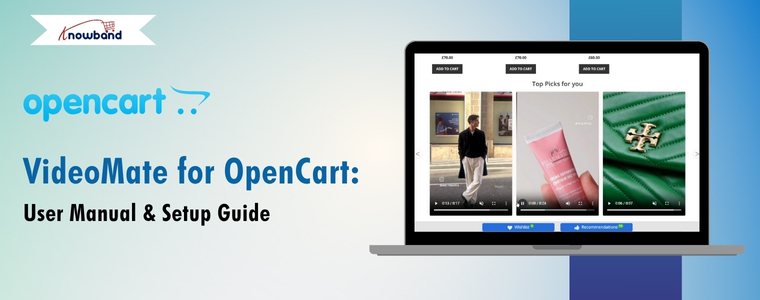
 

VideoMate for OpenCart: User Manual & Setup Guide

Elevate your online store with the OpenCart Video Manager Extension, a powerful and flexible extension designed to integrate high-impact video content throughout your e-commerce site. Whether you’re aiming to improve product visibility, boost user engagement, or increase conversions, this all-in-one video plugin for OpenCart makes video integration seamless and efficient.

With support for various display options such as the carousel extension, floating video widget, and single video embeds—you can highlight featured products, promotions, or brand stories directly on your homepage, product pages, or category listings. The module includes flexible placement settings, making it simple to adapt to your layout and marketing goals.

Designed for simplicity, the OpenCart VideoMate extension includes a powerful video uploader built for smooth integration with OpenCart. Moreover, the video manager for opencart features browser-based (client-side) validation to ensure files meet format and size requirements before they’re uploaded, reducing errors and improving speed. A built-in video library makes it easy to manage and organize content right from your admin panel—no technical expertise is needed.

Moreover, you can easily update video status, manage uploads, and organize your media for quick access and consistent presentation. The extension also supports displaying downloaded Instagram and Twitter reels, along with social clips from other platforms—making it a comprehensive, all-in-one video manager extension for OpenCart.

Furthermore, whether you’re aiming to create an immersive shopping experience, build a captivating in-store video gallery, or leverage video content for promotions, tutorials, or customer reviews, this plugin is purpose-built to deliver results. With powerful features like OpenCart homepage video integration and category-level video embedding, you can strategically position engaging content where it captures the most attention and maximizes impact.

Ideal for modern merchants, this video marketing plugin for OpenCart is fully responsive, highly customizable, and designed for ease of use—no coding required. Boost conversions and strengthen customer engagement with this all-in-one e-commerce video extension built to elevate your store’s visual experience.

1.0 Key Features of OpenCart VideoMate Extension

Transform Your OpenCart Store with Engaging Video Content: First and foremost, bring your storefront to life with dynamic video integration. Whether you’re showcasing products, running promotions, or telling your brand story, this all-in-one OpenCart video plugin empowers you to create a visually engaging and conversion-driven shopping experience.

Easy Video Uploads with Built-In Library Management: Next, upload and manage clips, reels, or videos directly from your OpenCart admin panel using the intuitive and reliable video uploader. Organize your media effortlessly and access your complete video library from one centralized location—no coding required.

Targeted Video Placement Where It Matters Most: Moreover, with advanced video mapping, you can assign videos to specific products, categories, or custom pages. Whether using the OpenCart product video extension or the category video plugin, you’re fully in control of where your content appears—maximizing relevance and visibility.

Choose from Multiple Responsive Widget Types: In addition, display multiple videos in an interactive, scrollable layout using either the video carousel or floating video widget. This is ideal for showcasing featured products, tutorials, or promotional clips in a sleek, engaging format.

User-Controlled Video Players: Furthermore, the OpenCart Video Manager Extension is fully responsive, ensuring seamless adaptation across desktops, tablets, and mobile devices for a consistent user experience.

Customize Every Detail with Display Controls: Finally, fine-tune how your videos appear and perform. Set autoplay timers, define widget titles, control the maximum number of displayed videos, and adjust additional display settings—all with ease. These customizable features help align your video content with your store’s branding and customer experience strategy.

Boost First Impressions with Homepage Video Integration: Leverage the OpenCart homepage video extension to capture attention the moment visitors arrive. Significantly, the extension is ideal for showcasing promotions, introducing your brand, or delivering impactful storytelling right on your storefront’s front page.

Enhance Browsing with Category-Level Video Support: Upload videos directly on category landing pages using the OpenCart category video plugin. Showcase themed collections, seasonal content, or product highlights to encourage exploration and boost click-through rates.

Connect Your Store to Social Media
Seamlessly incorporate external content with built-in support for Instagram and Twitter video formats on the OpenCart plugin. Showcase real-time engagement, customer testimonials, or influencer partnerships—all without requiring visitors to leave your store.

Fully Responsive and Mobile-Optimized
No matter how your customers browse—on desktop, tablet, or smartphone—your video content will look and perform flawlessly. This Knowband’s VideoMate extension for Opencart ensures a smooth, responsive experience across all devices.

Simplified Management with Centralized Admin Control
Additionally, manage all video assets, widgets, and settings from a single, user-friendly dashboard. Whether you’re updating a single video or overhauling your entire video strategy, the streamlined admin interface makes everything quick and efficient.

The Complete Video Marketing Toolkit for OpenCart
Finally, from promotional clips to product tutorials and authentic social proof, this powerful e-commerce video extension provides everything you need to build a media-rich, high-converting OpenCart store. It’s customizable, responsive, and simple to manage—your all-in-one solution for modern video integration

2.0 Installation Guide for Knowband’s OpenCart VideoMate Extension

Step 1: Download the Extension

After purchasing, download the videomate.ocmod.zip file, which contains the complete video plugin for OpenCart.

1. Unzip the downloaded file – this will contain the videomate.ocmod.zip and necessary folders.
2. Go to the upload folder and locate the admin and catalog files.


3. Copy these files into the root directory of your OpenCart store

Step 2: Upload via Extension Installer

  1. Go to Extensions > Extension Installer in your OpenCart admin panel.
  2. Upload the videomate.ocmod.zip file.
  3. Once installed, go to Extensions > Modifications, and click Refresh to apply changes.

Step 3: Assign User Permissions

Navigate to System > Users > User Groups, then edit your group and enable permissions for extension/module/videomate.

Step 4: Enable the Module

Navigate to Extensions > Extension Installer in your OpenCart admin dashboard.

3.0 Admin Panel Configuration of OpenCart Video Manager Extension

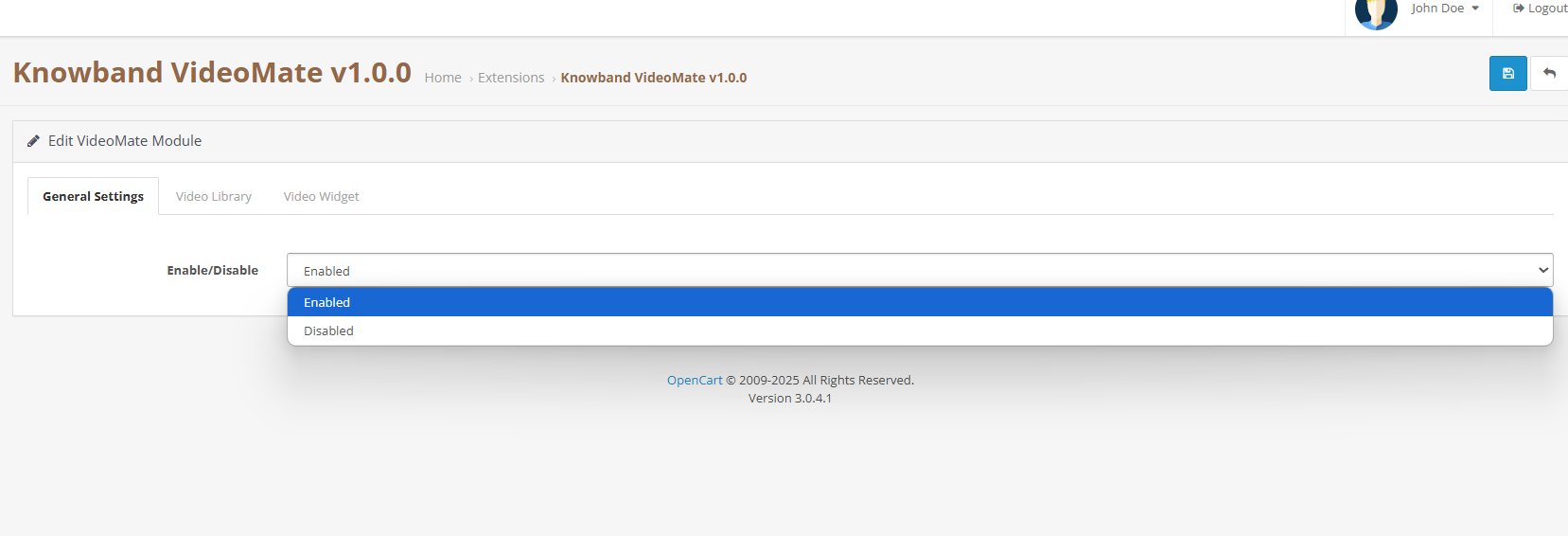
3.1 General Settings

  • Enable/Disable Module: Easily turn the OpenCart video plugin on or off with a simple toggle as no complex setup is required.

3.2 Video Library Management

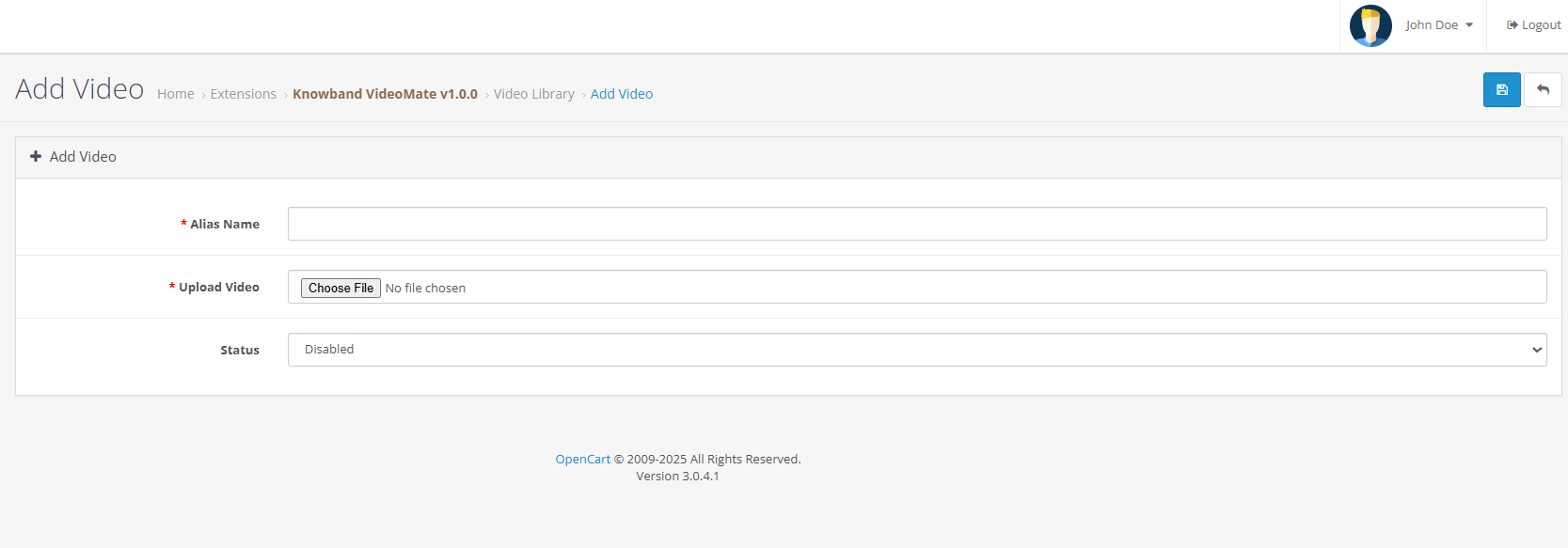
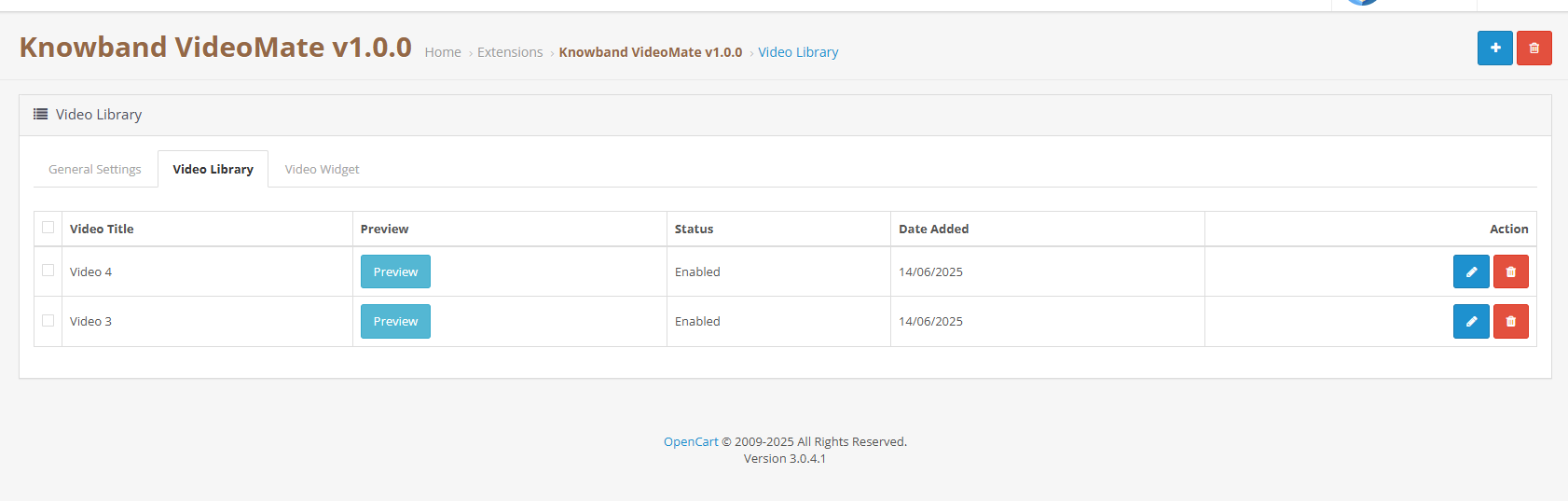
  • Add New Video: Upload files and assign alias names. Moreover, store owners can preview the videos before setting up the widget using Knowband’s Opencart Video Integration Extension. 
  • Status Toggle: Easily activate or deactivate any video, clips or reel from the Video Library by clicking on edit.
  • Social Media Videos or Clip Upload: Add downloaded reels, and clips from Instagram or Twitter to display via the social media video OpenCart plugin.
  • Delete: Remove any videos you no longer need with a single click—quick and hassle-free.
  • Preview: Preview the videos before mapping to the widgets.

3.3 Video Widget Configuration

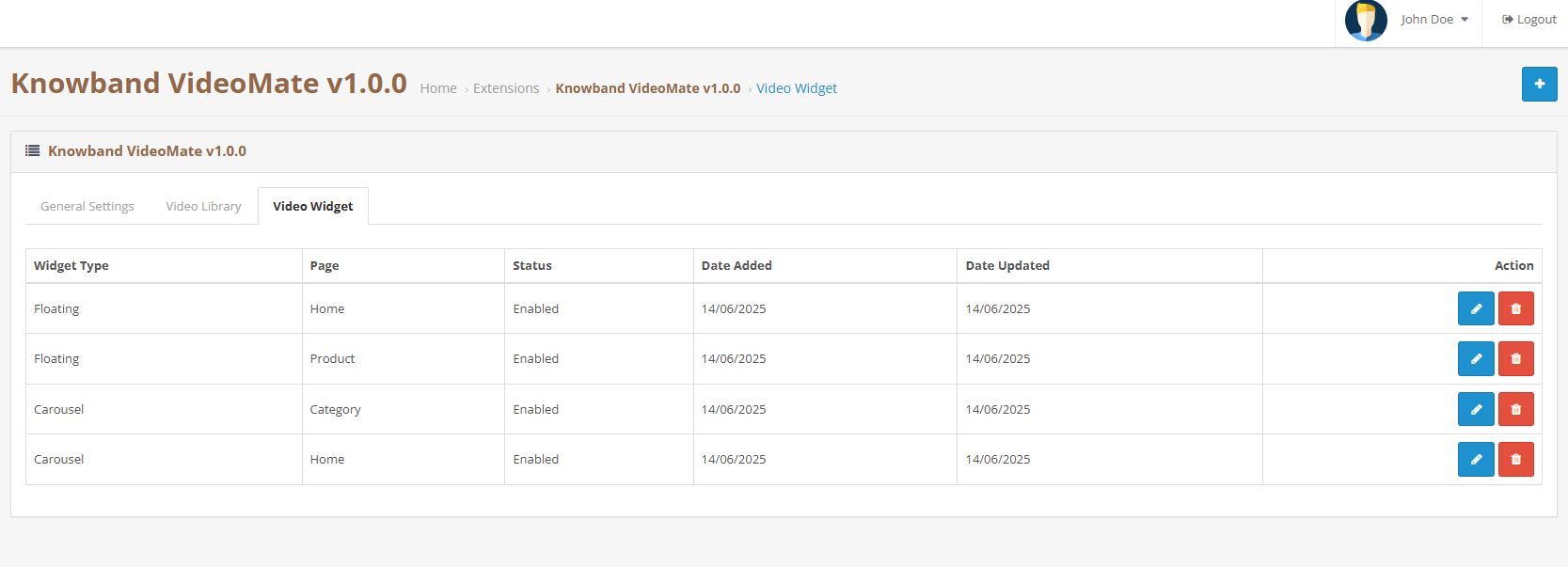
  • Widget Title: Assign custom titles to each video widget to match your branding or content strategy. For example, use titles like “Top Picks for You”, “Product Highlights”, or “How-To Videos” to guide your customers and create a more personalized experience.
  • Create a New Widget: Define a new widget for products, categories, home, or custom pages.
  • Page Type Selection: Choose display location (homepage, category, product, custom layout).
  • Entity Mapping: Select specific products or categories to which you want to add clips or videos.
  • Widget Type: Choose between a carousel or floating video widget based on your store’s layout, user behaviour, or current design trends. Each option offers a unique way to present engaging video content.
  • Carousel: Enables multi-video sliders via the OpenCart video carousel extension.
  • Showcase multiple videos in a sleek, scrollable slider using the OpenCart video carousel extension. Simply select and add the videos you want to be featured in the carousel—perfect for highlighting products, promotions, or brand content in one interactive view.
  • Floating: Choose Floating as video widgets for videos via the Knowband’s OpenCart floating video widget extension.
  • Autoplay Settings: Set a custom autoplay timer (in seconds) for each video widget. This feature ensures videos start automatically after a defined delay, helping to capture attention without user interaction.
  • Widget Positioning: Store owners can choose to place the video to be placed on the right or left. Control exactly where your floating video appears to align with your store’s layout and design
  • Max Videos: Set the maximum number of videos to display within the carousel to keep your layout clean, focused, and user-friendly.
  • Widget Status: Easily control the visibility of each widget with a simple enable/disable toggle. Show or hide video sections on demand—perfect for seasonal content, limited-time promotions, or testing different layouts.

4.0 Benefits of Using OpenCart VideoMate Extension

Increase Engagement & Time on the Site
First and foremost, using video through the OpenCart product video extension encourages customers to explore products longer and make informed purchase decisions.

Improve Conversion Rates
Secondly, VideoMate is ideal for in-store video marketing, which can significantly boost product page conversions by showcasing product value more effectively.

Versatile Video Placements
In addition, you can display content on the homepage, category pages, product pages, or custom layouts using various video formats and widget types to suit your store’s needs.

Instagram Video Integration
Moreover, enhance your storefront with real-time, dynamic content by uploading downloaded Instagram videos directly into the OpenCart VideoMate plugin—perfect for showcasing social proof, influencer clips, or behind-the-scenes moments.

Easy to Use
Lastly, with its intuitive UI and centralized controls, the OpenCart Video Manager Extension makes it simple to add videos to OpenCart plugin-based stores without any technical expertise.

5.0 Tutorial: Watch the Video Guide

To help you set up and use the Opencart Video Manager Plugin, we have created a comprehensive YouTube tutorial. This step-by-step video guide walks you through the installation process, configuration options, and how to effectively add and manage video content on your store.

6.0 Support & Assistance

If you encounter any issues during installation or usage, please contact our support team via:

We are happy to assist you with configuration, troubleshooting, or feature-related questions for your OpenCart video integration plugin.

New Release: Supercharge Your eCommerce Store with VideoMate – Now on PrestaShop, WooCommerce & OpenCart

In today’s competitive eCommerce space, standing out requires more than just great products. It demands immersive, informative, and visually engaging shopping experiences. While product images serve as a basic necessity, they often fail to deliver the full picture. This is where video content becomes a game-changer—and why merchants across platforms are turning to modern video solutions to enhance the aesthetic appeal of their stores and connect with today’s visual-first customers.

Recognizing this growing demand, Knowband has launched the much-anticipated VideoMate Addon. Now available for PrestaShop, WooCommerce, and OpenCart, VideoMate is an all-in-one eCommerce video solution designed to bring your store to life with high-impact video marketing. Whether you want to display how-to guides, showcase product reviews, tell your brand story, or integrate short-form content from social platforms, this robust e-commerce video module simplifies it all.

Why Your Store Needs Video

To begin with, modern customers prefer to see products in action. The video gives them the next best thing to a hands-on experience, offering clarity, confidence, and connection that static visuals can’t match.

Studies show that customers are more likely to convert after watching a product video. That’s because video:

  • Provides better product understanding
  • Reduces hesitation and return rates
  • Builds trust through authenticity
  • Enhances emotional engagement
  • Increases time-on-site and improves SEO

Clearly, integrating video isn’t just a creative enhancement—it’s a conversion strategy.

How Video Content Influences Buyer Behavior

More specifically, video content speaks directly to the way online customers consume information. A PrestaShop Video Manager Module, for instance, lets customers see a product’s features, texture, and use cases. Similarly, a well-placed OpenCart product video extension builds credibility with visual proof, making it easier for customers to say “yes.”

Through a Prestashop Video Manager addon, you can share your brand’s mission, showcase behind-the-scenes content, or present video testimonials that make your store feel more human. In addition, short-form content such as downloaded Instagram Reels or Twitter videos can be uploaded using the PrestaShop Instagram Reels Addon or the OpenCart Twitter video plugin—further extending your reach and consistency across channels.

How Knowband’s VideoManager Addon for Prestashop, Opencart & WooCommerce Helps Your Store Stand Out

Fortunately, VideoMate takes the complexity out of video marketing. Whether you’re running PrestaShop, WooCommerce, or OpenCart, this addon allows you to upload, place, and manage videos across your store with ease. As a result, you can enhance product pages, boost homepage engagement, and even feature time-sensitive offers with floating widgets—all without technical skills.

By supporting formats such as a PrestaShop homepage video module, a PrestaShop video carousel module, and a floating video widget for both OpenCart and PrestaShop, VideoMate offers unmatched flexibility.

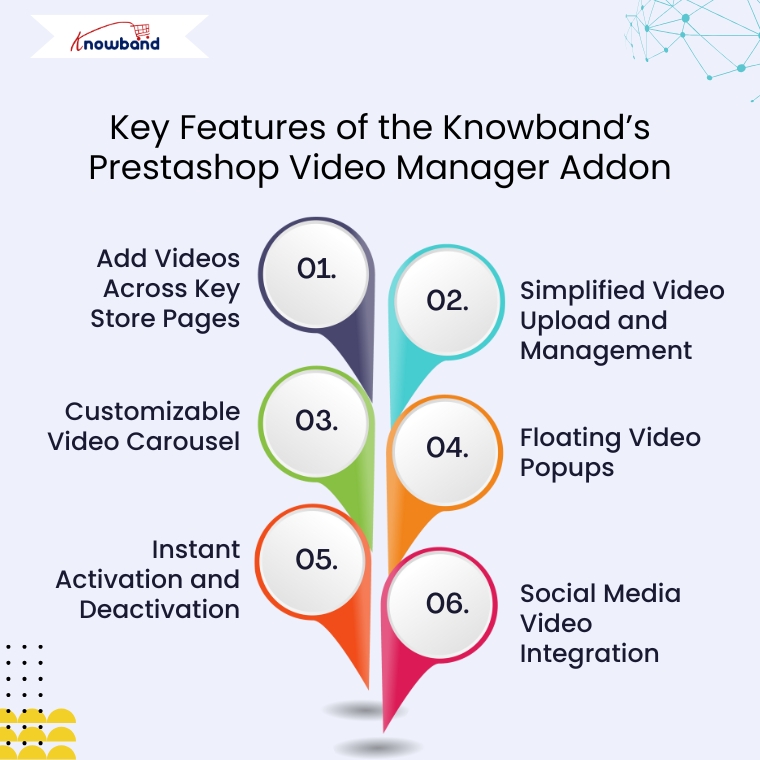
Key Features of the Knowband’s Prestashop Video Manager Addon

Add Videos Across Key Store Pages

First and foremost, VideoMate enables video placement on all crucial store pages. This includes product pages, category pages, homepages, best-seller sections, and even new arrivals. With options like the PrestaShop homepage video module and the OpenCart category video plugin, you can deliver compelling content exactly where it matters most.

Simplified Video Upload and Management

Next, the built-in video uploader for OpenCart video manager extension makes adding videos incredibly simple. Upload directly from your local system, assign content to specific pages, and edit or remove videos anytime—no coding required. This level of ease turns your store into a flexible video-powered selling machine.

Customizable Video Carousel

To further boost interactivity, the PrestaShop video carousel module and its OpenCart equivalent let you create scrollable, auto-playing video sections. Add custom headings, adjust transition timing, and control how many videos are displayed. This not only modernizes your store’s design but also improves customer engagement.

Floating Video Popups

For time-sensitive promotions or feature highlights, the floating video widget module for PrestaShop and OpenCart floating video extension provide an elegant solution. These popups can be positioned left or right, and are designed to attract attention without disrupting the browsing flow.

Instant Activation and Deactivation

For ultimate control, you can enable or disable videos directly from the admin panel. Whether you’re running seasonal campaigns, testing performance, or updating content, you have real-time flexibility without needing developer support.

Social Media Video Integration

Lastly, the PrestaShop social media video addon and OpenCart video plugin support embedded content from platforms like Instagram and Twitter. This means you can repurpose engaging short-form content—such as reels, product clips, or influencer shoutouts—right into your store. It’s a powerful way to unify your eCommerce and social marketing efforts.

Conclusion

In conclusion, integrating video into your online store is no longer just an enhancement—it’s a necessity. The VideoMate Addon equips merchants on PrestaShop, OpenCart, and WooCommerce with the trending features needed to transform static shopping experiences into engaging, video-rich journeys that build trust and boost sales.

With support for everything from product videos and video carousels to floating widgets and Instagram Reels, this addon combines ease of use with powerful functionality. Whether you’re telling your brand story, showcasing reviews, or launching new collections, VideoMate Plugin for WooCommerce helps you connect with customers in the most compelling way possible.

Explore the full potential of videos with the eCommerce Video Manager Addon because a product seen in videos is a product one step closer to being sold.