The Knowband OpenCart Claude AI Content Generator/Translator Extension is a cutting-edge extension designed to simplify content creation and translation for OpenCart store owners. Leveraging the advanced capabilities of Claude AI, the module helps merchants craft high-quality product descriptions, product titles, category descriptions, meta titles, and meta descriptions while ensuring SEO-friendly content.
The AI-powered translation feature also allows seamless integration with Claude AI, enabling accurate translations to help businesses expand their reach globally.
With this powerful extension, OpenCart store owners can generate engaging and original content effortlessly. Thus, Knowband’s OpenCart AI Content Generator enhances creativity in product descriptions and ensures all generated content aligns with search engine optimization best practices.
Furthermore, the module integrates smoothly with Claude AI API, offering a hassle-free experience for both content generation and translation. The built-in SEO optimization features help improve search rankings while maintaining content integrity.
Whether managing a small boutique or a large e-commerce store, the Knowband OpenCart Claude AI Content Generator streamlines content workflows, ensuring consistency across product listings. The module’s user-friendly interface and robust AI capabilities make it a must-have extension for any OpenCart store looking to scale efficiently.
1.0 Key Features of OpenCart Claude AI Content Generator & Translator Plugin
Create Content Instantly with AI- The OpenCart Claude SEO Content Generator plugin by Knowband allows store owners to craft SEO-optimised product & category descriptions, meta titles, and descriptions. Additionally, the Opencart Claude AI Generator plugin ensures that the content is informative, and optimized for SEO.
Powered by Advanced AI Technology –The extension uses Claude 3.5 Sonnet, Claude 3 Opus, and Claude 3 Haiku to create unique and high-quality content.
Easily Translate Content for Global Reach- The store owners do not need to manually translate product descriptions anymore. Therefore, this AI-powered plugin ensures accurate and natural translations, making it simple to reach customers in different countries.
Improve SEO with Optimized Content- The OpenCart Claude AI Content Generator module ensures that all generated and translated content follows SEO improving rankings on Google. Thus, Integrating relevant keywords naturally helps boost sales and traffic.
Simple Installation & Easy to Use- Designed for a user-friendly setup, the OpenCart Claude AI Content Generator Plugin is easy to purchase and configure. Therefore, the setup is quick and simple, and the interface is designed to be user-friendly for all opencart store owners.
Generate Bulk Content in Seconds – This addon is perfect for stores with large product base catalogues, allowing e-merchants to generate and translate SEO Optimized content for multiple products simultaneously. Therefore, it helps in saving time and effort.
Supports Multiple Languages & RTL Scripts – Whether the customers speak English, Spanish, Arabic, or any other language, this addon supports them all. It also works with right-to-left (RTL) languages.
Customize Content to Fit Your Brand- Furthermore, store owners can customize content length, tone, and style to align with their brand voice, ensuring consistency across all product listings.
2.0 Installation Guide
Setting up the Opencart Claude Module is simple. The e-merchants must follow the simple steps to complete the installation process easily.
When you purchase the Knowband Claude Content Generator/Translator Extension, you will get the following files:
- A zipped file containing the source code for the Opencart Claude content Translator Extension.
- A user manual for the extension to assist you further.
Steps to Install the Extension:
-
Unzip the Downloaded File:
Locate the zipped file in your account under My Account > Downloads and extract it. Once unzipped, you’ll see folders similar to those shown in the illustration below:

-
Transfer Files to the Root Directory
Use an FTP manager to copy all the files and folders from the unzipped folder to the root directory of your Opencart setup.
- Complete the Installation
The module is now successfully installed and ready for configuration.
- Access and Configure the Extension
Navigate to the Admin Panel > Main Menu > Extensions.
3.0 How to Generate the Claude API Key for Module Configurations?
The store owners must get an API key to enable functionality in your opencart store.
Steps to generate the API Key for OpenCart Claude AI Content Generate Extension:–
Step 1: Obtain an API Key:
- Visit https://console.anthropic.com/settings/keys. Create or log into the page to create the API key.

- Go to “ Create key” to get the API Key. Make sure to copy this key for the next step.


Step 2: Paste the API Key in the Opencart Store:
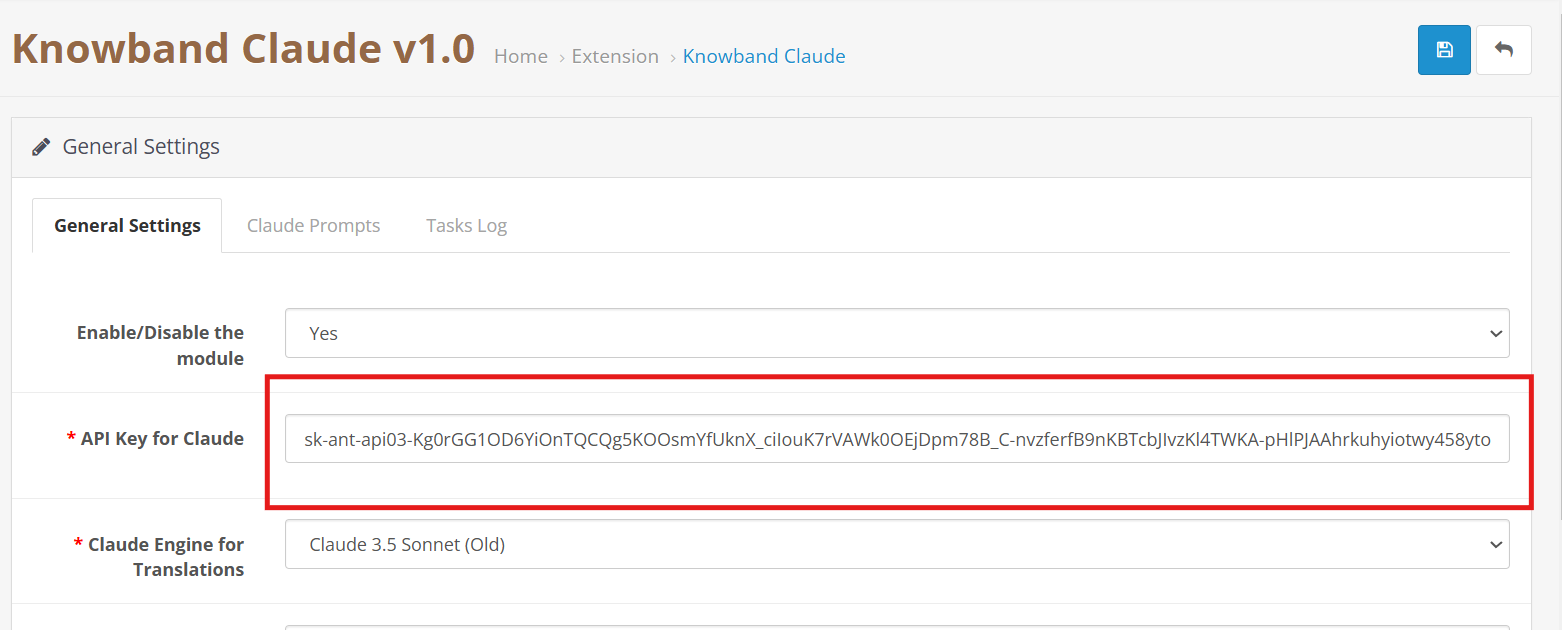
- In your Opencart Store’s Backend, go to the Knowband Claude AI General Settings page.
- Add the API Key into the given API Key for the Claude block.
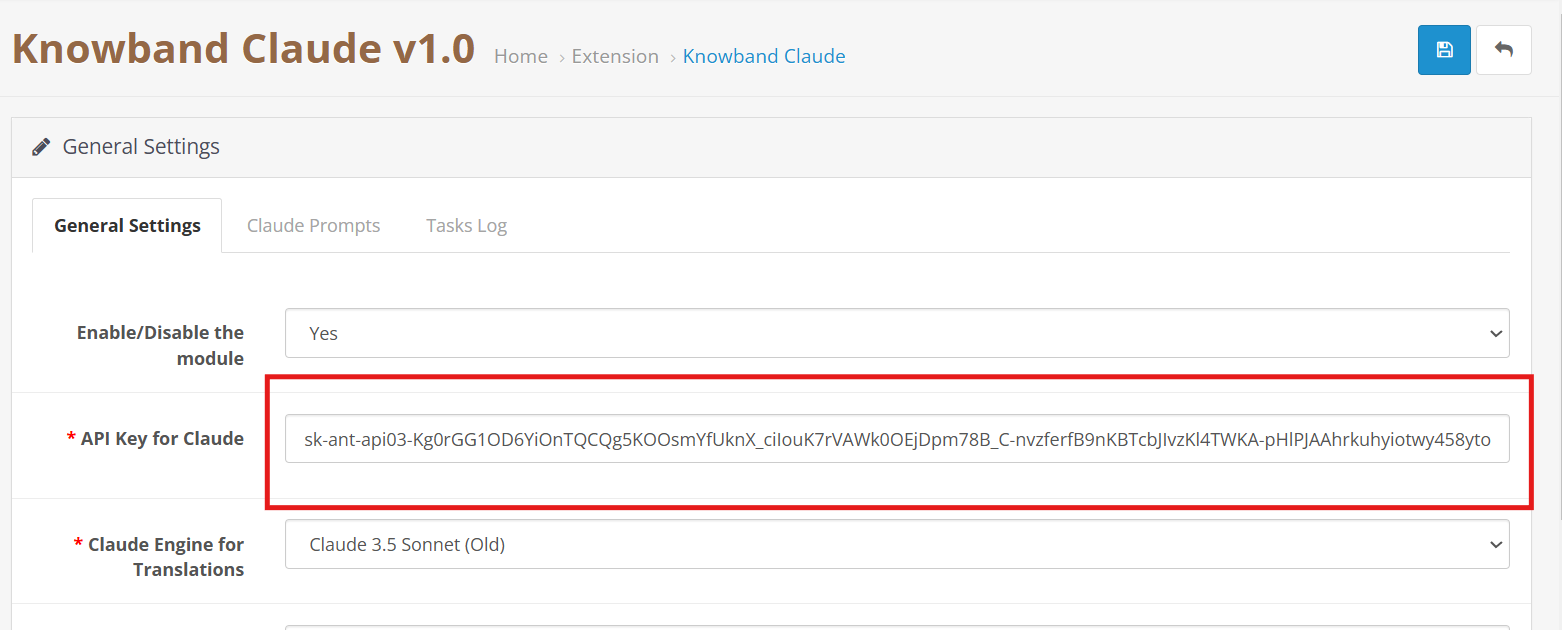
Step 3: Save the Settings:
- After inserting the API Key in General Settings, click Save to Module settings. The Claude AI module will now use this key to interact with the Claude API.
4.0 Admin Interface Overview:
4.0.1 General Setting:

The Opencart Claude Content Translator Plugin by Knowband allows the e-merchant to configure general settings and manage operations efficiently. Therefore, the Knowband provides an intuitive interface that allows the e-merchants to configure the module.
Here is a Brief Overview of the features of the Module
Enable/Disable: E-merchants can enable or disable the OpenCart Claude AI Extension.
API Key for Claude: Add your Anthropic API Key in the required field.
Claude Model Selection: The module allows the e-merchant to select from Anthropic’s models, including Claude 3.5 Sonnet(new), Claude 3.5 Sonnet(old), Claude 3 Opus, and Claude 3 Haiku.
Temperature: Store owners can adjust the creativity level of the content which generally is between 0.0 to 1.0 – higher values represent more creative content, while lower values represent more consistent and focused results.
Maximum Tokens: Store owners can control how much text the AI generates. By default, it uses 2,000 tokens.
Select Claude Engine: E-Merchants can choose which Claude model to use specifically for translation tasks.
Primary Language Content Generator: Choose your primary language for automatic content generation and translation.
Target Languages: The store owners to select which languages they want content translated into.
4.0.2. OpenCart Claude Prompts:
The Extension contains 14 pre-configured prompts designed generator and translator.


Knowband’s OpenCart Claude AI Content Translator Extension– AI Prompts
Product Content Generation
Generate Product Descriptions – Creates SEO-friendly product descriptions with key features and benefits.
Generate Product Meta Titles – Writes optimized meta titles (under 60 characters) with keywords to boost search rankings.
Generate Product Meta Descriptions – Creates concise meta descriptions (within 140 characters) that highlight product details.
Product Content Translation
Translate Product Titles – Converts product titles into multiple languages as needed.
Translate Product Descriptions – Translates descriptions while keeping formatting intact.
Translate Product Meta Titles – Translate meta titles while maintaining the store’s tone and style.
Translate Product Meta Descriptions – Ensures accurate and well-structured translations of product meta descriptions.
Category Content Generation
Generate Category Descriptions – Creates category descriptions while keeping formatting intact.
Generate Category Meta Titles – Writes SEO-friendly meta titles (under 60 characters) with relevant keywords.
Generate Category Meta Descriptions – Generates short and optimized meta descriptions (within 140 characters) with focus keywords.
Category Content Translation
Translate Category Titles – Translates category titles into different languages based on store needs.
Translate Category Descriptions – Translates descriptions into multiple languages while preserving HTML structure.
Translate Category Meta Titles – Ensures SEO-friendly translations of category meta titles.
Translate Category Meta Descriptions – Translates category meta descriptions with accuracy and clarity.
4.0.3. Claude Prompts Task Log:
Knowband OpenCart Claude AI Content Translator Extension Module Task Log

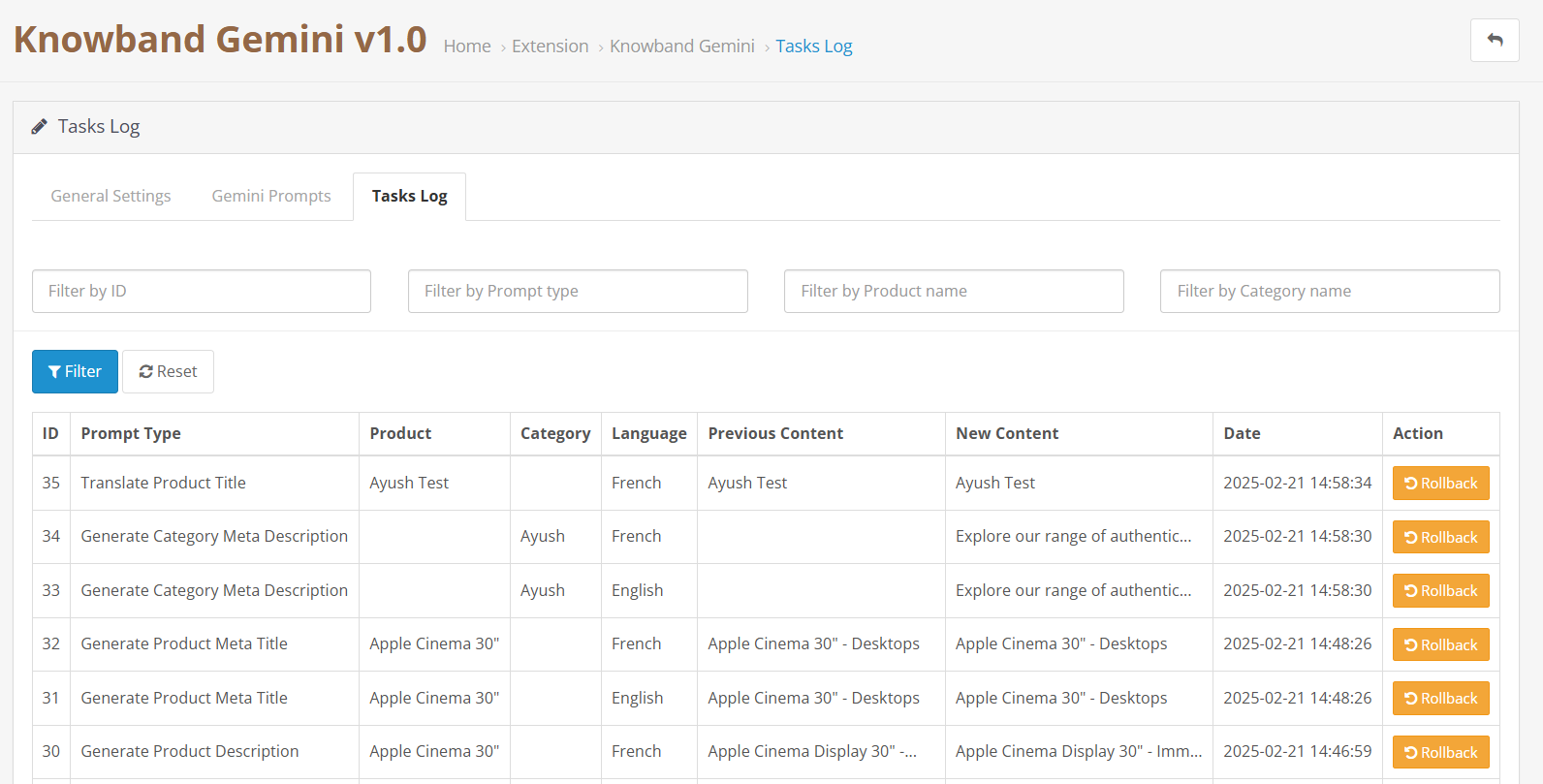
The task logs keep a comprehensive record of all executed prompts with details like Prompt Type, Product, Category, Language, Previous Content, New Content, and time.
5.0 Steps to Execute Claude Prompts?
Knowband OpenCart Claude Prompt Execution Steps
Choose your desired products or multiple products access the Bulk Actions and select the prompt that you want to execute.

Generate Product Meta Titles: Make search-friendly titles for multiple products together to improve online visibility.
Generate Product Meta Descriptions: Create informative summaries for many products simultaneously that help shoppers understand what you offer.
Translate ProductTitles: Convert your product names into different languages to reach international customers.
Translate Product Descriptions: Transform your product information into various languages so more people can understand what you sell.
Translate Product Meta Titles: Turn your search titles into multiple languages for better global search visibility.
Translate Product Meta Descriptions: Use Knowband’s Claude AI to translate product summaries into different languages all at once.