Magento 2 Claude AI Content Generator/Translator Addon – User Manual

The Magento 2 Claude AI Content Generator/ Translator Plugin is a cutting-edge solution designed to streamline content creation and generation for Magento 2 store owners. Powered by Claude AI, the Magento 2 Claude AI Translator module enables merchants to generate high-quality SEO optimized product descriptions, engaging product titles, category descriptions, meta titles and meta descriptions for both product and category as well.  As a result, businesses can attract more visitors, improve search engine rankings, and boost conversions effortlessly.

Moreover, the Claude AI Content Generator for Magento 2 integrates seamlessly with Claude 3 Haiku, Claude 3.5 Haiku, Claude Sonnet old and Claude Sonnet new AI engines, ensuring a smooth and hassle-free experience. The Magento 2 SEO Content Translator Plugin is a SEO Content Generator, guaranteeing unique, compelling, and search engine-friendly content. Additionally, Knowband’s Magento 2 Claude AI Content Translator Extension allows merchants to expand globally with accurate and natural-sounding translations.

1.0 Key Features of Magento 2 Claude AI Content Generator/Translator Extension

AI-Powered Content Generation: The Magento 2 Claude SEO Content Generator/Translator Plugin by Knowband enables merchants to create compelling product descriptions, meta titles, and SEO-friendly content effortlessly. By leveraging the advanced Claude AI model, the extension ensures that all content is engaging, informative, and optimized for better search engine rankings.

Cutting-Edge AI Technology: The AI-driven translation extension for Magento 2 utilizes Anthropic’s latest Claude AI models, including Claude 3.5 Sonnet new and old, and Claude 3 Haiku new and old. Moreover, with these advanced AI engines, merchants can generate high-quality content and precise translations, enhancing the store’s global reach.

Smart AI-Powered Translation: The Magento 2 AI Translation Extension guarantees accurate and contextually relevant translations with minimal effort. As a result, merchants no longer need to translate product details manually, saving time while ensuring linguistic accuracy across different markets.

User-Friendly Installation & Configuration: Designed for seamless integration, the Magento 2 Claude AI Content Generator Extension features an intuitive interface. Additionally, even store admins with no coding experience can easily install, configure, and start using the extension without any hassle.

Bulk Content Creation for Large Catalogs: Ideal for businesses with a vast inventory, the Claude AI Content Generator for Magento 2 can generate content in bulk. Furthermore, this automation eliminates the need for manual content creation, streamlining product management and enhancing efficiency.

Global Language Support: Magento 2 AI Content Generator Plugin supports multiple languages, including right-to-left (RTL) scripts, catering to international businesses. Furthermore, the extension is compatible with various Magento 2 versions, making it a reliable and versatile solution for online merchants.

2.0 Steps To Generate Claude AI API For Magento 2 Claude AI Generator

To activate the Magento 2 Claude AI Content Generator Plugin in your Magento 2, you must first generate an API Key. Follow these steps to integrate it seamlessly:

Step 1: Claude API Key Generation

Step 2: Configure the API Key in Magento 2

  • Access your Magento 2 Admin Panel and navigate to Stores → Configuration → Knowband → Magento 2 Claude AI Generator/Translator.
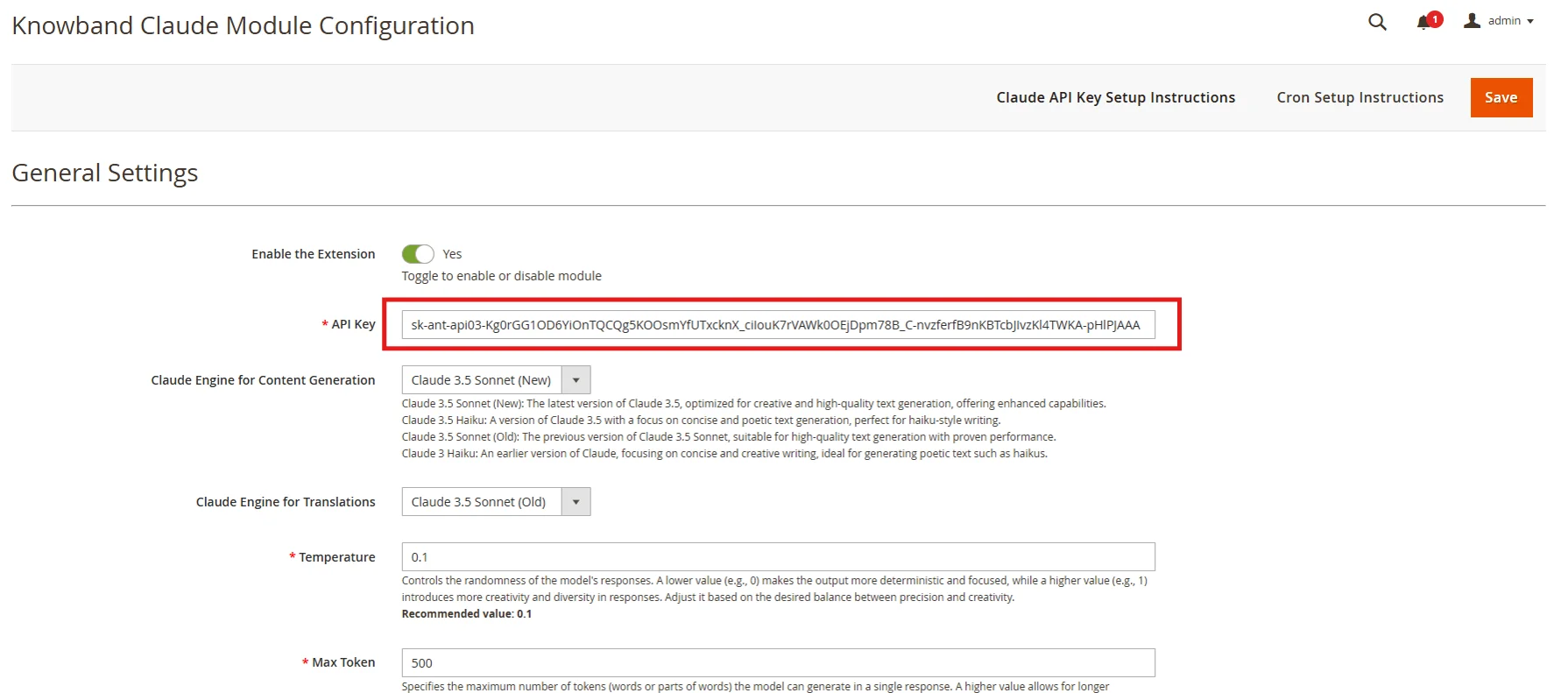
  • Find the “API Key for Claude” field and paste the copied key into it.

Step 3: Save the Settings:

  • After adding the API Key in General Settings, click “Save” to store the settings. The Claude AI module will now use this key to interact with the Claude API.

Smarter Content Starts Here – Claude for OpenCart

Easy setup, no code needed.

🛍️ Get Claude AI Now

3.0 Admin Interface Overview:

The Magento 2 Claude Translator Extension by Knowband provides store admins with an intuitive interface to configure settings and efficiently manage bulk content generation and translation.
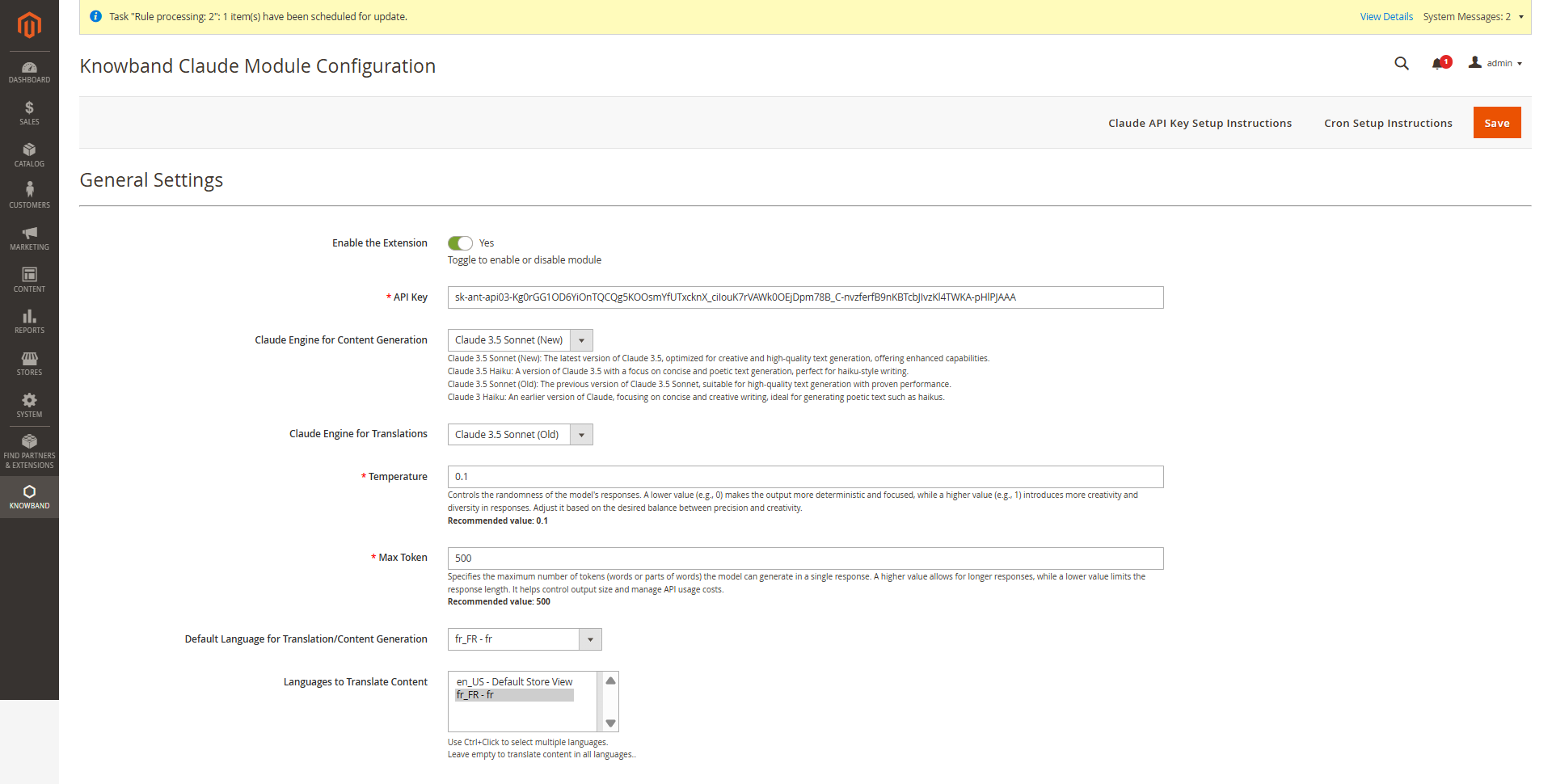
3.0.1 Key Configuration Options

Enable/Disable – Activate or deactivate the Magento 2 Claude Content Generator with a single tab.

API Key for Claude – Enter your Anthropic API Key(Claude API Key) in the provided field to enable the functioning of the Knowband AI-powered content generator/Translator Module

Claude Model Selection – Choose from Claude 3.5 Sonnet (New), Claude 3.5 Sonnet (Old), and Claude 3.5 Haiku as well as Claude 3 Haiku, to generate content based on your store’s requirements.

Temperature: Adjust the creativity of the content —higher values generate more creative content, while lower values ensure consistency and focused content.

Maximum Tokens: Set a token limit (default: 500), representing text fragments used by the AI.

Claude Engine for Translations: Choose from Claude 3.5 Sonnet (New), Claude 3.5 Sonnet (Old), Claude 3.5 Haiku and Claude 3 Haiku to generate content tailored to your store’s needs.

Primary Language: Set your default language of the store for content generation and translation in the general settings.

Target Languages: Choose multiple target languages to expand your store’s global reach and improve accessibility for international customers.

3.0.2 Magento 2 Claude AI Content Generator Prompts
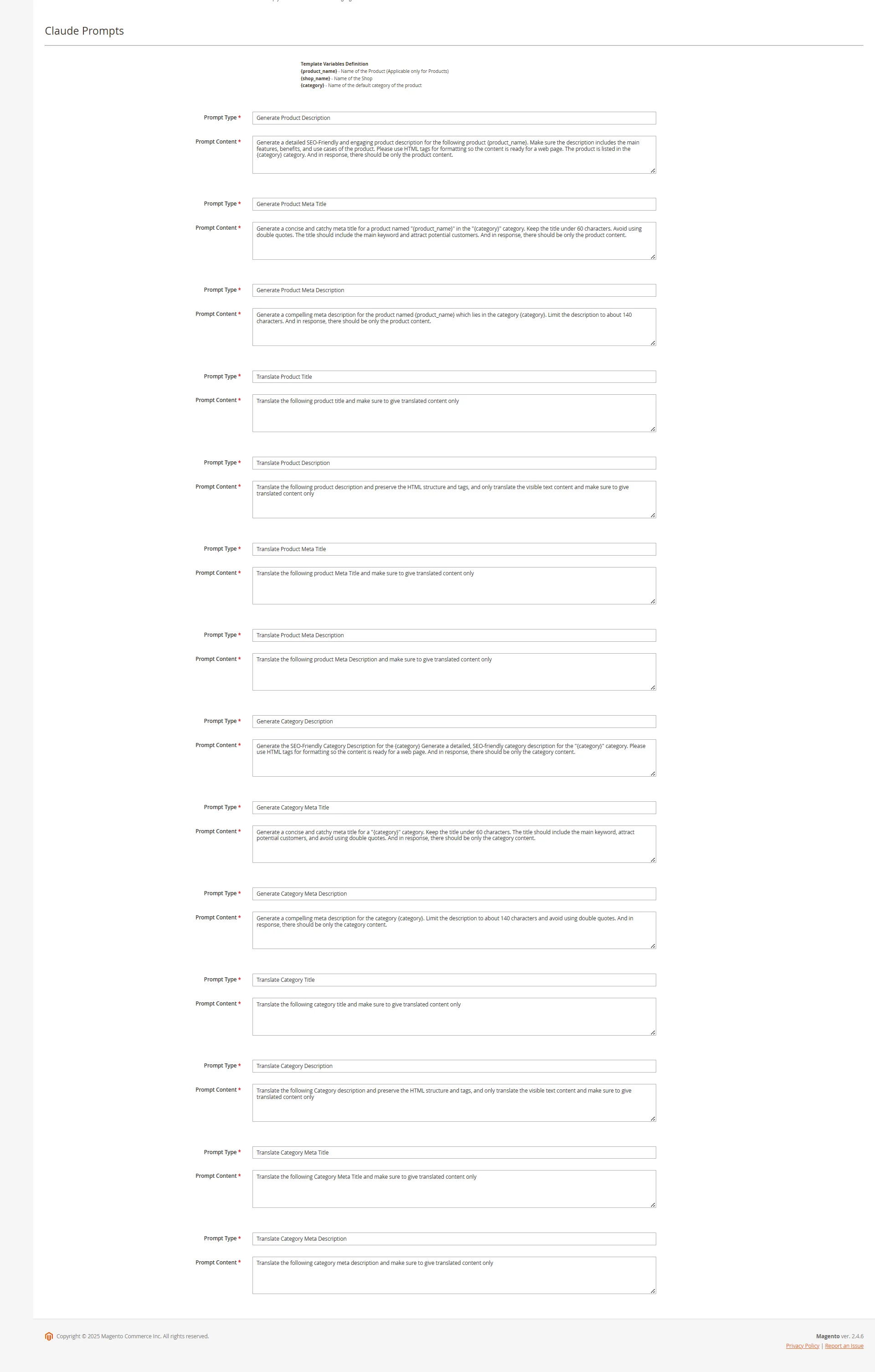
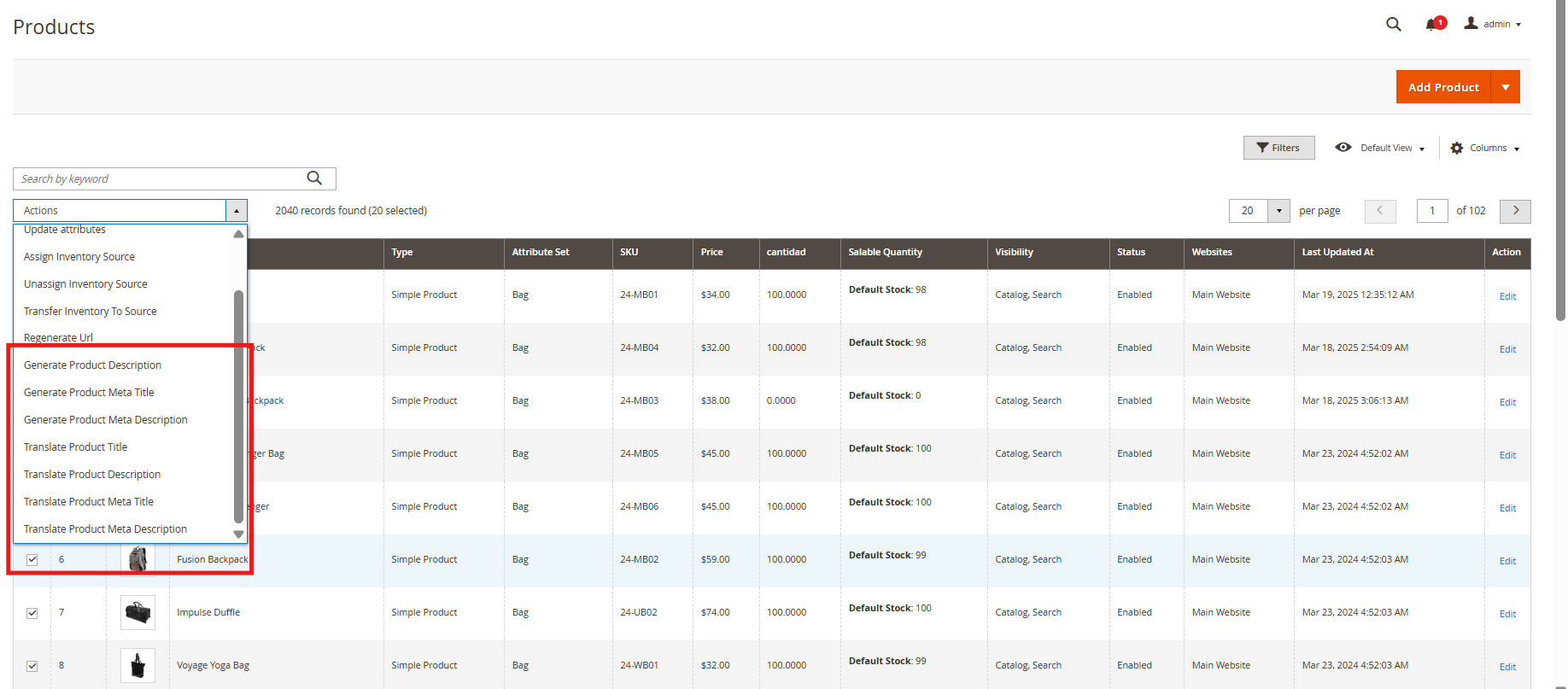
The Magento 2 Content Generator Module includes 14 pre-configured prompts tailored for various e-commerce content needs.

Knowband Magento 2 Claude Content Generator Extension AI Prompts 

Generate Product Description: Creates SEO-friendly, formatted descriptions for products, ensuring the generated data is accurate and in context.

Generate Product Meta Title: Crafts optimized meta titles (under 60 characters) with relevant product and category keywords. 

Generate Product Meta Description: Produces engaging meta descriptions within 140 characters. 

Translate Product Title: Converts product titles accurately into multiple languages. 

Translate Product Description: Accurately translates product descriptions while retaining HTML formatting.

Translate Product Meta Title: Converts meta titles into multiple languages with precision.

Translate Product Meta Description: Provides accurate translations of meta descriptions across various languages.

Generate Category Description: Creates SEO-optimized category descriptions with proper HTML structure. 

Generate Category Meta Title: Generate concise, keyword-rich meta titles (under 60 characters). 

Generate Category Meta Description: Creates compelling meta descriptions (within 140 characters). 

Translate Category Title: Converts category titles, descriptions (maintaining HTML structure), and meta details into multiple languages.

Translate Category Description: Translates accurate category descriptions while maintaining HTML structure.

Translate Category Meta Title: Converts category meta titles into multiple languages with precision.

Translate Category Meta Description: Delivers accurate translations of category meta descriptions across various languages.

3.0.3. Knowband’s Magento 2 Claude Prompts Task Log

The Magento 2 Claude AI Content Generator/ Translator maintains a detailed activity log of all executed prompts, allowing users to track content generation and translation tasks efficiently.

The task log includes:

Prompt Type: Specifies whether the task involved content generation or translation.

Product/Category: Identifies the associated product or category.

Language: Displays the source and target languages for translations.

Previous Content: Shows the original content before modification.

New Content: Records the updated or translated content.

Timestamp: Logs the date and time of execution for tracking and auditing purposes.

RollBack Feature: Enables users to restore previous content instantly if the new version is unsatisfactory. Moreover, this feature ensures flexibility by allowing store owners to revert to the last saved version with a single click, maintaining content quality and accuracy.

4.0 Pending Task Logs of Magento 2 Claude AI Plugin

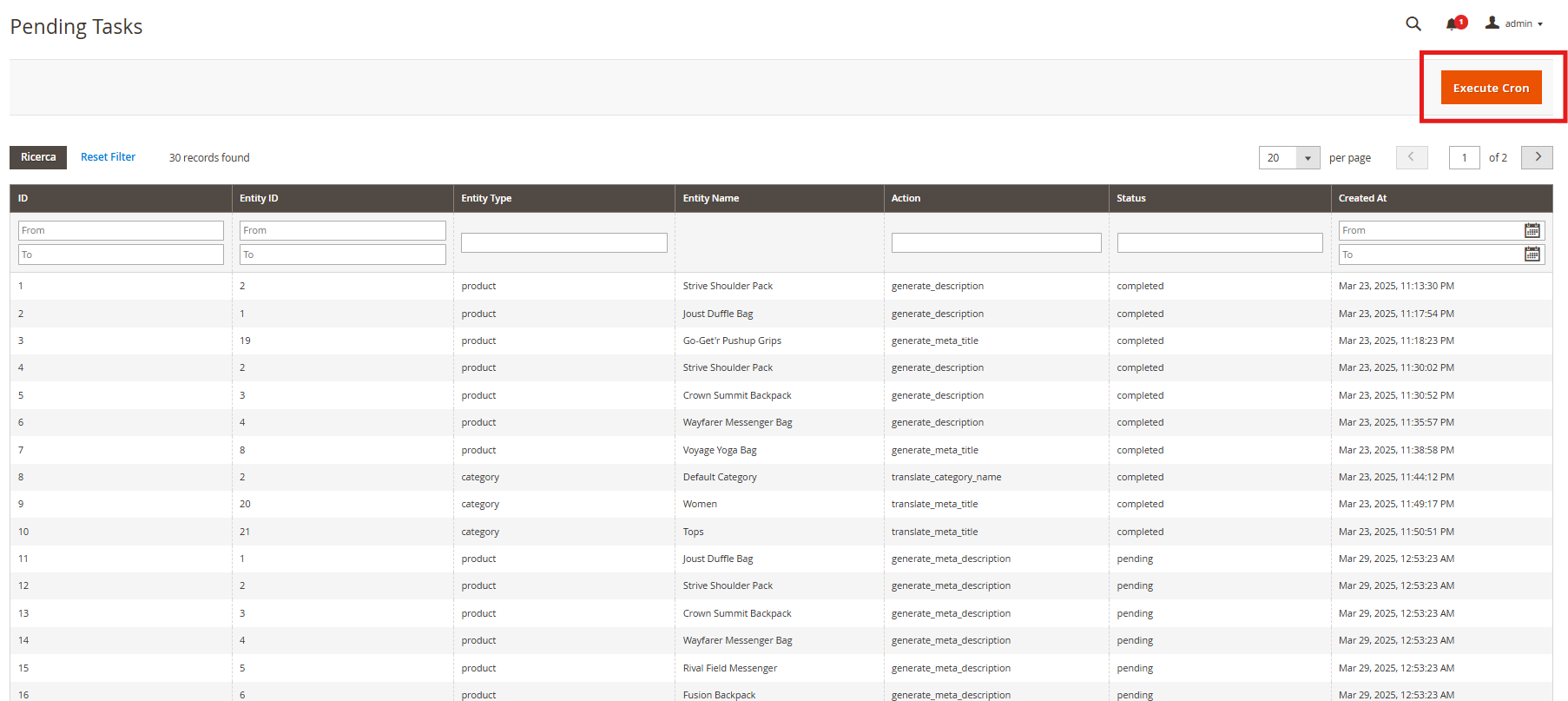
The Pending Task Logs feature in Knowband’s Magento 2 AI Content Generator Extension allows users to efficiently manage and monitor content generation and translation tasks before execution. 

How Pending Task Logs Work

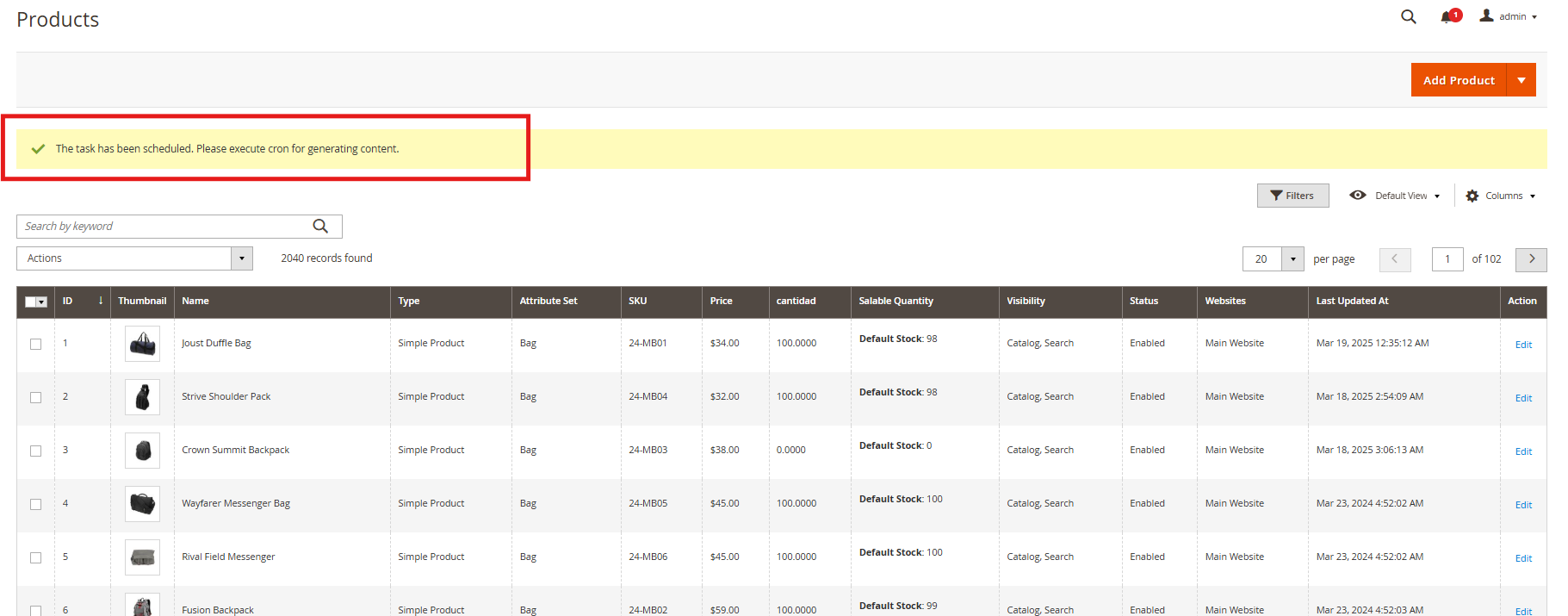
When a content generation or translation request is initiated, it is first stored in the Pending Task Logs section. Users can review, modify, prioritize, or delete tasks before execution. Moreover, the “Execute Cron” tab allows manual or scheduled processing, ensuring accuracy and efficient workflow management.

5.0. Steps to Execute the Prompts 

The Knowband PrestaShop Claude AI Content Translator module streamlines content generation and translation through a structured process. 

Follow these steps to execute prompts efficiently:

Step 1: Product/Category Selection: Choose the products or categories for which you want to generate or translate AI-powered content.

Content includes product descriptions, category descriptions, titles, meta titles, and meta descriptions.
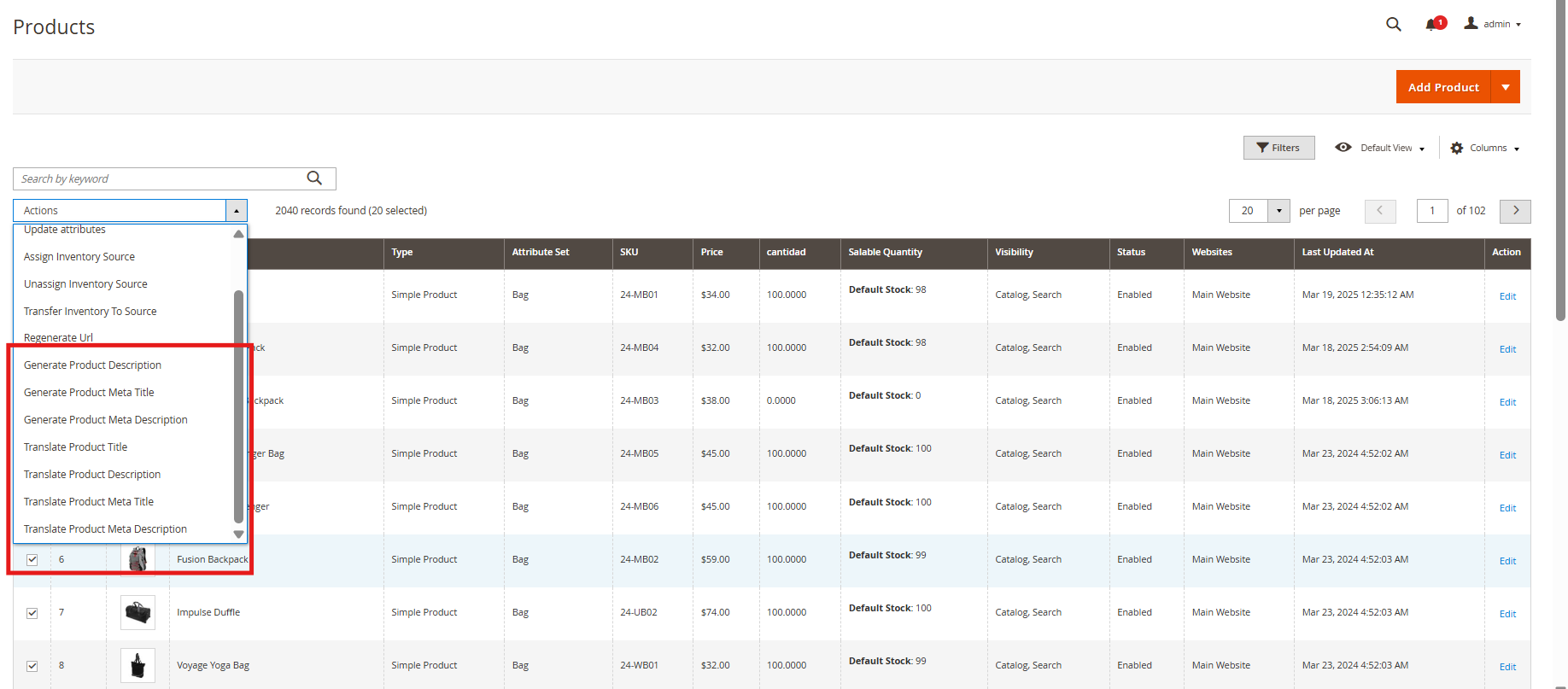
Step 2: Task Execution: Once selections are made, the system sends the content generation or translation requests to the Pending Task Logs for processing.

Managing Pending Task Logs: Review, modify, or remove pending tasks before execution, ensuring accuracy and preventing unnecessary content changes.

Step 3: Executing the Cron Job: Run the cron job to process all pending tasks automatically.

The generated or translated content is applied to the respective products/categories seamlessly.


Magento 2 Gemini AI Content Generator/Translator Extension – User Manual

Knowband’s Magento 2 Gemini AI Content Generator/Translator Extension helps store owners create and translate content quickly using Google’s Gemini AI technology. With the Magento 2 Gemini AI Extension, store owners can easily generate product descriptions, meta titles, meta descriptions, category descriptions, meta titles, meta descriptions and SEO content without spending hours writing.

The Magento 2 Gemini AI Extension also translates your content into different languages, helping you reach customers worldwide. It’s easy to use and works for all types of online stores, whether you have a small shop or a large marketplace.

The Magento 2 Gemini AI Extension saves you time and ensures all your product listings look professional and appealing to both customers and search engines. Simply install the extension, and you can start generating high-quality content right away. The Gemini AI Extension for Magento 2 utilizes Google’s advanced Gemini AI models, including Gemini 2 Flash, Flash Light Preview, Gemini Flash 1.5, Gemini Flash 8B, and Gemini 1.5 Pro, which generate and translate SEO optimized content.

2.0.0 Key Features of the Knowband’s Magento 2 Gemini AI Content Generator/Translator Extension

Automated Content Generator: The Magento 2 Gemini AI Content Generator/Translator allows the admin to generate SEO Optimized content for the products. 

Focused Content Translator:  The Magento 2 Gemini AI-powered content Translator translates the generated content as well as product titles. Additionally, the Magento 2 Gemini Powered Translator Extension supports all the languages that are listed on your store.

Gemini Engines: The Gemini AI Extension for Magento 2 uses Google Gemini AI models, including Gemini 2 Flash, Flash Light Preview, Gemini Flash 1.5, Gemini Flash 8B, and Gemini 1.5 Pro, which generate and translate focused and SEO optimized content.

Bulk Product Content Generator: The Knowband’s Magento 2 Content Generator Extension can generate SEO-optimized content and translate the content into multiple languages with the focused content.

User-Friendly Interface: The Magento 2 Gemini AI Content Generator provides a user-friendly interface for the store admin as it doesn’t require any coding knowledge.

Global Market Reach: The Magento 2 Gemini AI Plugin benefits the user by increasing international sales by providing SEO-optimized and focused content translation in all the store’s languages.

Accurate Translation: The Magento 2 Gemini AI plugin translates the generated content and product title accurately into multiple languages.

3.0 Steps to Generate  the Gemini API Key to Enable Knowband’s Magento 2 Gemini AI-Powered Content Generator Plugin

To enable Gemini AI functionality in your Magento 2 Gemini AI Extension, follow these 3 steps to get your API key.

Step 1: Obtain an API Key

  1. Visit the Google AI Studio to generate the API Key

(https://aistudio.google.com/app/apikey)

  1. Click on “Create new secret key”. Make sure to copy the key.

Step 2: Add the API Key to the Magento 2 Gemini

  • In Magento 2 Backend, go to the “Knowband Gemini” General Configuration page.
  • Add the Gemini API Key into the provided “API Key ” field.

Step 3: Save the Settings:

  • After pasting the API Key in General Settings, click “Save”. Now, you can use Knowband’s Magento 2 Gemini Module Extension.

4.0 Admin Interface Panel


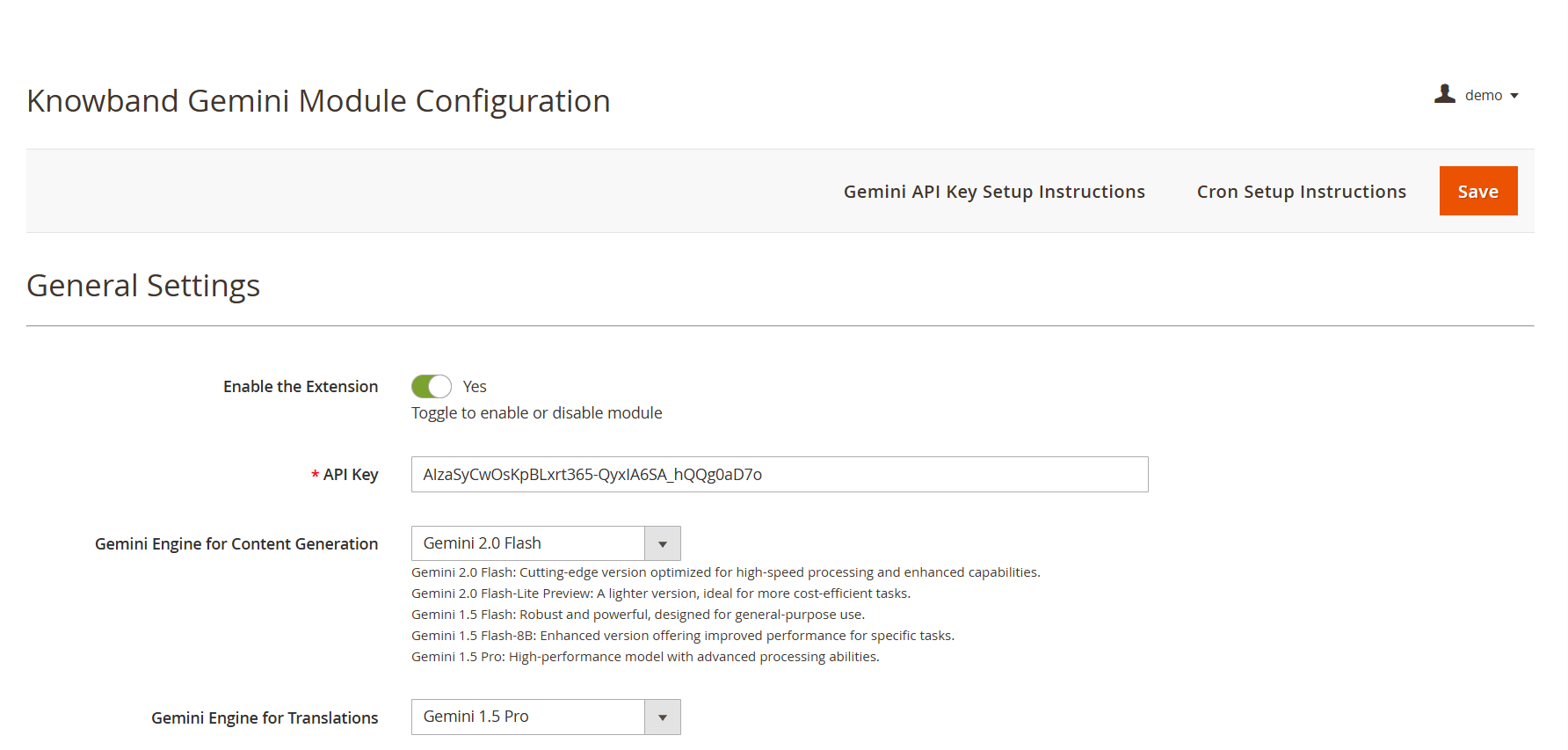
API Key: Add your API KEY from Google AI Studio in the required field.

Gemini AI Model Selection: The Magento 2 Content Generator Extension offers Google’s latest Gemini AI models, including Gemini 2 Flash, Flash Light Preview, Gemini Flash 1.5, Gemini Flash 8B, and Gemini 1.5 Pro to generate the content.

Temperature: The e-merchants can adjust the temperature from 0.0 to 1.0 – higher values represent more creative content, while lower values represent more accurate content.

Maximum Tokens: The Knowband’s Magento 2 Gemini Content Generator allows the admin to set a token limit (default: 500). The token represents the number of words that the AI Model can generate.

Gemini AI Engine for Translations:  The Magento 2 Gemini Translator Extension provides various Gemini AI Models, including Gemini 2 Flash, Flash Light Preview, Gemini Flash 1.5, Gemini Flash 8B, and Gemini 1.5 Pro, to select the model that the store owners want.

Primary Language: The admin can select the store’s default language for content generation and translation of the products

Target Languages: The Magento 2 Gemini Translator Extension provides the option for store owners to select which languages they store owners want their content to be translated into.

Prestashop Gemini AI Content Generator/Translator Module

No Coding Skills Required

Buy Now

4.0.2. Gemini AI Prompts:

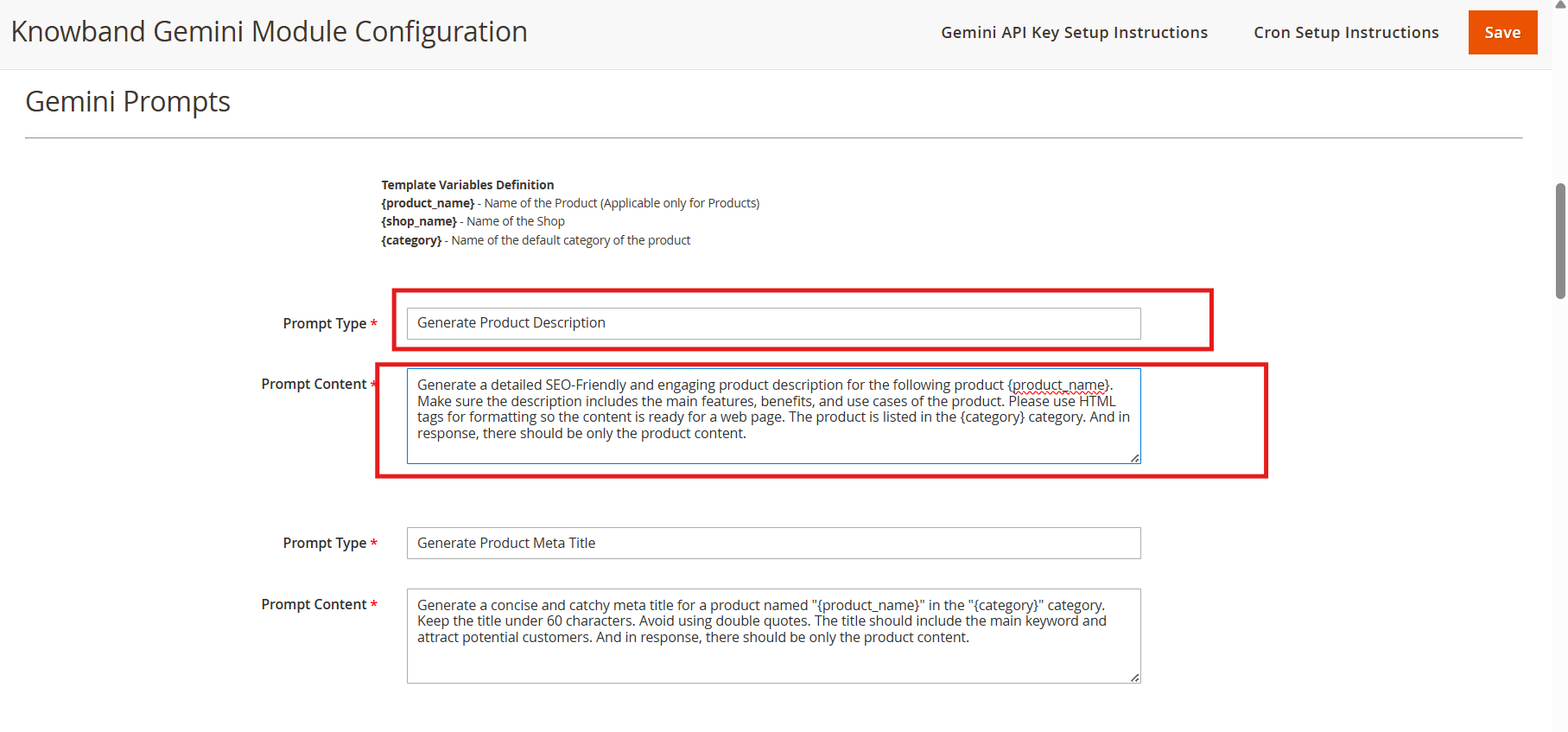
The Magento 2 Gemini AI Content Generator Extension features 14 pre-configured prompts designed for various e-commerce content needs. Also, the store owner can change the content of the prompts based on their needs.

Knowband Magento 2 Gemini AI Content Translator AI Prompts

Generate Product Description: Generate the description based on the product name and category. The store owner can also change the content for the Generate Product Description prompt.

Generate Product Meta Title: Generates SEO- optimized meta titles under 60 characters, including keywords and product categories to increase the search rank.

Generate Product Meta Description: The prompt generates the product meta descriptions of the product within 140 characters maintaining accurate and context-aware information according to the product.

Translate Product Title: Translates the product titles or names to multiple languages selected on the store.

Translate Product Description: The prompt translates the product descriptions while preserving HTML formatting and focused content.

Translate Product Meta Title: Translate Product Meta Titles to multiple languages according to the store theme.

Translate Product Meta Description: The prompt translates Product meta descriptions to multiple languages,, maintaining translated content focused and accurate.

Generate Category Description:  The Generate Category Description prompt generates a category description while preserving the formatting and information of the product.

Generate Category Meta Title: Translate category meta titles within 60 characters with keywor,ds maintaining the category meta title SEO Optimized and focused.

Generate Category Meta Description: Translates category meta descriptions within 140 characters, focusing on the generated meta keywords.

Translate Category Title: The prompt is to translate category titles into multiple different languages based on the needs of the store.

Translate Category Description: Translates category descriptions in the multiple languages selected on the configuration of the extension while maintaining the HTML structure and generated category descriptions.

Translate Category Meta Title:  Translates category meta titles to multiple languages keeping the accurate translation of generated or added meta titles.

Translate Category Meta Description: Translates category meta descriptions to multiple languages, focused on the prompt’s content.

4.0.3. Gemini AI Task Log:


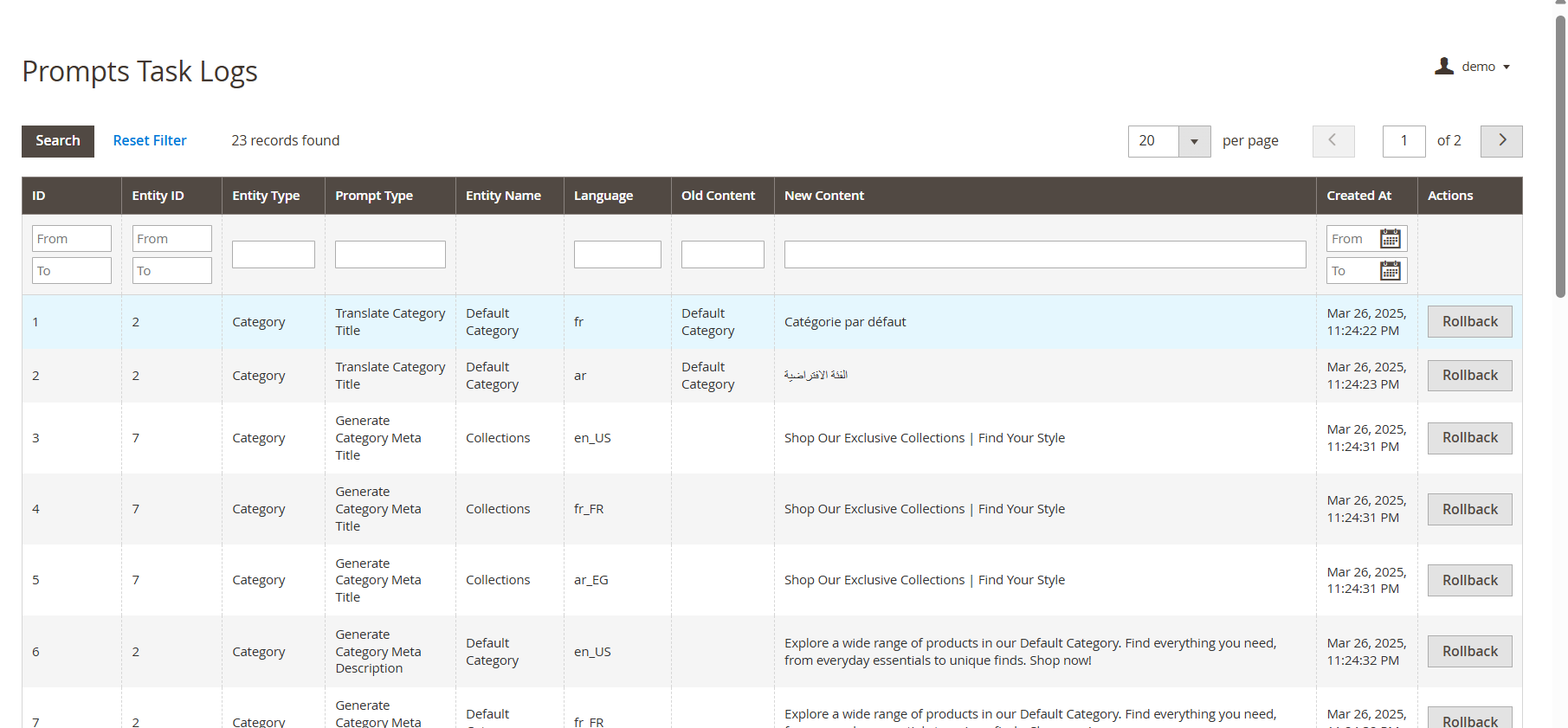
The Task Logs keep a record of all changes and actions performed within the store. Additionally, Knowband’s Magento 2 Gemini AI Extension maintains detailed logs, allowing store owners to track modifications, review past actions, and, if necessary, undo or revert changes for better control and accuracy.

4.0.4 Pending Task Logs

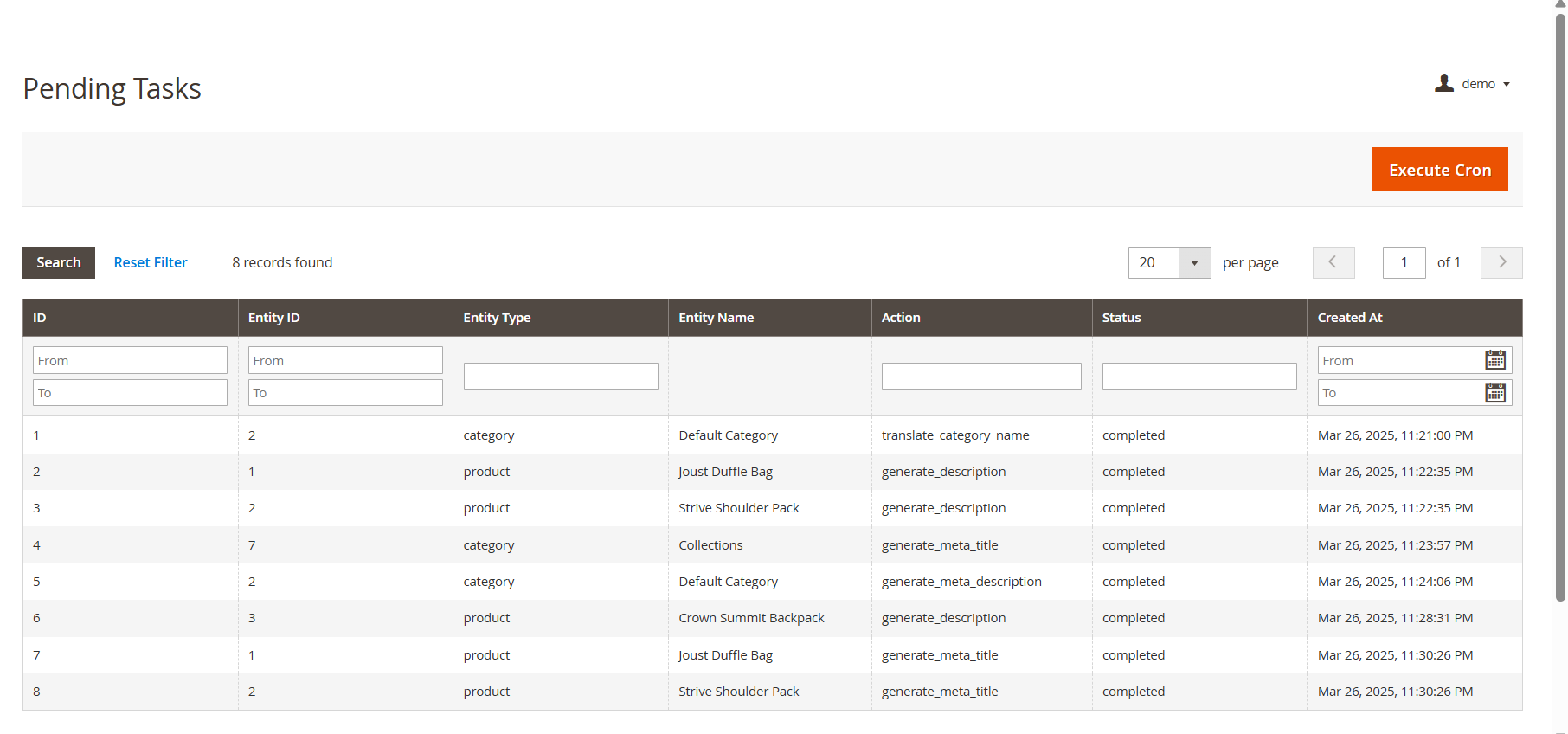
The Pending Task Logs feature in Knowband’s Magento 2 Gemini Content Generator Extension allows users to efficiently manage and monitor content generation tasks before execution. When users initiate a content generation request, it does not get processed immediately. Instead, all tasks are first stored in the Pending Task Logs, providing a tab “ Execute Cron” to execute pending tasks.

5.0. Steps to Execute the Prompts 

The Knowband’s Magento 2 Gemini Content Generator Extension provides an efficient way to manage content generation tasks through a structured process. The key steps involved in this feature are:

  • Product Selection: Users start by selecting the products for which they want to generate or translate AI-powered content, such as product or category descriptions, titles, meta titles, and meta descriptions.
  • Executing the Task: After selecting the products, users execute the task, which sends all content generation requests to the Pending Task Logs section.
  • Managing Pending Task Logs: All pending tasks are stored in the log, allowing users to review, modify, or remove any task before final execution.
  • Executing the Cron Job: To complete the process, users run a cron job that automatically processes all pending tasks and applies the generated content to the respective products.

Magento 2 ® ChatGPT Content Generator/Translator Extension – User Manual

The Magento 2 ChatGPT Content Generator and Translator Plugin is a powerful tool designed to streamline content management for Magento 2 stores. With advanced AI technology, it simplifies content creation and translation, making it a must-have for modern eCommerce businesses. This plugin enables you to create engaging product and category descriptions, attractive titles, and SEO-friendly content to boost your store’s visibility and enhance customer experience.

Beyond generating content, the plugin integrates seamlessly with Magento 2 and includes a translation feature. The AI-powered Magento 2 ChatGPT Content Translator helps store owners expand into new markets with accurate and context-aware translations.

Whether you’re managing multilingual content or improving your content strategy, the Magento 2 ChatGPT Content Generator saves time and effort. By leveraging ChatGPT Engines 3.5 and 4.0, it delivers high-quality, multilingual content that takes your online store to the next level.

Key Features of Knowband’s Magento 2 ChatGPT Content Generator/Translator Plugin:

1. Effortless Content Creation

Easily generate high-quality product titles, detailed descriptions, and optimized meta tags, ensuring consistency across your store while saving time.

2. Advanced Dual AI Engine Support

Powered by ChatGPT models 3.5 and 4.0, the plugin delivers advanced content creation and precise translations, catering to bulk product needs.

3. SEO-Friendly Content

Create optimized content that enhances your store’s search engine rankings and attracts more visitors.

4. Seamless AI-Powered Translation

Translate store content into multiple languages effortlessly, paving the way for global business expansion.

5. User-Friendly Design

With an intuitive interface, the plugin is easy to use, even for store admins with no technical expertise.

6. Category and Meta Tag Management

Simplify the creation and translation of category names and meta descriptions for a professional and polished look.

7. Bulk Content Processing

Perfect for stores with large inventories, the plugin allows batch processing of items to save time and increase efficiency.

8. Streamlined Operations

Simplify content-related tasks for smoother product updates and better operational efficiency, regardless of business size.

9. Multi-Language Support

Compatible with all languages, including RTL scripts, the plugin ensures flexibility for businesses worldwide.

2.0 Setting Up the ChatGPT Key for Your Plugin

Follow these simple steps to configure the API key and activate ChatGPT functionalities in your Magento 2 plugin:

Step 1: Generate an API Key

  1. Visit the OpenAI API Key Generation page.
  2. Log in to your OpenAI account or create one if you don’t have an account yet.

  1. Click on “Create new secret key” to generate a unique API key.
  2. Copy and securely save the key, as it will only be displayed once.

Important: Verify Billing Status

To ensure uninterrupted functionality, make sure your OpenAI account has an active billing setup:

  1. Visit the OpenAI Billing Overview page.
  2. Check your account balance and add funds if necessary.
  3. Remember, insufficient credits can cause API requests to fail.

Once you’ve set up the API key and verified billing, your Magento 2 ChatGPT plugin will be fully configured and ready to generate and translate high-quality content for your store.

Also Available for Prestashop eCommerce Platform

SHOP NOW

Admin Panel Overview:

The Magento 2 AI Content Translator provides the store admin with an easy-to-manage and intuitive module dashboard. Let’s have a quick overview on all the different options provided in module backend.

Configurations:

Enable Disable the Extension: This button is used to enable/disable the module.

API Key: Insert the API key generated by following the steps in point 2.

ChatGPT Engine for Content Generation: The Content Generator and Translator Plugin for Magento 2 comes with 4 powerful ChatGPT Engines to take care of all your SEO rich content needs.

GPT-4: Highly capable model designed for complex tasks, offering superior accuracy and depth.

GPT-4o: Optimized for balancing cost and performance.

GPT-3.5-turbo: Cost-effective, suitable for general tasks.

GPT-4-turbo: Advanced model with improved accuracy and context handling.

Select the engine for content generation.

ChatGPT Engine for Translations: Choose the suitable engine for content translation from the dropdown list.

Temperature: Enter the value between 0.1 to 0.9. This value defines the creativity and uniqueness of the content. Where the lower number stands for more precise data, increasing the temperature could lead to more optimized and creative content generation.

Max Token: Enter the number of maximum tokens used in a single prompt execution.

Default Language for Translation/Content Generation: Select the default language for content generation on your store.

Languages to Translate Content: Choose the languages to translate the content.

ChatGPT Prompts:

Generate Product Description: Generate a detailed SEO-Friendly and engaging product description for the following product {product_name}. Make sure the description includes the main features, benefits, and use cases of the product. Please use HTML tags for formatting so the content is ready for a web page. The product is listed in the {category} category.

Generate Product Meta Title: Generate a concise and catchy meta title for a product named “{product_name}” in the “{category}” category. Keep the title under 60 characters. Avoid using double quotes. The title should include the main keyword and attract potential customers.

Generate Product Meta Description: Generate a compelling meta description for the product named {product_name} which lies in the category {category}. Limit the description to about 140 characters.

Translate Product Title: Translate the following product title and make sure to give translated content only.

Translate Product Description: Translate the following product description and preserve the HTML structure and tags, and only translate the visible text content and make sure to give translated content only.

Translate Product Meta Title: Translate the following product Meta Title and make sure to give translated content only.

Translate Product Meta Description: Translate the following product Meta Description and make sure to give translated content only.

Generate Category Meta Title: Generate a concise and catchy meta title for a “{category}” category. Keep the title under 60 characters. The title should include the main keyword, attract potential customers, and avoid using double quotes.

Generate Category Meta Description: Generate a compelling meta description for the category {category}. Limit the description to about 140 characters and avoid using double quotes.

Translate Category Title: Translate the following category title and make sure to give translated content only.

Translate Category Meta Title: Translate the following Category Meta Title and make sure to give translated content only.

Translate Category Meta Description: Translate the following category meta description and make sure to give translated content only.

3. ChatGPT Prompts Task Log:

The following tab displays a detailed record of completed tasks for the admin. It includes information such as the executed prompt type, product name, product category, language, previous content, and newly generated content.

Admins can also filter the task log using criteria such as Filter ID, Prompt Type, or Product Name, making it easier to locate specific data.

How to Use ChatGPT Prompts?

To use ChatGPT prompts, store admins can go to Catalog >> Products in the admin panel.

Executing Prompts with the Magento 2 AI Content Generator Plugin

  1. Select the products you want to update from the list.
  2. Open the Bulk Actions tab, as illustrated in the guide.
  3. Choose the desired prompt to perform the required action on the selected products.

This efficient workflow enables admins to generate or translate content for multiple products simultaneously, saving time and effort.