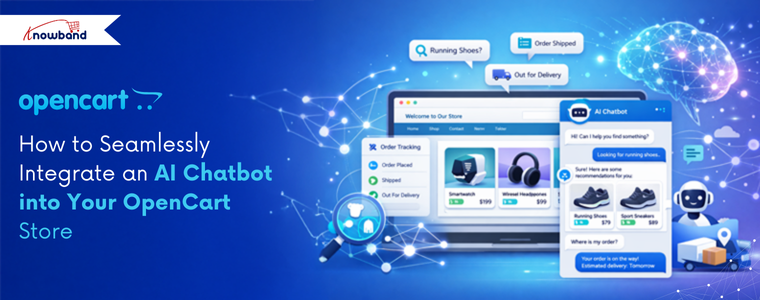
Introducing the perfect AI chatbot for your OpenCart store. Nowadays, you have observed that many stores have AI chatbots that answer customer queries and recommend products. Like that, Knowband has released its OpenCart AI chatbot after developing the PrestaShop AI chatbot.
Important Update for PrestaShop and OpenCart AI Chatbot Users
Knowband is excited to announce the release of the latest versions of its OpenCart AI Chatbot Extension and PrestaShop Live AI Chatbot Addon, which are now live and available on the OpenCart Marketplace and Prestashop Addon Marketplaces. This major update in both the AI Chatbot Module brings a wide range of enhancements designed to improve chatbot management by store owners, customisation of the UI of the chatbot interface, security, and implementation of new AI Models like DeepSeek, Gemini and many more with their engines and overall customer interaction.
The updated Live AI Chatbot for OpenCart now includes a detailed Chat Logs feature for store owners, allowing them to analyse conversations and customer queries, and gain valuable patterns to help in product recommendations and many more. Furthermore, this AI Chatbot for Prestashop also includes features such as chatbot availability Scheduling and many more.
This chatbot enables users to integrate the AI Live Chatbot on the frontend on all pages. This AI chatbot comes with built-in API features and is integrated with the Qdrant database. This perfect chatbot not only works with exact product names, but it also understands the customer’s words and their meaning. Based on that, it recommends products that help in conversion.
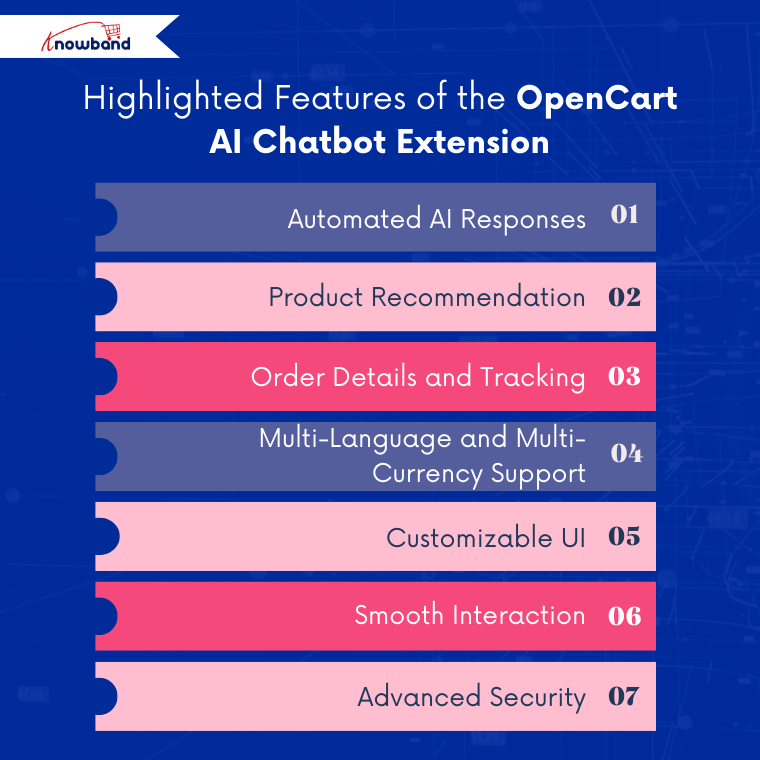
So let’s explore the highlighted key features and key benefits of the OpenCart AI Chatbot Module.
This professional AI chatbot responds to customers based on their queries. Furthermore, it delivers product information, order information, and tracking based on the real data of the store. The chatbot instantly answers customer queries, from product availability and pricing to order status. This real-time AI Assistant is designed using OpenAI ChatGPT. Moreover, this AI chatbot supports multiple ChatGPT models such as GPT-5, GPT-4 Turbo, Mini, and GPT-3.5.
2. Product Recommendation
Integration with vector search is the main key feature of this OpenCart AI chatbot. This allows the AI chatbot to recommend products based on the keywords and meaning of the customer’s query.
3. Order Details and Tracking
The AI chatbot helps customers check order information, shipping information, order status, and more. Customers get the information when they add sentences like “What’s my order status?” or “When will I receive the order?”
4. Multi-Language and Multi-Currency Support
The AI chatbot works perfectly with stores that have multiple languages. This AI chatbot can automatically detect the store’s language and currency and answer in that language, providing responses for international customers.
5. Customizable UI
This AI chatbot allows admins to customise the overall UI according to their brand’s theme. You can change the chat window colour, button colour, and text blocks of both the chatbot and customers.
6. Smooth Interaction
This Knowband AI chatbot smoothly interacts with all customer queries. Even if customers ask queries that are not related to the store, the chatbot answers that it cannot respond to them.
7. Advanced Security
This AI chatbot is integrated with guardrails to ensure that the chatbot does not respond to queries that can be a threat to your store.
Prestashop AI Chatbot Addon
Create and launch a perfect AI Chatbot for your Prestashop store.
Why You Should Use an AI Chatbot for Your Opencart Store
Professionalism: An AI chatbot integrated into your OpenCart store enhances your brand’s professionalism and credibility. Furthermore, this AI Chatbot helps customers easily search for products, find information, and navigate the store smoothly, creating a more polished and trustworthy shopping experience.
24/7 Instant Customer Support: This best AI chatbot extension acts as 24-7 customer support for your opencart store, as it helps in reducing the cost of labour.
Faster Response Times & Reduced Waits: The customer does not have to wait for too long for replies; this AI chatbot replies in seconds, accurately to all the queries of customers.
Higher Conversion Rates: This AI chatbot recommends the product based on the meaning of the words that the visitor used when he or she comes to the store. This, in turns helps in conversion rates
Personalised Shopping Experience: The AI chatbot helps the customers with order tracking, delivery status, updates, and post-purchase queries. This improves transparency, builds customer trust, and ensures a smooth experience.
Conclusion
In conclusion, this OpenCart AI Chatbot Extension is much more than a simple chatbot. With features such as seamless integration with the store’s data and smart automation, it becomes a must-have solution for improving customer engagement and support.
Moreover, it also works as a live chat system for your OpenCart store, remaining available 24/7 to assist customers throughout their shopping journey.
Knowband is continuously working on enhancements and plans to introduce new features such as chatbot availability, scheduling and chat log options. Store owners can also customise this module according to their business requirements. Our team of experts is always available to help with customisation and ongoing support.
Support: support@knowband.com
Checkout our PR on AI chatbots for e-commerce stores
Introducing the OpenCart AI Chatbot Module by Knowband, which is designed to meet these expectations by providing a smart, professional, AI virtual chatbot for your opencart store.
By using advanced OpenAI technology, this ai chatbot gives natural, human-like responses in real time. Furthermore, it helps customers search for products, check prices and stock, understand store policies, and track orders, without human intervention.
With easy setup and powerful features, this AI assistant by Knowband improves customer satisfaction, reduces support workload, and boosts conversions.
1. Real-Time Intelligent Responses Firstly, the AI Chatbot instantly answers customer queries related to product prices, stock availability, categories, and comparisons by fetching live store data.
2. Multi-Language & Multi-Currency SupportThe chatbot automatically detects the store’s languages and currencies and responds accordingly, making it perfect for international Opencart stores.
3. Powered by ChatGPT TechnologyUsing the latest OpenAI GPT models, the opencart chat extension provides accurate, context-aware, and like-human responses. Moreover, admins can choose different AI models like GPT 5, GPT 4o & GPT 4o mini based on performance needs.
4. Vector Search IntegrationVector search integration with Qdrant allows the chat plugin for opencart to perform semantic searches based on keywords and their meaning. Moreover, this enables intelligent product recommendations, providing customers with results that match the true intent of their queries.
5. Smart Product SearchFurthermore, customers can search products, browse categories, and compare items directly within the chatbot interface.
6. Automatic Order Information Retrieval Logged-in customers can retrieve order details such as order ID, products, prices, and order status directly using opencart live chatbot Extension.
7. Real-Time Order Status & TrackingCustomers can easily track their orders and shipment status by entering their order ID in the live chatbot plugin for opencart.
8. Fully Customizable Chat InterfaceInterestingly, store owners can customise chatbot colours, chat window design, icons, buttons, and text styles to match their brand theme using Opencart Live chat Plugin.
Step 1: After purchasing the extension, download the ZIP file from your Knowband account.Step2: Unzip the folder and copy the files to the upload folder and move the admin and catalog files.
Step 3: Log in to the OpenCart Admin Panel and navigate to Extensions → Installer. Upload the downloaded ocmod file.
Step 4: Go to Extensions –> Modifications and click “Refresh”. Then navigate to Extensions -> Extensions -> Modules and install the opencart online chatbot Extension.
Step 5: Click on Edit to access the configuration page.
4. 0.0 Admin Interface Overview
The OpenCart Chatbot Using OpenAI is designed to be simple and user-friendly. The admin panel includes sections for General Settings, AI Configuration, and UI Customisation.
4.1.0 General Configuration of Opencart AI Chatbot Extension
Enable Chatbot: Store owners can enable or disable the module as per their need.
OpenAI API KeyEnter your OpenAI API key to create a connection between the chatbot and OpenAI. This key is mandatory for the functioning of the Opencart AI Chatbot.
For security reasons, the API key should be kept confidential and must not be shared with anyone.
AI Model SelectionChoose the AI model that will be used to generate opencart AI chatbot ChatGPT extension responses based on your store’s requirements:
GPT-4o: Suitable for handling complex queries, providing accurate responses, and maintaining better context during longer conversations.
GPT-4o Mini : Designed for faster response times and reduced API usage, ideal for basic customer interactions.
GPT-5: Offers enhanced processing capabilities and improved response quality for advanced use cases.
TemperatureThis setting controls the randomness of opencart chatbot software responses. Moreover, lower values generate more predictable and factual replies, while higher values allow more variation in responses. It is recommended to use a moderate value for customer support scenarios.
Max ResultsYou can define the maximum number of product results displayed when customers asks product related queries. This feature on opencart live chatbot extension turns limiting results, helps maintain clarity and prevents overloading the chat interface.
Conversation HistoryIn this feature, Opencart modern chat assistant remembers the last conversation history and answers according to that.
Debug Mode:Enable this option to generate system logs that assist in diagnosing issues related to chatbot behavior, API connectivity, or data retrieval.
Enable Vector SearchYou can activate semantic search functionality, enabling the Opencart AI Chatbot Using OpenAI to better understand user intent and return more relevant responses beyond keyword-based matching.Qdrant URLEnter the endpoint URL of the Qdrant vector database server used to store and retrieve vector data for semantic search operations. We have covered the steps in section 7.0.0.
Qdrant API KeyProvide the API key required to authenticate access to the Qdrant server. Furthermore, this ensures secure communication between the chatbot and the vector database.
4.2.0 Chatbot UI Customisation of Knowband Opencart AI Chatbot Plugin
The module allows complete customisation of the chatbot interface, helping store owners match the chatbot’s appearance with their store’s branding and design.Chatbot Logo Upload First, this option allows you to upload a custom logo for the OpenCart ChatGPT AI Chatbot. The logo represents your brand inside the chat window and helps maintain visual consistency across your store. Supported file formats include JPG, PNG, GIF, and WEBP.
Chat Background Color Next, using this setting, you can define the background color of the chat area where conversations appear. This helps improve readability and ensures the chat interface aligns with your store’s overall design.
System Message Color Additionally, this option enables you to customize the background color of messages sent by the OpenCart Live AI ChatBot Extension. A distinct system message color helps customers easily differentiate between chatbot responses and their own messages.
User Message Color In addition, this setting in the OpenCart AI Chatbot Software Plugin allows you to change the background color of customer messages in the chat window. As a result, conversations become clearer and easier to follow.
Chat Popup Background Color Moreover, this option lets you customize the background color of the entire chat popup window. This ensures that the AI Chatbot for OpenCart blends smoothly with your store’s theme and layout.
Chat Button Color Furthermore, this setting controls the color of the OpenCart AI Chatbot Extension launch button and action buttons. A visually appealing and contrasting button color can improve visibility and encourage customers to start a conversation.
Chat Text Color Likewise, this option allows you to set the text color for both chatbot responses and user messages. Choosing a clear and readable text color enhances accessibility and user comfort.
In summary, these customisation options ensure that the Best AI Assistant for OpenCart integrates seamlessly with your store design while delivering a modern, visually appealing, and user-friendly chatbot experience.
Language Selection (English, French) This setting allows you to select the language in which the chatbot interface will be displayed. The chatbot can be configured separately for each available language, such as English and French, ensuring localized communication for different customer groups. Chatbot TitleEnter the title that will be displayed at the top of the OpenCart ChatGPT-powered Chatbot popup window. This title helps users identify the chatbot’s purpose, such as AI Product Assistant, and can be customized for each language.
Welcome MessageLastly, set the initial message shown to customers when the OpenCart Chatbot Using OpenAI (ChatGPT) LLM opens. This message is used to greet users and guide them on how to interact with the chatbot, such as asking about products, orders, or store policies.
Product Search and Browsing Customers can search for products and browse categories directly through the chatbot. Additionally, this AI chatbot conversation retrieves relevant products based on customer input and displays matching results in real time, making product discovery faster and easier.
Keyword- and Meaning-Based Queries The ChatGPT AI chatbot supports both keyword-based and semantic (meaning-based) queries. Furthermore, with Qdrant integration enabled, the chatbot understands the intent behind customer questions and returns more accurate and relevant results, even when exact keywords are not used.
Product Details In addition, customers can request detailed product information such as price, stock availability, and product descriptions without navigating away from the current page, using AI chatbot assistance.
Order Details and Order History For logged-in users, the chatbot provides access to complete order information, including previous orders, purchased products, prices, and current order status, directly within the AI chatbot interface.
Shipment Tracking and Order Status Moreover, the ChatGPT chatbot allows customers to check shipment details and track the current status of their orders by simply providing the required order information.
General Store Queries Lastly, the Live AI ChatBot responds to common store-related questions such as store policies, delivery information, payment methods, and other general inquiries, ensuring continuous customer support.
6.0.0 How to Generate OpenAI API Key
To enable the functioning of the AI Chatbot Software by Knowband, you need an OpenAI API key. Follow these steps:Step 1: Log in to your OpenAI account Use your registered email and password to access the OpenAI platform.Step 2: Navigate to Profile → View API Keys This section lists all your existing API keys.Step 3: Click “Create New Secret Key” Generate a new API key specifically for your chatbot integration.Step 4: Copy the API Key and store it securely The key provides access to your OpenAI account, so it should not be shared publicly.
Step 5: Paste the key into the moduleNow, in your OpenCart admin panel, open the AI chatbot module settings and enter the key in the API Key field under General Configuration → OpenAI API Key.
7.0.0 How to Generate Qdrant API Key and Endpoint URL for Opencart AI Chatbot
If you are using vector search with Qdrant for semantic queries in Knowband’s Opencart Best AI Assistant, follow these steps:
Step 1: Sign in to your Qdrant account Access your Qdrant cloud or self-hosted instance.
Step 2: Create a new API Key Navigate to the clusters, create a cluster, and generate keys for your chatbot integration.
Step 3: Copy the API Key and Endpoint URL The Endpoint URL points to your Qdrant server, and the API Key authorises access to the vector database.Step 4: Enter the details in the module In your OpenCart admin panel, go to General Configuration → Qdrant URL and paste the endpoint URL. Then enter the API Key in the Qdrant API Key field. Note: Moreover, using Qdrant vector search allows the chatbot to perform semantic searches, providing context-aware and accurate product recommendations based on customer queries.
9. 0.0 Summary
The OpenCart AI Chatbot Extension by OpenAI ChatGPT enhances customer support by offering instant, intelligent, and personalised assistance. Furthermore, it automates repetitive tasks, improves engagement, and helps store owners deliver faster and smarter customer experiences 24/7.Hence, this AI chatbot helps OpenCart merchants stay competitive while providing a modern, reliable, and efficient shopping experience.