
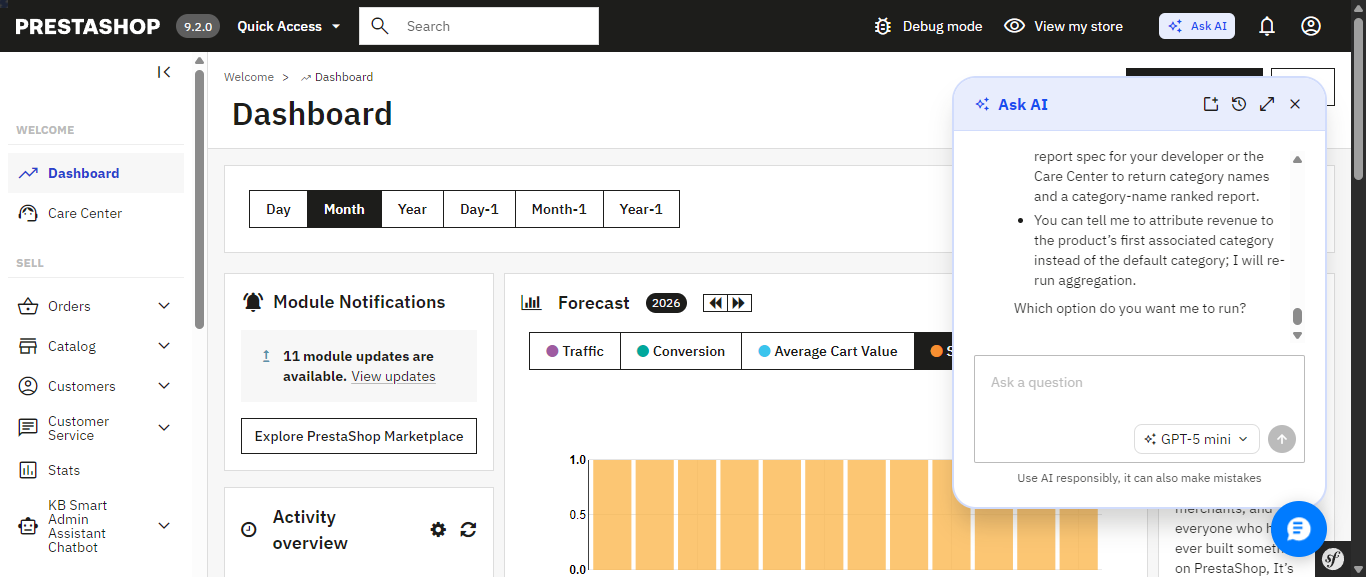
PrestaShop’s new Ask AI, introduced with PrestaShop 9.2, is a promising sign of where the platform is headed a native assistant built right into the back office that lets you query your store in plain language. It’s tied to PrestaShop 9.2 specifically, and it relies on two companion modules, the PrestaShop MCP Server and MCP Tools, being installed and configured alongside it before it can see any of your store’s data.
In practice, opening Ask AI drops a chat panel into the corner of whichever admin page you’re on, and it remembers your previous conversation the next time you reopen it. Ask something like “Which products are out of stock right now?” and it doesn’t just answer quietly in the background it shows its work: the specific MCP tool it’s about to call, a “Tool approved” confirmation step, a stated goal, and its reasoning before handing back the answer as a formatted list. That’s a genuinely nice trust signal, though the trade-off is no visible SQL you see the tool call and the goal, not the underlying query.
PrestaShop’s native Ask AI panel, opened from the top admin bar it remembers the previous conversation across sessions.
Ask AI shows its work: the MCP tool it calls, a tool-approval step, and its stated reasoning before answering.
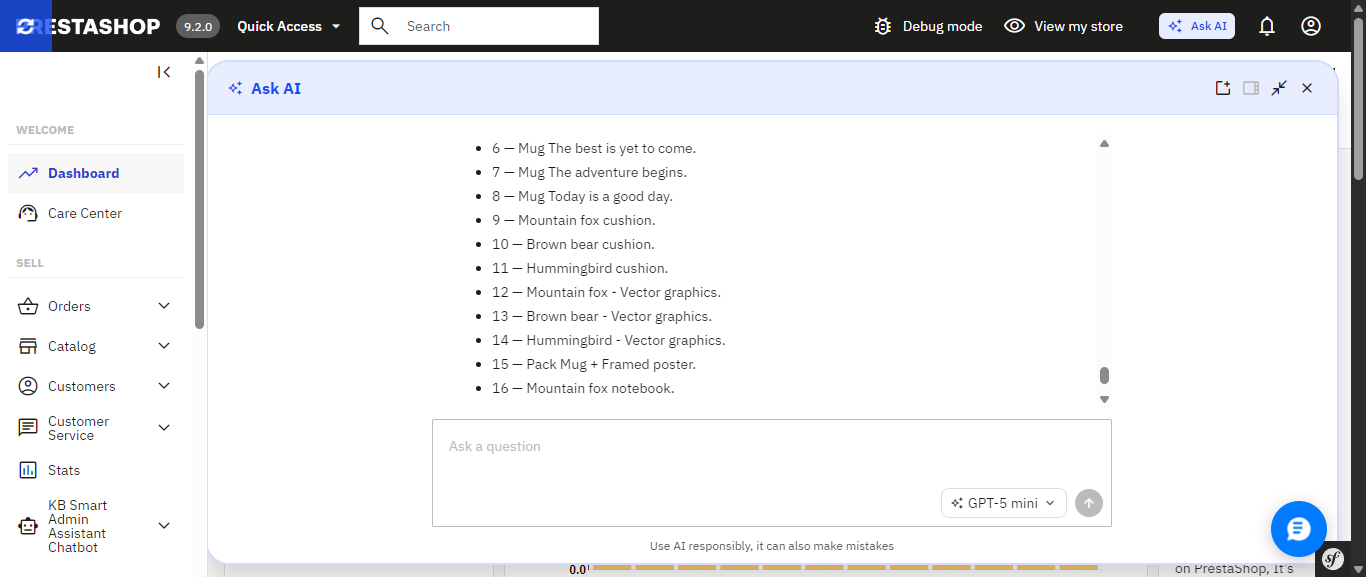
The finished answer, expanded to full width a plain list of out-of-stock products with a follow-up question box ready.
If you’d rather skip that setup, or you’re running an earlier PrestaShop version where Ask AI isn’t an option at all, there’s a module you can install today that already delivers a natural-language AI assistant and builds a good deal more around it, much of which Ask AI simply doesn’t include yet. It’s called Smart AI Admin Assistant.
PrestaShop Ask AI vs Knowband Smart AI Admin Assistant
| Feature | PrestaShop Ask AI | Knowband Smart AI Admin Assistant |
|---|---|---|
| PrestaShop version support | 9.2 | 1.7.x to 9.x.x |
| Setup requirements | Requires the separate PrestaShop MCP Server and MCP Tools modules | Install the module, add your API key, and start asking questions |
| How it accesses your data | Through the PrestaShop MCP Server using defined tool calls | Natural-language-to-SQL against curated, read-only database views |
| Taking action on your store | Can execute actions with explicit confirmation required | Read-only; blocks DELETE, DROP, UPDATE, INSERT and TRUNCATE |
| Query transparency | MCP tool calls; SQL is not directly visible | ✓ View, edit and re-run the generated SQL |
| Built-in analytics dashboard | Not Available | ✓ 44 widgets covering revenue, orders, stock, best sellers and more |
| Data export | Not Available | ✓ Excel and CSV exports, including full-dataset exports |
| Voice input | Not Available | ✓ Browser-based speech recognition |
| Quick-access shortcuts | Context-aware suggestions on Product, Order and Customer pages | ✓ Editable quick-query chips for common questions |
| Employee access control | Not Available | ✓ Role-based, per-employee configuration |
| Audit logging | 30-day conversation history per user; no SQL or action-level log | ✓ Timestamped query and audit log, including executed SQL |
Ask AI’s confirmation-before-action design and its native integration into PrestaShop’s core are real strengths, and worth keeping an eye on. But most of what makes Smart AI Admin Assistant a complete toolkit the dashboard, the exports, the access control, the audit trail, the voice input is territory Ask AI hasn’t entered yet.
The Problem that AI Assistant
Every PrestaShop store owner knows this routine: check yesterday’s revenue, scroll through orders looking for anything stuck, check which products are running low, maybe export something to send to a partner. None of it is hard. All of it is repetitive, and all of it eats into the hours you’d rather spend on the parts of the business that actually need your judgment.
Smart AI Admin Assistant replaces that routine with a conversation. You type or speak a question the way you’d ask a colleague, and you get a precise, live answer straight from your store’s database. No dashboards to navigate. No report builder. No SQL. Just a question and an answer, in seconds.
Ask Anything, Get a Real Answer
And this is what the entire module is based upon: an engine that will help analyze the language in the question regarding orders, customers, products, sales, inventory, and coupons without requiring any technical background whatsoever. There’s no need to fill in forms or make choices from a drop-down menu; all one has to do is:
- “How many orders were placed today?”
- “Show me low stock products.”
- “Which customers spent the most this month?”
- “What’s my revenue this week compared to last week?”
- “Which products are missing descriptions or images?”
- “What are my top 10 best-selling products this quarter?”
Both Ask AI and Smart AI Admin Assistant let you ask this kind of question in plain language that part isn’t unique to either one. The difference shows up in everything built around it, starting with how each one actually reaches your data.
Choose the AI Model That Fits the Question. Ask AI Doesn’t Offer This Level of Control
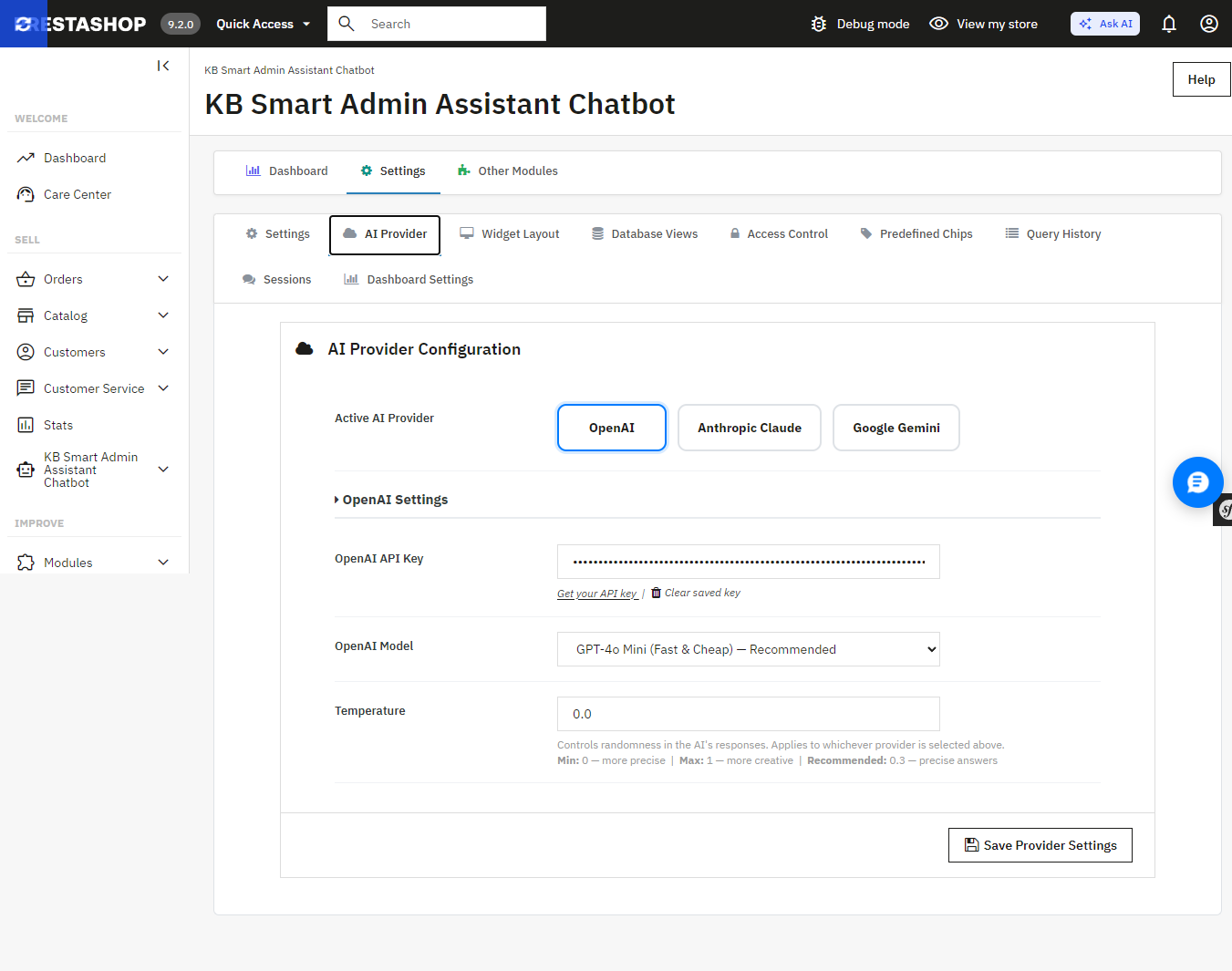
Smart AI Admin Assistant provides a true choice between the providers and the tier models without changing the code, using one settings panel:
- OpenAI GPT-4o Mini, GPT-4o, or GPT-5.5
- Anthropic Claude Haiku 4.5, Sonnet 4.6, or Opus 4.7
- Google Gemini 3.5 Flash or 3.1 Flash-Lite
Want fast, low-cost answers for quick daily checks? Point it at a lighter model. Want the deepest possible breakdown of a slow sales month? Switch to a flagship tier for that one query. Ask AI, by contrast, connects to whichever single provider key you’ve configured it doesn’t offer this kind of tier-by-tier switching from within the assistant itself.
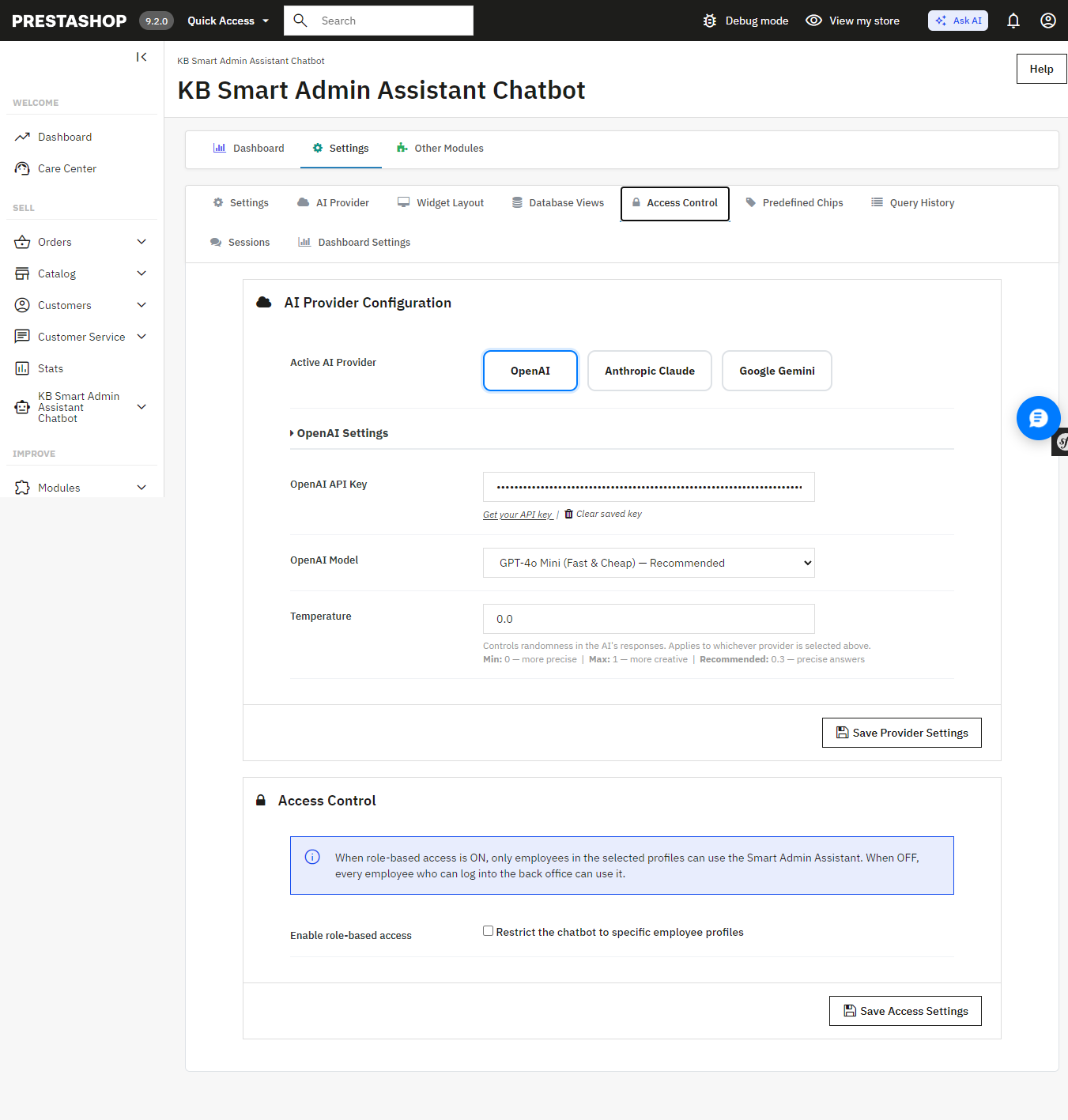
Smart AI Admin Assistant’s AI Provider settings switch between OpenAI, Anthropic Claude, and Google Gemini, and pick a model tier for each.
An Answer, Not Just a Table of Numbers
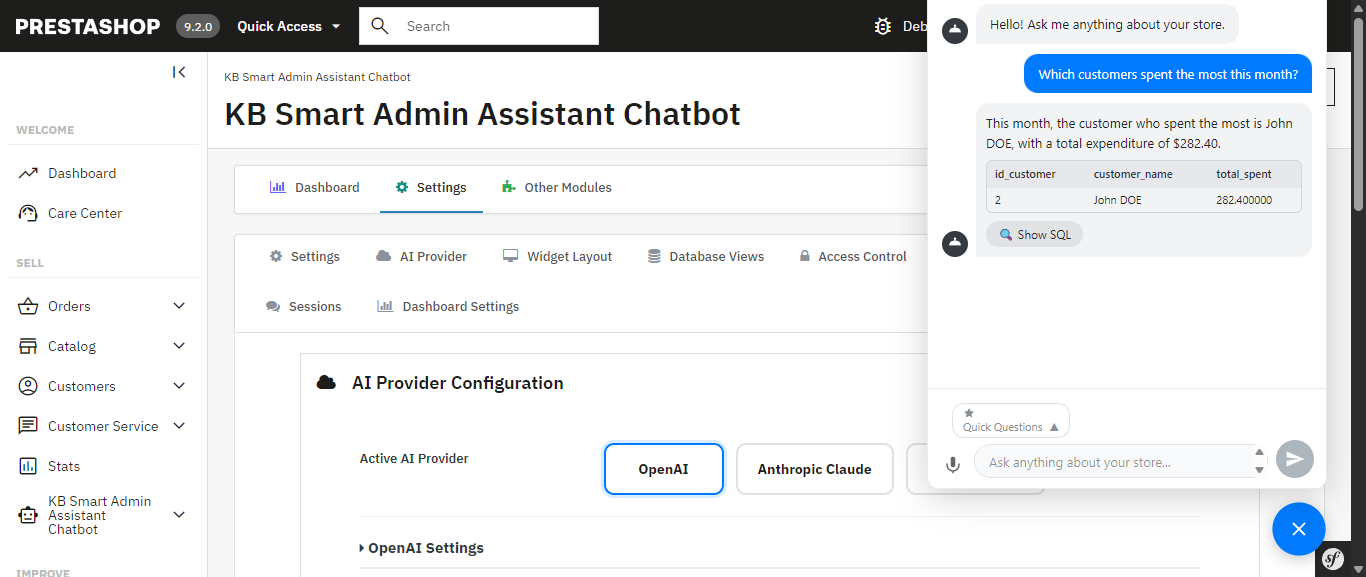
Every query comes back with more than raw data the assistant generates a plain-language summary alongside it, calling out the trend or number that actually matters. Ask about your inventory and you don’t just get a table; you get told which products are about to become a problem.
Smart AI Admin Assistant for Prestashop answering “Which customers spent the most this month?” with a plain-language summary and the underlying data.
A Full Analytics Dashboard Comes Built In Something Ask AI Doesn’t Have
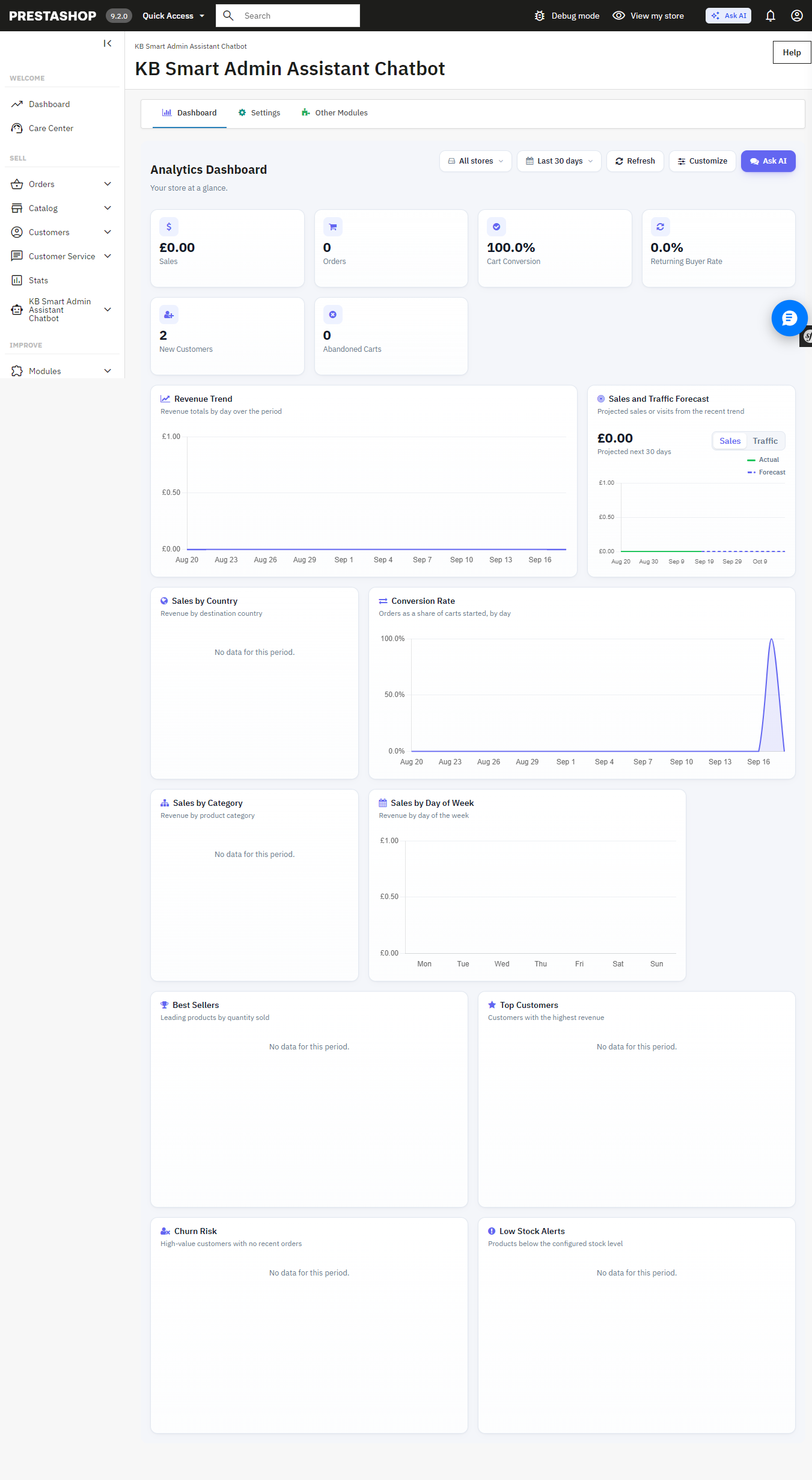
Beneath the chat interface is the full back office analytics dashboard with 34 widgets such as revenue analytics, order quantity, cart conversion rates, customer retention rates, inventory alerts at product level, best sellers, churn rate analytics, sales by countries, categories, payment methods, time slots, etc. Each of these widgets is easily toggleable and reorderable to create your perfect dashboard view. It can also be used as the PrestaShop back office home page.
The built-in Analytics Dashboard revenue, orders, cart conversion, and more, all on one page.
Answers You Can Export, Share, and Verify Not Available in Ask AI
Get a result you need to hand off? Export it instantly to Excel or CSV full datasets, not just the rows visible on screen. Ask AI has no export functionality; any data it surfaces stays inside the chat conversation.
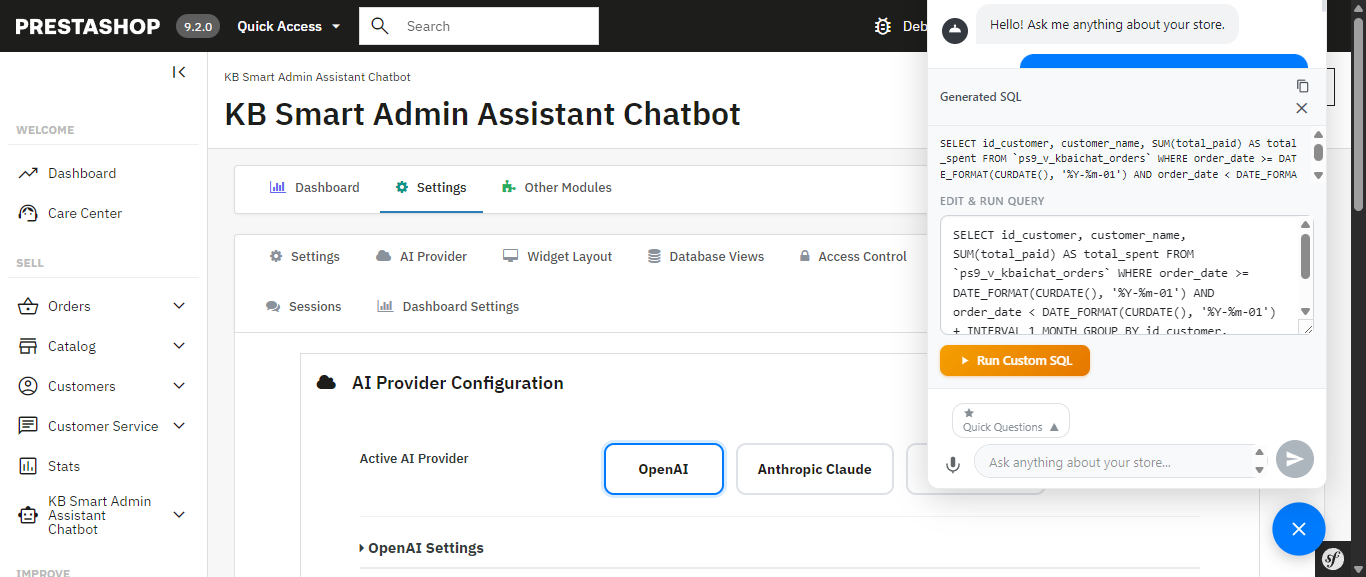
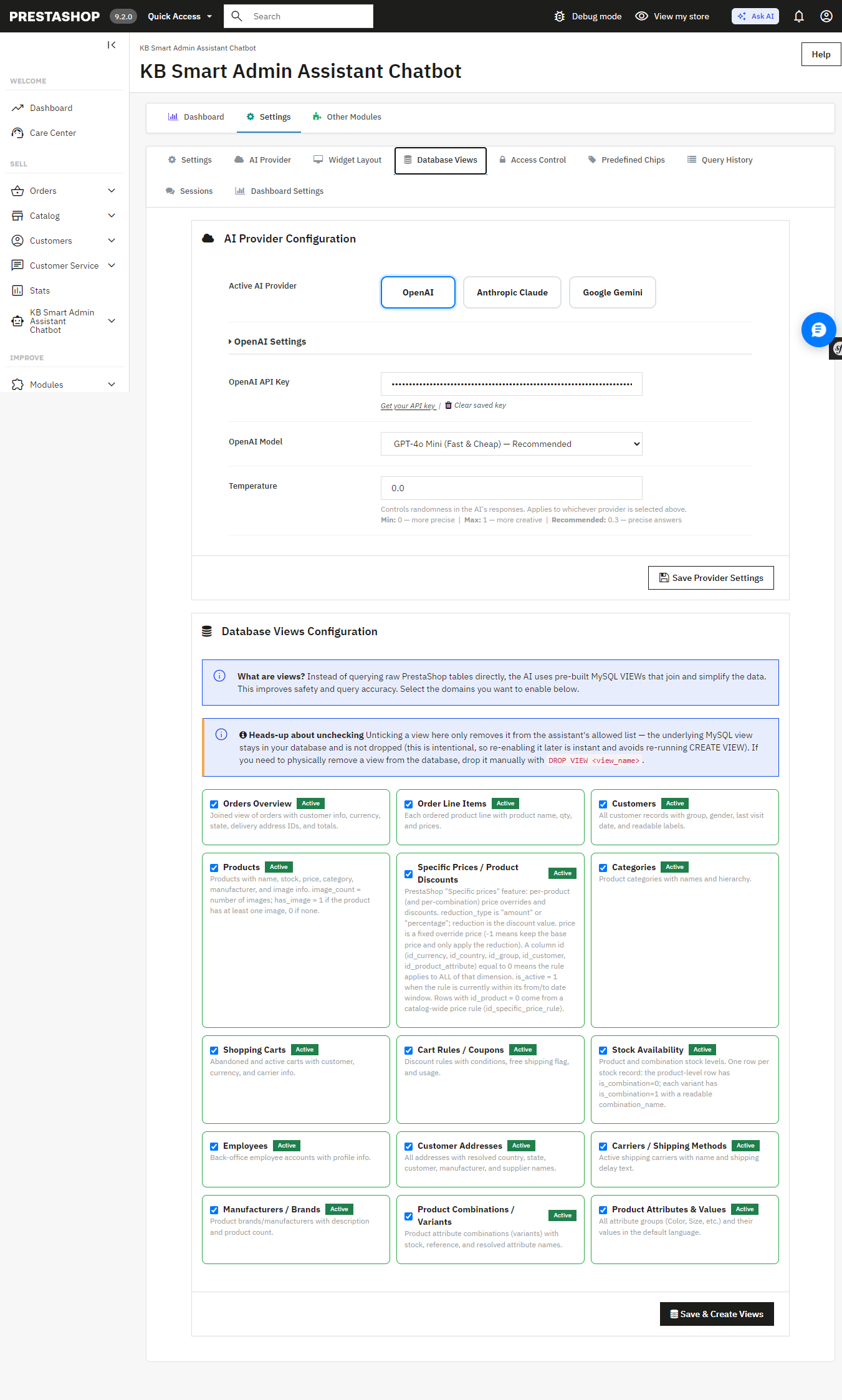
Allowing the assistant access to your database must be carefully considered, and the module has been designed with this in mind: strict restrictions on DELETE, DROP, UPDATE, INSERT, and TRUNCATE ensure that the assistant can only access your information, not write to it.. Multi-statement execution is blocked and SQL-injection patterns are screened automatically and unlike Ask AI, which works through MCP tool calls with nothing to inspect, you can view, edit, and re-run the exact SQL Smart AI Admin Assistant generated yourself. Nothing runs as a black box.
The exact generated SQL is visible, editable, and re-runnable nothing is a black box.
Database Views configuration the AI queries curated, read-only MySQL views instead of raw tables.
Built for Teams, Not Just Solo Store Owners Ask AI Has No Equivalent
If you have a shop with several admins or you manage this on behalf of your clients as an agency, the module comes with role-based employee access controls, and you get to determine precisely which employees have access to the assistant and what they are permitted to ask. All queries will be timestamped and recorded to provide you with a full audit trail. The Ask AI platform provides 30 days of chat history for each individual; however, it does not provide user permissions and an audit trail per query.
Access Control restricts the assistant to specific employee profiles.
Query History a full, timestamped audit log of every question asked, including the generated SQL.
Speak Instead of Type Ask AI Doesn’t Support Voice Input
Voice input, built on the browser’s native speech recognition, lets you ask your question out loud instead of typing it useful on a warehouse floor, during a busy order-processing morning, or anytime your hands are full. Ask AI is text-only.
Quick-Access Shortcuts for the Questions You Ask Every Day More Flexible Than Ask AI’s Suggestions
The Prestashop AI Admin Assistant ships with ready-to-use “quick query chips”: Total Orders Today, Revenue This Month, Low Stock Products, Abandoned Carts (Last 30 Days), Top Customers by Revenue, and more that you can fully edit and customize. Ask AI offers contextual suggestions on Product, Order, and Customer pages, but they aren’t something you can edit or add to.
Get Started
If you’re ready to stop digging through admin screens and start just asking your store what you need to know, Smart AI Admin Assistant is available, with live admin and front-end demos and a full user manual so you can see exactly what you’re getting before you buy:
Get PrestaShop Smart AI Admin Assistant
