Objectives of the blog
After reading this blog, you will able to setup the desktop notification for your site. You will also be able to customize your notification by your own message, image, icon etc.
Benefit of Desktop Notification
Suppose you want to notify your customer outside the webpage then we can use the desktop notification as if you have enabled desktop notification for email, you don’t need to check emails regularly. In every email, you got a notification.
Code for Desktop Notification
Add the below function in the script tag in the head of the HTML.
function showNotification() {
    // Verify if the user's browser supports notifications or not
    if (!("Notification" in window)) {
        alert("Your browser does not support the desktop notification");
    }
    // Verify if notification's permissions have already been granted or not
    else if (Notification.permission === "granted") {

        // Create Notification
        var options = {
            body: 'Simple notification message line 1.\nSecond line of notification message.', // body of the notification
            dir: 'ltr', // direction of message ltr: left to right. rtl : right to left.
            image: 'https://www.knowband.com/blog/wp-content/uploads/2016/09/cropped-knowband_logo-v2.png', // Add image if required to show
            icon: 'https://www.knowband.com/blog/wp-content/uploads/2016/09/cropped-knowband_logo-v2.png', // Add icon if required to show
        }

        var title = "Knowband Blog";
        var notification = new Notification(title, options);


        //Add the notification click link
        notification.onclick = function (event) {
            event.preventDefault(); // prevent the browser from focusing the Notification's tab
            window.open('https://www.knowband.com/blog/', '_blank');
            notification.close();//Close the notification after click
        }
    }

    // If no permissions, ask the user for permission
    else if (Notification.permission !== "denied") {
        Notification.requestPermission().then(function (permission) {
            // If the user accepts, let's create a notification
            if (permission === "granted") {
                var notification = new Notification("Hi there!");
            }
        });
    }
}
You can trigger this function through event as you wish. For testing purpose, you can check this by adding a button. Use below code for button in the body
<button onclick="showNotification()">Show Notification!</button>
Note: If you are running this code on the local system then use the local sever i.e. localhost.
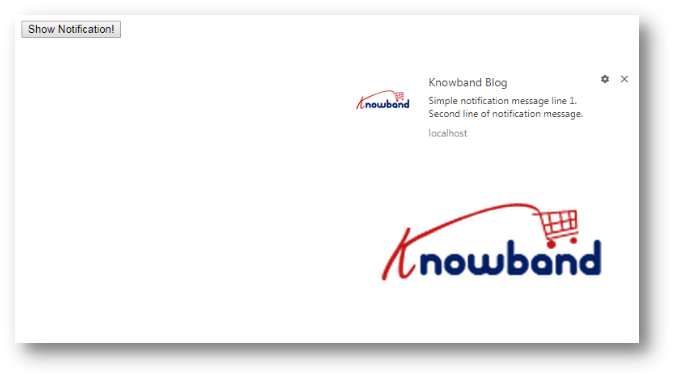
Output Screen