
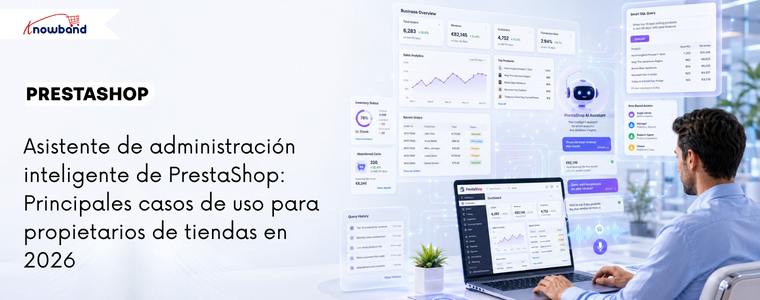
PrestaShop stores generate large volumes of operational data daily, from orders and customers to inventory, abandoned carts, revenue, and employee activity. While the data is available, accessing it involves navigating through multiple pages of reports, setting filters, and repeating the process for each question. For administrators who review the same figures daily, this time quickly adds up. The Knowband PrestaShop Smart Admin Assistant integrates into your admin panel and answers your store’s questions in plain language, retrieving results directly from your database in real time. No reports. No navigation. No SQL knowledge required. The module will be released soon. Here are some key use cases that illustrate how it transforms your daily store management.
AI-powered natural language queries: No SQL knowledge required.
Write a question in simple language, and the wizard will return the answer based on your store’s real-time data in a matter of seconds. What truly makes it useful, beyond its convenience, is the “Show SQL Query” feature. When activated, the wizard displays the exact SQL query it generated to produce the answer. A second option, “Allow SQL Editing and Re-execution,” allows the administrator to modify the query and run a revised version without having to write SQL from scratch.
Previously, data requests involving multiple tables or custom filters remained on the developers’ to-do list. Now, any administrator can handle it without technical expertise.
Example: An administrator wants to find customers who have placed at least three orders but haven’t placed any in the last 90 days for a customer recovery campaign. They write: “Show me the customers who have placed at least 3 orders but haven’t placed any in the last 90 days.”
The PrestaShop Smart Admin Assistant generates and executes this query:
SELECT
c.id_cliente, c.nombre, c.apellido, c.correo electrónico,
COUNT(o.id_order) AS total_orders,
MAX(o.date_add) AS last_order_date
FROM ps_customer c
JOIN ps_orders o INTO c.id_customer = o.id_customer
GROUP BY c.id_cliente
HAVING
COUNT(o.id_order) >= 3
AND MAX(o.date_add) < DATE_SUB(NOW(), INTERVAL 90 DAY)
SORT BY last_order_date ASC;
The result is a table with the customer’s name, email address, total orders placed, and the date of their last order. All inactive repeat customers are displayed in a single view. The administrator then adds a spend filter to focus first on the highest-value customers.
HAVING
COUNT(o.id_order) >= 3
AND MAX(o.date_add) < DATE_SUB(NOW(), INTERVAL 90 DAY)
AND SUM(o.total_paid) > 200 – The administrator adds this line
SORT BY last_order_date ASC;
Repeat. Now only customers who spent more than €200 appear. Export from query history. Retrieved customer list ready. No developers, no phpMyAdmin, no waiting.
Database views: Manage and restrict AI access to stored data.
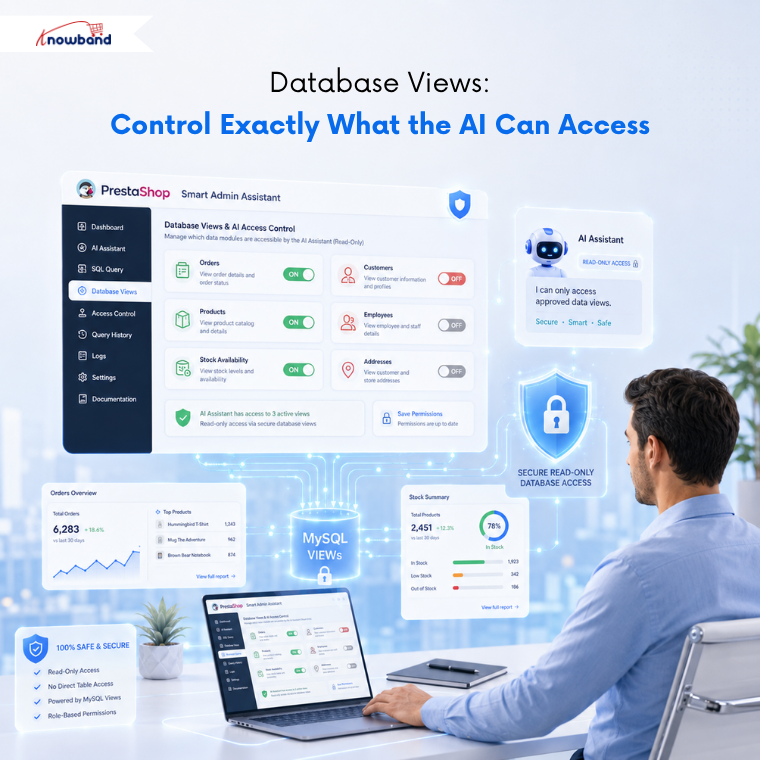
The Database Views tab allows the administrator to choose which data domains the wizard can query. Available views include Orders, Customers, Products, Stock Availability, Shopping Carts, Cart Rules, Employees, Carriers, Product Combinations, and more.
Each view is a predefined MySQL view, rather than a direct query to the table. This ensures security in two ways: AI cannot modify any data, as the views are read-only; and, since joins are already built into each view, the answers are more accurate than if the tables were queried directly.
If a view is disabled, the AI-powered admin assistant will not be able to access that data, regardless of the query. This is where PrestaShop admin panel analytics becomes truly controllable, as the administrator sets the limits, not the tool.
Example: A store owner wants the logistics team to use the PrestaShop Smart Admin Assistant for stock and order queries, but not for customer personal data or employee records. Orders, stock availability, and products are retained. Customers, employees, and customer addresses are deactivated. The logistics team can only access the information they need for their role.
Role-based access control: The right data for the right people.
The Access Control tab allows the store owner to select which employee profiles can use the PrestaShop Smart Admin Wizard. Selecting a profile grants that profile access. If not all profiles are selected, access is granted to everyone. If only the profiles that should have access are selected, others will not see anything when they log in.
Ejemplo: Una tienda con seis cuentas de administrador quiere que solo el Superadministrador y el equipo de ventas utilicen el asistente. El propietario de la tienda marca esos dos perfiles y deja los demás sin marcar. El traductor y el personal de logística inician sesión y el asistente no está visible para ellos. No se han realizado cambios en el código ni en el tema.
Chips predefinidos: Monitoreo diario de la tienda con un solo clic.
Los botones predefinidos son botones de preguntas que se pueden pulsar dentro del widget de chat. Una consulta predefinida se ejecuta al instante con un solo clic, eliminando la necesidad de introducir datos manualmente.
El conjunto predeterminado cubre las comprobaciones diarias más comunes: Pedidos de hoy, Ingresos de los últimos 30 días, Carritos abandonados, Stock bajo, Sin stock, Clientes activos, Clientes nuevos este mes, Pedidos cancelados, Cupones de envío gratuito y Productos sin SKU. Cada chip es editable, se puede reordenar y se puede activar o desactivar individualmente.
Para las tiendas que realizan las mismas comprobaciones cada mañana, esto por sí solo supone un ahorro de tiempo considerable. La revisión diaria, que antes implicaba abrir seis páginas diferentes, ahora se gestiona completamente a través de las herramientas de análisis del panel de administración de PrestaShop en un único widget, en menos de un minuto.
Ejemplo: Cada mañana, el gerente de la tienda revisa cuatro cosas: los pedidos del día, los ingresos del mes, los productos con menos de cinco unidades en stock y los carritos abandonados de las últimas 24 horas. Las cuatro son fichas. La revisión completa se realiza en minutos.
Selección flexible de proveedores de IA: elija OpenAI, Claude o Gemini.
La pestaña Proveedor de IA permite al administrador elegir entre OpenAI, Anthropic Claude y Google Gemini. Cada uno requiere la clave API del administrador y la selección de un modelo de entre los niveles disponibles del proveedor.
Para Claude, las opciones son Haiku 4.5 para consultas rápidas cotidianas, Sonnet 4.6 para un equilibrio entre velocidad y profundidad, y Opus 4.6 para tareas complejas con múltiples tablas. OpenAI y Gemini siguen la misma estructura escalonada. Pagar solo por el uso real, sin intermediarios, mantiene los costos operativos predecibles independientemente del tamaño de la tienda. Esto es lo que hace que el módulo de IA de administración de PrestaShop sea realmente accesible para las tiendas que no pueden comprometerse con una suscripción mensual fija de IA.
Ejemplo: Las grandes tiendas pueden usar Haiku 4.5 para consultas rutinarias basadas en chips y así mantener bajos los costos operativos. Cuando el gerente de operaciones necesita un desglose mensual detallado de varias tablas unidas, cambia a Sonnet 4.6 para esa sesión y luego vuelve a la versión anterior.
Entrada de voz, personalización de widgets y soporte multilingüe.
Three functions cover the rest of the daily usability of the PrestaShop Smart Store Management plugin.
Widget Layout centralizes all visual settings: position, chatbot name, welcome message, avatar, width, height, and more. Changes are instantly reflected in a live preview on the right. No CSS is used at any point.
Voice input allows administrators to ask questions aloud instead of typing them. The browser’s built-in speech recognition API handles the transcription. For administrators who are on the go, work with mobile devices, or simply prefer speaking to typing, this eliminates any obstacles to getting a quick response.
The chatbot language allows the administrator to control the language in which the PrestaShop admin AI module responds. If set to “Back-office language,” the response is based on the admin panel language. If set to “Custom language,” the administrator can choose the language independently, which is important for multilingual teams where the back-office language and each employee’s working language differ.
Example: A French-speaking operations manager works in an administrative office set to English to maintain consistency across the team. The custom language is set to French. The manager asks a question using voice input and receives the answer in French. The administrative office settings have not been changed.
Query history and session logs: a complete audit trail
Each question submitted through the wizard is saved in the Query History tab as a permanent record. The record includes the date, employee, question, number of rows returned, response time in milliseconds, the AI provider that executed it, the status, and the complete SQL query that was executed.
Logs are filtered by date and status and can be exported to CSV or Excel. A retention setting automatically deletes entries older than a specified number of days, keeping the log table optimized without manual cleanup. The Sessions tab saves complete conversation threads for each employee, allowing anyone to review past exchanges or audit how the team uses the tool.
Example: A store owner receives a suspicious response during Monday morning’s check. He opens the query history, finds the exact query that was executed, reads the SQL code, and discovers that a database view was serving cached data. He clicks “Update Schema Now,” rebuilds the schema, and re-runs the query with the correct result.
How the intelligent administrative assistant Knowband improves store operations
Each feature covered here fills a gap that previously required a developer or a report that took too long to generate. The PrestaShop Smart Store Management AI module preserves data depth, SQL continues to function, data remains up-to-date, and controls remain accurate, but the module removes the technical barrier between the administrator and the information they need. For store owners who spend more time analyzing data than running the business, the PrestaShop Smart Store Management plugin is the best practical solution.
The Knowband PrestaShop Smart Admin Assistant is launching next week. Stay tuned for more information about the module and what it can do within your admin panel.
👉 Explora el módulo con nuestra guía en vídeo


